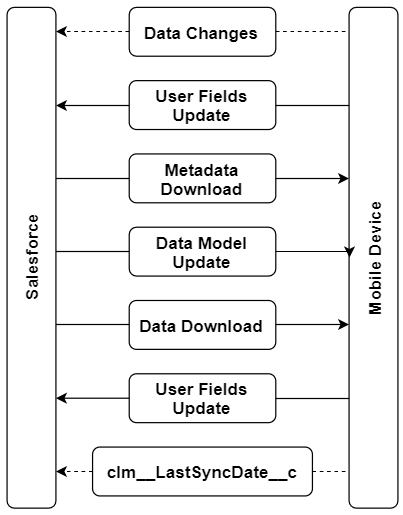
Full Synchronization
To run full synchronization, long tap the Sync button in the top right corner of the Home Screen and select Full synchronization from the picklist.
| Due to the iOS platform limitations, do not collapse the application and do not turn off the screen during the first or full synchronization. |
-
The full synchronization is triggered when you run your first synchronization.
-
During the full synchronization except for the first full synchronization, the application is locked.
-
The full synchronization process will be interrupted in case of errors.
Sync Steps
-
Data changes in the application such as deletions, insertions, and updates are sent to Salesforce.
The step is skipped during the first full synchronization because the database is empty.
-
The changes in the audit fields of the current user record are sent to Salesforce.
The change of the clm__LastSyncDate__c field will be updated only if the previous synchronization was successful, but has been interrupted before the field sync date was updated. -
Metadata components are downloaded.
Metadata components are downloaded from ZIP archive(s) or directly using administrator credentials depending on the CT Mobile package version. The cloud token should be valid to retrieve components from the ZIP archive(s) (refer to CT Mobile Control Panel: Tools / CT Mobile Control Panel 2.0: Tools). The synchronization process can proceed without a valid cloud token or administrator credentials, and in that case, validation rules, offline reports, and some operators in formulas might not operate properly.
-
The current data model:
-
is created in case of the first full synchronization.
-
is replaced by the newly updated in case of full synchronization.
-
-
Records of the custom settings, custom metadata types, offline objects, and objects, which are necessary for activated modules, are downloaded if a record matches the conditions set in related list filters.
-
The audit fields of the current user record are updated:
The clm__LastSyncDate__c field will be updated only if the first full or full synchronization was successful. This field shows that the actual information is downloaded on the device.