CG Cloud Object Model
This scheme gives you a basic understanding of CG Cloud objects and relationships when working with the CT Mobile app.
| Here are the main objects and relationships. The list of all required components is available here. |
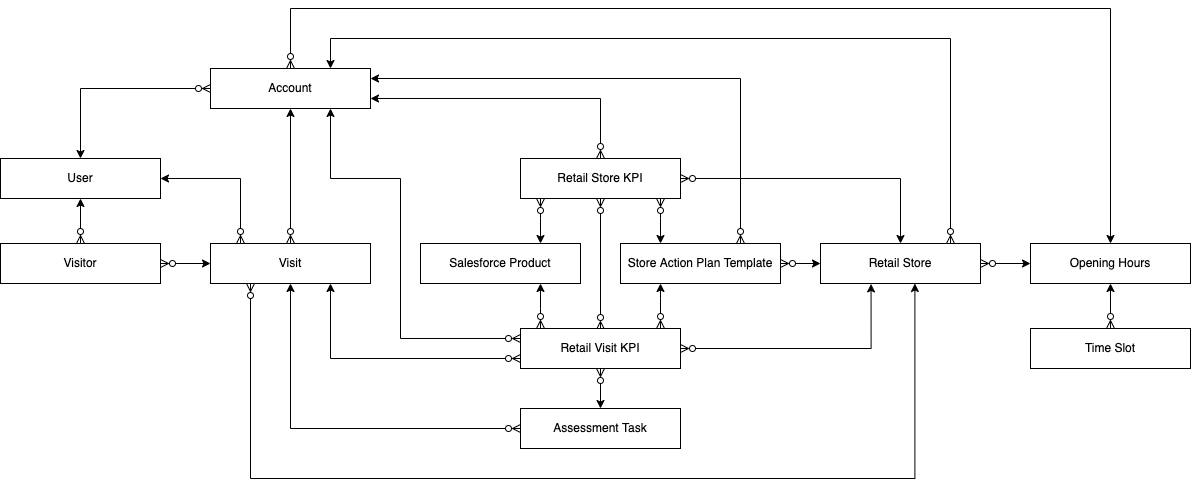
Click the link to view the field reference for the selected object:
| Object | Object API Name | Description |
|---|---|---|
Account |
Each retail store should be related to the Account record. |
|
AssessmentTask |
Represents tasks based on the selected action template to be performed during the visit to the retail store. Available values:
|
|
OperatingHours |
The field reps' activities depend on the store’s business hours and the availability of the store managers to meet with the field reps. Stores information related to timezone and time slots and represents the hours in which a retail store is available for visits. Operating hours consist of one or more time slots. |
|
Product2 |
Represents a product that your org sells. |
|
RetailStore |
Represents a retail store. |
|
RetailStoreKpi |
Represents the target values to be achieved during a visit to a retail store. |
|
RetailVisitKpi |
During a visit, it is used to capture the actual information against the target values. |
|
StoreActionPlanTemplate |
Based on the selected Action Plan record, represents the association of the action plan template to the store. |
|
TimeSlot |
The field reps' activities depend on the store’s business hours and the availability of the store managers to meet with the field reps. Stores information for each day of the week, and admins can define the business start time and end time for a day, or mark a day as a non-working day. |
|
Visit |
Represents a rep’s visit related to the retail store. Available values of the Visit statuses:
|
|
Visitor |
Represents a sales rep. |
|
User |
Each visitor should be related to the User record. |