Recommendations for Object and Field API Names and Page Layouts
Object and Field API Names
| Working in non-English Salesforce environments, all settings should be specified in English. Use Translation Workbench for translating all labels and other settings. |
-
Creating fields with identical API names inside a single object is not allowed, even if their prefixes and postfixes are different. For example, Name and Name__c are considered as the same API name.
-
All API names should be in English.
-
Specify the short and meaningful name and avoid using Pidgin English.
-
Specify Description or Help Text to simplify the setup process and reduce the time for preparing documentation.
-
Start the API name with the capital letter. In the case of several words, use the following format: CompanyName, BillingDate, InvoiceNumber.
-
The dashes and underscores are restricted.
-
Please avoid using numbers.
-
Recommendations for specifying API names for fields with the specific datatype:
-
Lookup Relationship should contain the name of the object to link and the Id word, for example, AccountId, ContactId. Also, specify the plural name of the object in the Child Relationship Field, for example, Activities, Orders.
-
The checkbox should contain the Is or Has word, for example, IsActive__c, HasProducts__c.
-
For Number, Text, and Text Area, do not limit the Length field unless necessary.
-
Geoposition is created in decimal format, with 6 decimal places.
-
For Auto Number, it is required to specify variables in the Display Format field. For example, the following date format SF{000}-{DD}/{MM}/{YYYY} returns the SF021-13/05/2009 value.
-
The deleted field API-name has the _del postfix. Be sure to remove this postfix after recovery.
-
Field Access
Do not specify the Required and Read-Only attributes while creating a field. Add the field to the appropriate page layout and set these attributes:
-
Go to Setup → Object Manager.
-
Select the required object.
-
Click Page Layouts, select the required page layout.
-
In the Fields section, find the desired field and hover the mouse pointer over it.
-
Click
 and set the attributes.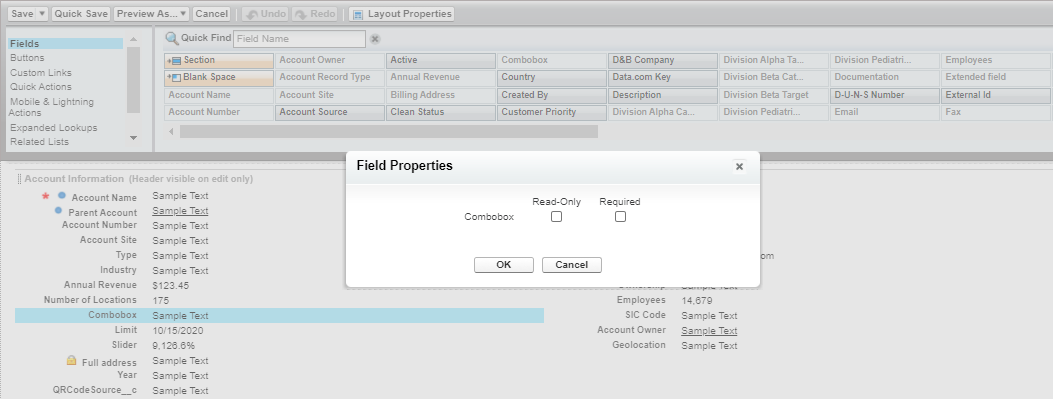
Page Layouts
Set up page layouts given the following:
-
Fields with the Text Area or Text Area Long datatype should be placed together in a separate section with a 1-column layout.
-
The Created By, Last Modified By, and Owner should be placed in the System Information section.
-
Fields with the Number, Date, and Date/Time datatype are placed on the right side of the Information section.
-
Manage related lists within the editing the corresponding page layout.
Do not remove a related list from the custom page in Lightning App Builder because it will be removed for all users in the Salesforce org.