Sorting Records
| Applies to CT Mobile iOS versions starting from 3.0. |
Initially, offline objects records are sorted alphabetically by their title. To change their sorting method:
-
Go to the CT Mobile Control Panel 2.0: App Menu.
-
Select the required profile in the Profile picklist. To apply settings to all the profiles, select General Settings.
-
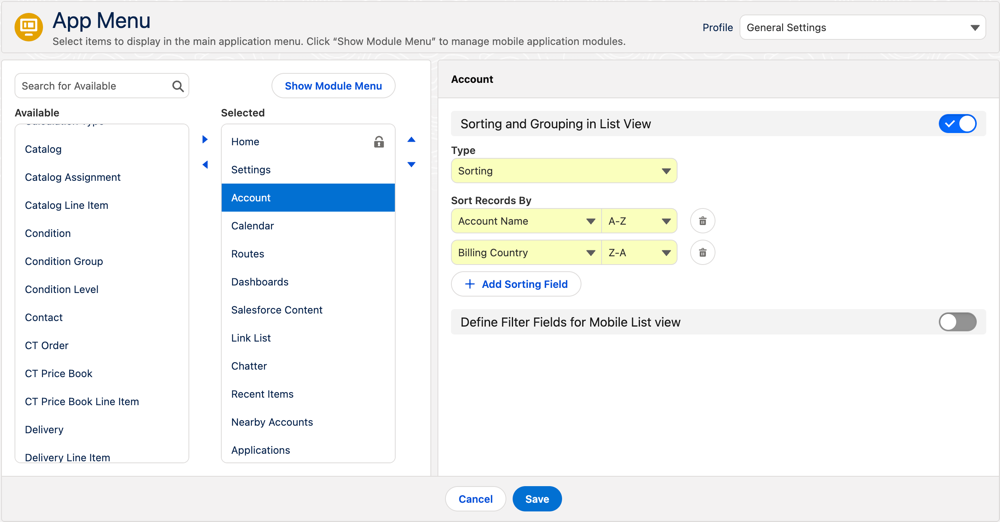
Select an object from the Selected list.
-
Turn on Sorting and Grouping in List View.
-
Select Sorting from the Type picklist.
-
Click Add Sorting Field.
-
Select field from the Sort Records By picklist and their sorting order (A-Z or Z-A).
You can add up to 10 sorting fields. Click
 to remove a field.
-
The first sorting field is used as the default one in the mobile app.
-
After a full sync, logging out or reinstalling the mobile app, the sorting will be reset to the default field, and the sorting order for all fields will be reset to the default one (A-Z).
-
-
Click Save.
Now you can sort records by configured sorting fields on selected list view.