CT Mobile Control Panel 2.0: Activities
|
The Activities tab is intended to configure objects, which are used in the Calendar module of the mobile app. The tab has the following sections:
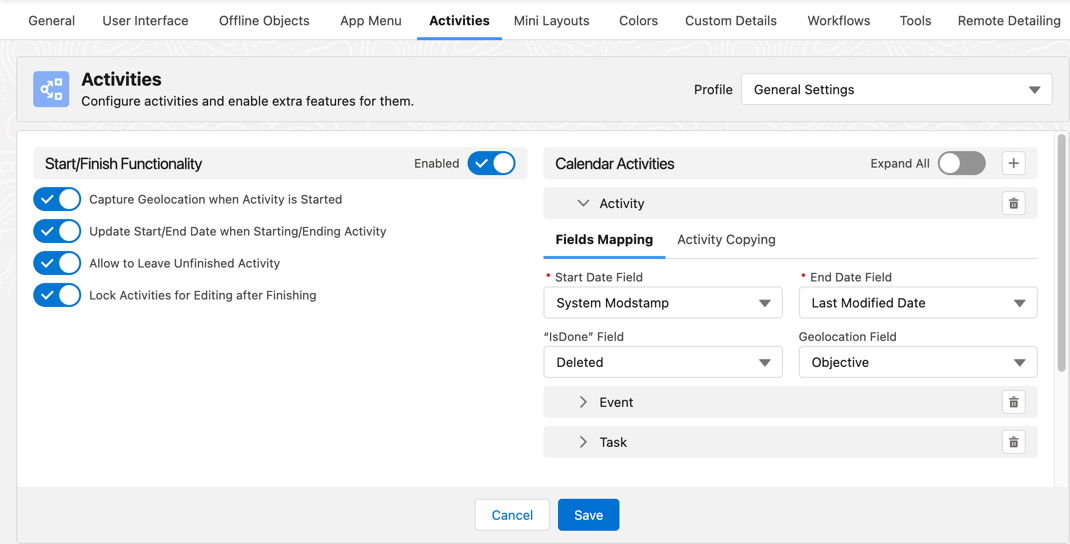
Start/Finish Functionality
If enabled, the mobile user can start and finish an activity using the additional logic that may be applied to a started activity.
| If you have a CT Mobile Workflow using the Start or Finish buttons, the additional functionality listed below will be disabled even if these settings are applied. |
Capture Geolocation when Activity is Started
If enabled, geolocation data on the Account and Activity objects will be collected in the Account Geolocation Field or Account Full Address Field according to selection and in the Geolocation Field.
Update Start/End Date When Starting/Ending Activity
If enabled:
-
Tapping the Start button will update the value in the Start Date field of the Activity record.
-
Tapping the Finish button will update the value in the End Date field of the Activity record.
Calendar Activities
Specify one or more Activity objects.
-
Click
 to add and customize the required Activity object, such as Activity, Task, Event, and custom Activity objects.
 -
Click
 to remove the required Activity object and its settings.
Fields Mapping
Start Date Field
Specify the API name of the field with the Date or Date/Time type that contains information on the start date of the Activity record.
End Date Field
Specify the API name of the field with the Date or Date/Time type that contains information on the end date of the Activity record.
"IsDone" Field
The API name of the field on the Activity object is used as an additional attribute showing that the Activity is finished. The field is used when the Start/Finish functionality is enabled.
Geolocation Field
If the Capture Geolocation when Activity is Started option is enabled, specify the API name of the field with the Geolocation type where the geolocation data of the Activity record will be written.
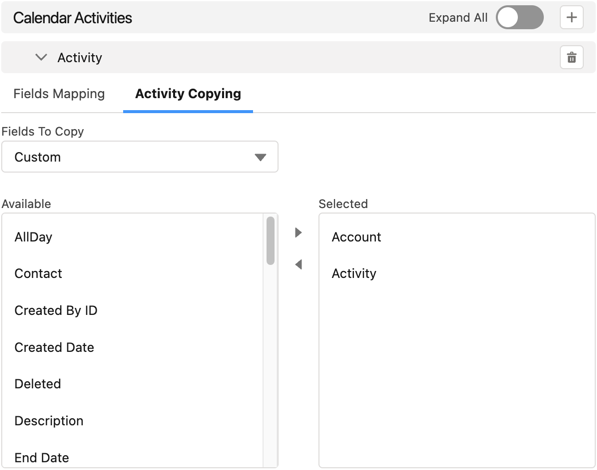
Activity Copying
Specify fields that should be copied while copying activities in the Calendar module of the mobile app.