CT Mobile Control Panel 2.0: Mini Layouts
The Mini Layouts tab is intended to configure and manage special forms that simplify the creation of a new record in the CT Mobile app.
According to the selected profile, settings on this tab will be saved in the corresponding fields of the Mobile Mini Layout Settings record.
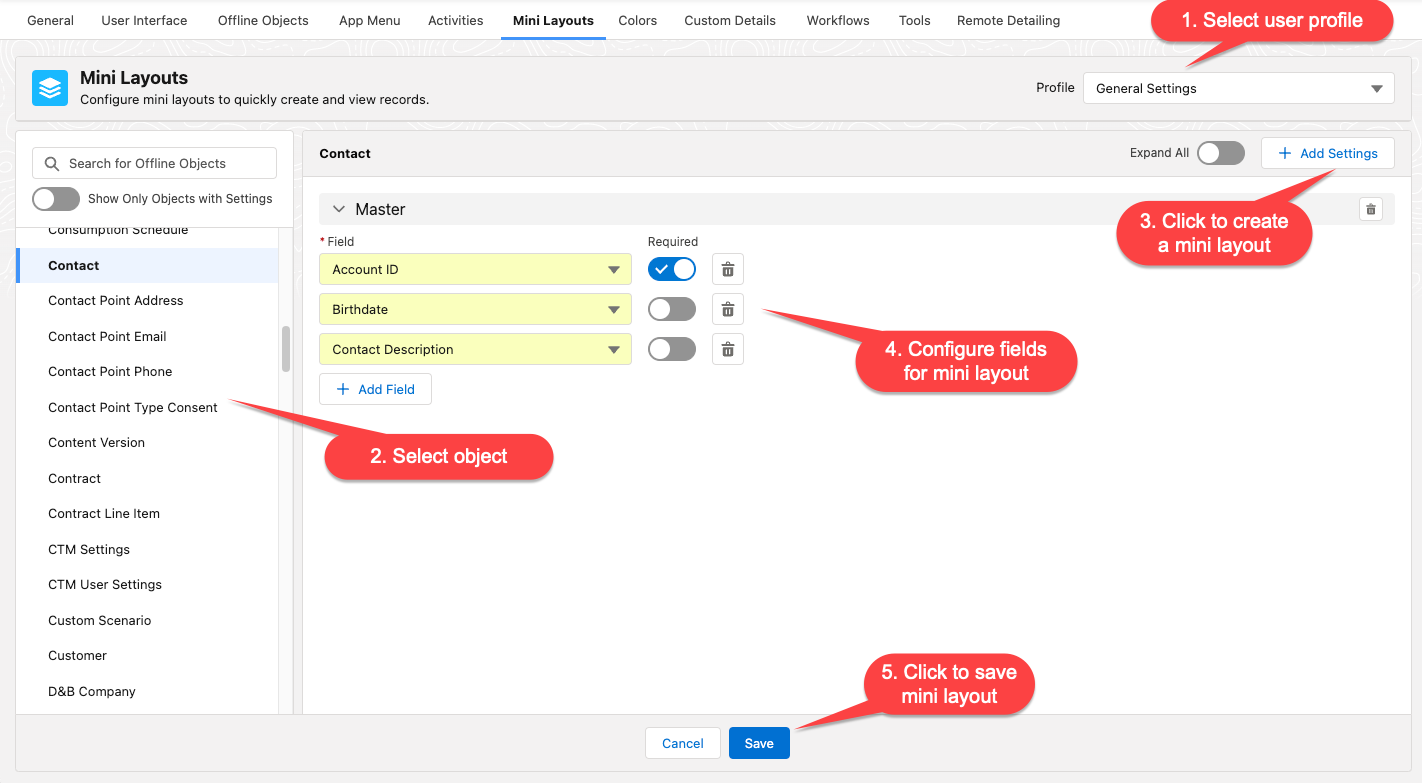
Mini Layouts are special forms with a preconfigured set of fields that are used to create a record in a more convenient way. A mini layout will appear, for example, when tapping the plus button to create a new Account record or creating a new Activity record on the calendar grid. A mini layout can be assigned per each active record type of the offline object.
If a mini layout for an offline object or its record type is not configured, the default page layout will be open when creating a record.
Create or Edit a Mini Layout
To create a mini layout:
-
Go to CT Mobile Control Panel: Mini Layouts.
-
Select the required profile in the Profile picklist. To apply settings to all the profiles, select General Settings.
-
On the left list, select an offline object. Toggle Show Objects with Settings if needed.
-
Select a record type for creating a mini layout. You can create one mini layout for each record type.
If a record has no custom record type associated with it, then the Master record type will be used. -
Click Add Settings.
If this button is disabled, it means that mini layouts have already been created for all record types, or the object cannot have the record types settings. You can create one mini layout for each record type. -
Select fields for the mini layout.
-
To add a new field, click Add Field.
-
Toggle Required option if needed.
-
Click
 to remove the field.
-
-
Click Save.
Alternatively, you can modify already existing mini layout:
-
Go to CT Mobile Control Panel: Mini Layouts.
-
Select user profile.
-
On the left list, select an object. Toggle Show Objects with Settings if needed.
-
Click
 to expand settings of mini layout. Toggle Expand All to expand all settings of all mini layouts.
 -
Make the necessary changes to the mini layout settings and click Save.