Calculating Discounts (7.0)
Calculating discounts using the Web Service is similar to usual discount calculation. The main difference is that calculation is performed not on your mobile device, but on the Web Service. It allows increasing calculation speed for massive orders and implementing advanced calculation logic.
-
Create a new order in the Order Module or in the CT Mobile application. For this order, specify a pricing procedure with applied discount(s).
-
If you created order in the Order Module, launch synchronization in CT Mobile.
-
In CT Mobile, open CT Orders application and choose your order.
-
Tap
 and then Edit order.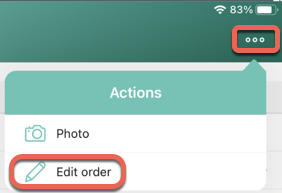
-
If needed, add products from Promotions and/or Catalogs lists and new Delivery.
-
Once you are finished, tap
 to calculate prices and discounts.
 -
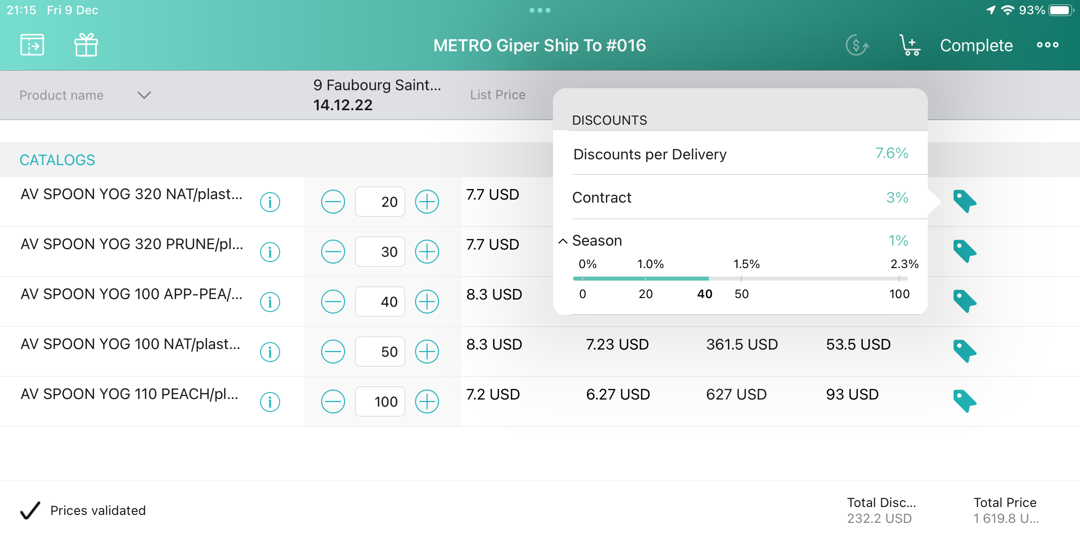
Wait while discounts and final prices are being calculated on the Web Service. Once it’s finished, you will see the Prices validated message on the bottom.
-
Tap the price tag to see in details which discounts were applied to your order:
-
Tap Complete to complete your order.