Creating Relationships between Product and CT Orders Objects
| By default, these relationships are already configured after installing the CT Order package. |
To have the ability to add a product from an available catalog or promotion to order and delivery, it is necessary to set up a lookup to the CT Product object on the Catalog Line Item, Promotion Line Item, Price Book Line Item, Order Line Item, Freebie Line Item, and Delivery Line Item objects.
To create a lookup to CT Product:
-
Go to Setup → Object Manager → Catalog Line Item → Fields and Relationships and click New.
-
Select the Lookup Relationship data type for the new custom field and click Next.
-
Select the CT Product (or Product, if the CPG package is not installed) object from the Related to picklist and click Next.
-
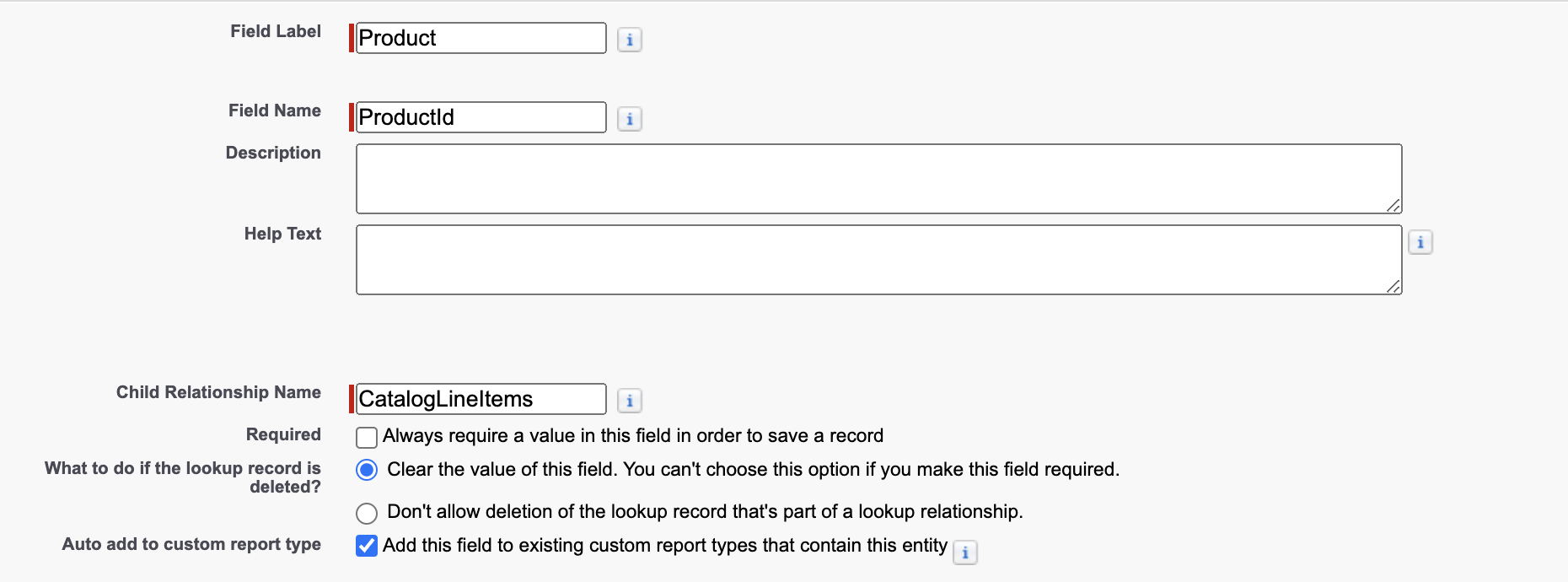
In the Field Information section:
-
Enter Product as the Field Label.
-
Enter ProductId as the Field Name.
The lookup field name must be the same for all objects (Catalog Line Item, Promotion Line Item, Price Book Line Item, Order Line Item, Freebie Line Item, and Delivery Line Item) to avoid an error. When naming the lookup field, please consider the following rules applied by the package logic during a search:
-
Search for a field with the ProductId__c name that has lookups to the corresponding object. If the search is unsuccessful, the system proceeds to the next step.
-
Search for a field with the Product__c name that has lookups on the corresponding object. If the search is unsuccessful, the system proceeds to the next step.
-
Search for lookups that are linked to the corresponding object and select the first one in the search result.
-
-
Enter a Child Relationship Name for integration purposes: CatalogLineItems.
-
-
Select the profiles to which you want to grant edit access to this field via field-level security and click Next.
-
Make sure the Catalog Line Item page layout is selected, if you want the CT Product field to be displayed, and click Next.
-
Specify the Related List Label and select the layout that should display the related list field.
-
Click Save.
The lookup to the CT Product object on the Catalog Line Item is created. Repeat the steps to create a lookup to the CT Product (or Product) object on Promotion Line Item, CT Price Book Line Item, Order Line Item, Freebie Line Item, and Delivery Line Item objects.