Web Service
Overview
Web service is a new way to calculate discounts, which allows you to execute calculations from different channels in one place. The web service supports all discount calculations as well as the new ones available in CT Orders since version 3.0:
-
Applying several conditions in one Calculation Type: Advanced Criteria 2.0, Apply Condition Types.
-
Freebie management: Freebie Values and Level Formula.
To find out more about the available functionalities per release for Salesforce and CT Mobile, refer to Features Overview.
Object Model
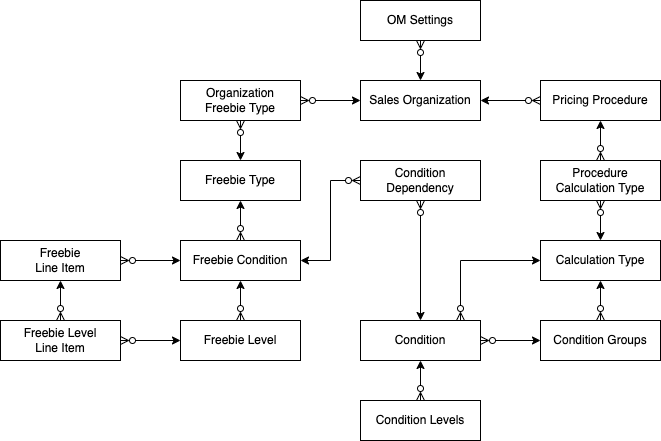
Objects on the scheme are responsible for calculating discounts and freebies, and the master data of these objects will be transferred to the server. For more information, refer to Data to Send to Web Service.
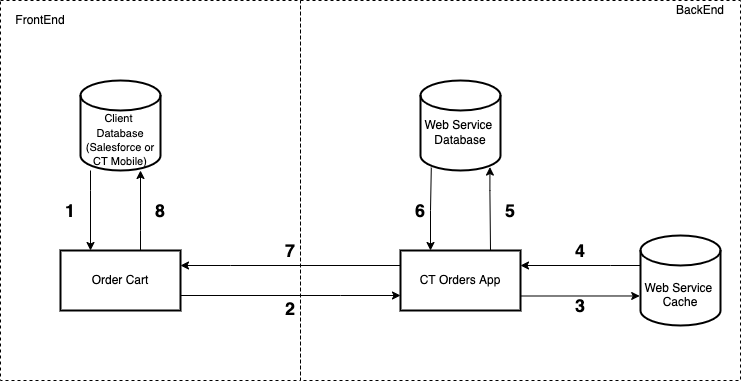
General Integration Scheme
The process of calculating prices and discounts consists of the following steps:
|
|
Integrated User Permissions
The integration user must have permission to carry out discount calculations using the Web Service. For more information, refer to Integration User Permissions.
Working with Web Service
Authorization
A secure two-way authorization is required to transfer data between Web Service and Salesforce.
-
When the administrator is authorized on the Settings Panel: Connect tab, two Auth Data records will be automatically created and filled out. One record stores a token for a user who has administrator permissions, and another one stores a token for an ordinary user. For more information, refer to Authorization (7.0).
-
The generated token in each Auth Data record is encrypted with the Key from the Auth Secret custom setting. When Salesforce sends a request to the Web Service to calculate discounts, each token will be decrypted with the same key.
-
The Auth Data records cannot be manually deleted to avoid accidental deletion by the user.
Two-way authorization allows the Web Service to use Apex classes and SOQL queries on the Salesforce side:
-
The SDK step of the pricing procedure uses the CalculatorServiceRest Apex class.
-
Freebie calculation with the Criteria Based adding method of Freebie Condition uses the SOQL query to retrieve the list of products.
Sync Types
After authorization, administrators should set up the sync process to keep master data up-to-date on the Web Service. Parameters of the selected sync process will be stored in the Settings record of the Web Service Setting record type.
On the Settings: Settings tab, select the sync mode and click Save. The button will be active only when some settings were changed. For more information, refer to Connecting to Web Service and Price Calculation (7.0).
-
Real-Time Type of Synchronization is used to send data changes in real-time by triggers. Triggers monitor the creation, modification, and deletion of master data records and will be fired only when fields of master data objects are changed in order to send changes to the Web Service database. The information about transferred master data records is stored in the Sync Transaction records.
When discounts are not applied, the total price is calculated based on List Price fields and may be performed only by the Calculate Discounts button. -
Batch in Schedule Type of Synchronization is used to send master data changes by batch on a schedule. Run the batch with a certain frequency (the maximum frequency is every hour every day) or specify when to run the batch on specific days.
It is possible to add the CalculatorServiceReplicator.runCalculatorServiceDeltaReplication(); method in your custom code to run the batch out of schedule. -
Enable Web Service for CT Mobile is used to calculate discounts in CT Mobile using Web Service. By default, we recommend using Web Service for online orders in Salesforce. If you use new functionalities for discount calculations, for example, Links in offline orders, it is required to activate Web Service for CT Mobile.
-
Run Batch. Click the button to send master data changes by batch.
-
Run Historical Batch. Click the button to send all master data. This can take quite a long time and therefore, with this type it is worth loading only historical data at the start of the project.
Sync Transactions
The Sync Transaction records are created when an administrator changes master data. Each record stores information about an object and the identifier of this object record with the modified master data. Next, the modified master data is sent to the Web Service according to the selected sync process.
-
When the master data is sent successfully, the Sync Transaction record is deleted.
-
If an error occurs while sending the master data, it will be recorded in the corresponding Sync Transaction record. After fixing the errors, the master data will be sent according to the selected sync process, or you can run a batch out of schedule.
Calculate Discounts
Discount calculation using Web Service is performed in the same way as described in Calculate Discounts.
See also: