Discount Management
Discount management provides full control over the discount calculation procedures, including the creation of different calculation types with specific conditions according to your organization’s marketing approach and elaborate adjustment of the advanced calculation method for complex scenarios with promotions.
Definition
-
Calculation Type
The unique entity in the system stores the set of rules for calculating a particular type of discount. The Calculation Type determines whether a discount should be calculated separately or in combination with other discount types.
-
Promotions (Promo)
A particular Calculation Type that uses specific syntax and can be configured via the user-friendly web interface. Promotion conditions can be configured for a group of clients and a group of products, as the Discount Rate differs per each quantity/amount level. Conditions may affect different products that have required/min/max attributes.
Object Model
| Since CT Orders Summer '22 and CT Mobile iOS 2.7, you can use the Web Service to execute calculations from different channels in one place instead of a built-in calculator. |
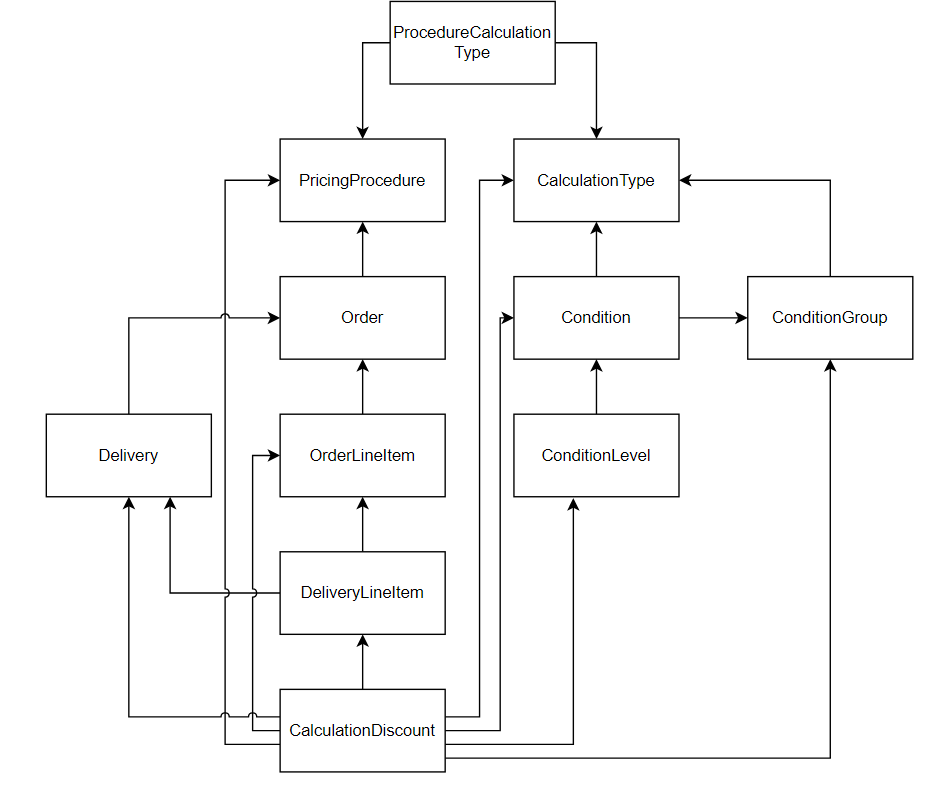
Discount Calculation Process
|
Calculation of discounts for Order Line Items is performed by the method of consecutive application of rules with appropriate criteria. The rules are manifested in the Condition and Condition Group child records and filtered and applied one by one in a distinct order.
-
Create an Order.
Pricing Procedure selected in order settings defines Calculation Type records which will be checked for appropriate criteria and applied to Order Line Items.

-
The system picks the first listed Calculation Type record.
-
The records' filtering order is determined by the number in the Order field on each Condition or Condition Group child record. Search is executed starting from 0 in ascending order. You can set up the order in which the records will be checked.
-
If Start Date and End Date are specified on the Condition Group or Condition record, they should lie within the date range specified in order settings.
-
For Condition Group records only: fields specified in the Condition Fields are not empty on the Order Line Items and can be accessed by a current user.

Example interpretation: the first field is located on the Order Line Item record, then the search mechanism jumps to next objects: orders__OrderLineItem__c → orders__Order__c → order__Account__c → the Personal_Discount__c custom field.
-
Condition Details field on the Condition record should contain expected values for a field specified in the Condition Fields List field.
-
The system checks the Exception Condition field on each condition and if the criteria are met, drops the condition and processes the next.
-
Define Discount Rate Location field:
-
If a Condition Record is selected, the discount % of the amount is taken from the Condition record.
-
If a Level Record is selected, product quantity and discount should be specified on the Condition Level records.
-
| Advanced Calculation Method can only be selected if Level Records are set as a discount rate location. |
After the Condition record that matches all search criteria is found, the system applies condition settings for discount calculation in accordance with the selected Pricing Procedure. The process is repeated until all Calculation Type records are checked.
Discount Recalculation
When the discount calculation process is finished and the final price with discount is applied, the system starts to track changes that can occur in the order and restart discount calculation in some cases. Discount recalculation in order happens in real-time and can be triggered by the following:
-
Product quantity change.
Each time you change the quantity of a product, the discount will be recalculated.
-
One of the fields affecting recalculation is changed:
-
Condition Recalculation Fields
API names of fields, that if changed, trigger new condition search and discount recalculation for the Order Line Item.
-
Discount Recalculation Fields
API names of fields, that if changed trigger discount recalculation, but no condition search.
The fields are specified in JSON format, similar to the SDK step syntax. The fields from the following objects can be used:
-
Order
-
Delivery
-
OrderLineItem
-
DeliveryLineItem
Some fields cannot be used as recalculation triggers. See the full list in this article. For example:
[
    {
        "objectName": "orders__OrderLineItem__c",
        "fields": [
            "orders__Test__c"
        ]
    }
]
-
-
-
The discount recalculation will be initiated when the following fields are changed:
-
The fields specified for the basePrice key in the Pricing Procedure.
-
The fields specified for the value and items keys in the Set Value step.
-
The fields specified for the condition key in the Step Conditions.
-
See also: