Configuring Delivery and Delivery Line Item Mapping
| By default, these settings are already configured after installing the CT Order package. |
To create deliveries in order and successfully process products within each delivery, the following settings should be configured:
If the mapping setting (global or for a selected sales organization) for at least one of these objects is not found, the order creation attempt will result in an error.
Delivery Mapping
Configure the Delivery Mapping record:
-
Go to Settings and click New.
-
In the New Settings window, select the Delivery Mapping record type.
-
Configure the settings as follows:
-
If required, select a Sales Organization, for which you configure the mapping. If no Sales Organization is defined for a Setting record, it will be applied globally to all records without configured Sales Organization.
-
Enter the field API name for the Total Price Field from the Delivery record.
-
Enter the field API name for the Total Discount Field from the Delivery record.
-
-
Click Save.
The setup is complete.
Delivery Line Item Mapping
Configure the Delivery Line Item Mapping record:
-
Go to Settings and click New.
-
In the New Settings window, select the Delivery Line Item Mapping record type.
-
Configure the settings as follows:
If you updated an earlier release version of CT Orders to version 2.0 or later, some fields listed below might be absent on your page layout. Please, go to the Settings object and add required fields to the Delivery Line Item Mapping record type layout. -
If required, select a Sales Organization, for which you configure the mapping. If no Sales Organization is defined for a Setting record, it will be applied globally to all records without configured Sales Organization.
-
Enter the field API name for the Unit Price Field from the Delivery Line Item record.
-
Enter the field API name for the List Price Field from the Delivery Line Item record.
-
Enter the field API name for the Quantity Field from the Delivery Line Item record.
You can reuse the package’s Quantity field if the Number (18,0) format is suitable for your organization. You can also create a custom Quantity field with the required measurement specifications. -
Enter the field API name for the Total Price Field from the Delivery Line Item record.
-
Enter the field API name for the Total Discount Field from the Delivery Line Item record.
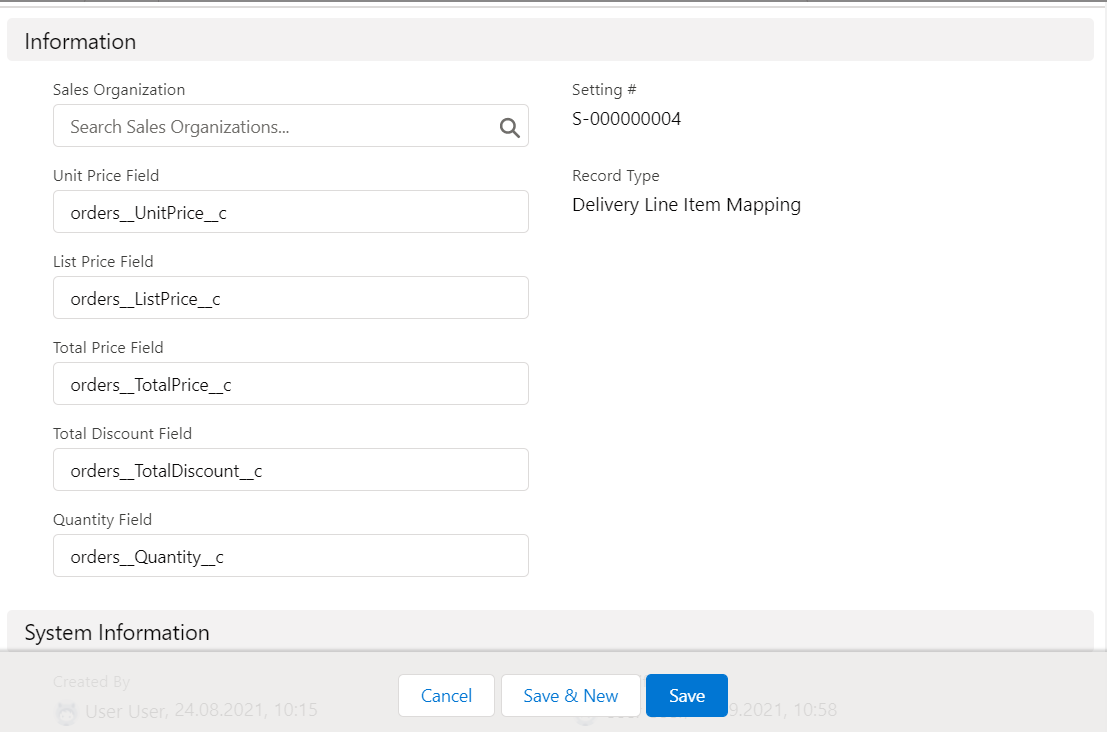
-
-
Click Save.
The setup is complete.