Configuring Object Setting
| By default, these settings are already configured after installing the CT Order package. |
Configure the main CT Orders settings for an Instance:
-
Go to the Settings tab and click New.
-
In the New Settings window, select Object Settings record type.
-
Specify the following:
-
In the Activity Object, select the corresponding Activity object: CT CPG or CT Pharma.
-
In the Product Object, select the corresponding Product object.
-
Select the corresponding Product Component Object, which will be used as the bundle component.
-
Specify Group Object, if dynamic groups will be used.
-
In the Address Object, specify the API name of the standard Address object.
-
In the SKU Field, specify the API name of the standard Active field of the corresponding Product object.
-
The SKU Field setting is required for the proper operation of the Catalog and Promotions pages. The SKU attribute defines whether the product record can be added to an order. It distinguishes the product SKU record from other product records used to create hierarchy, such as brands, families, etc.
-
If the SKU Field is set to CTCPG__IsSKU__c, then it will correspond with the SKU checkbox on the Product object. If the SKU checkbox is unchecked, the product cannot be added to an order, but will be displayed in the product hierarchy.
You may create a custom field of the corresponding Product object to use as the SKU Field. 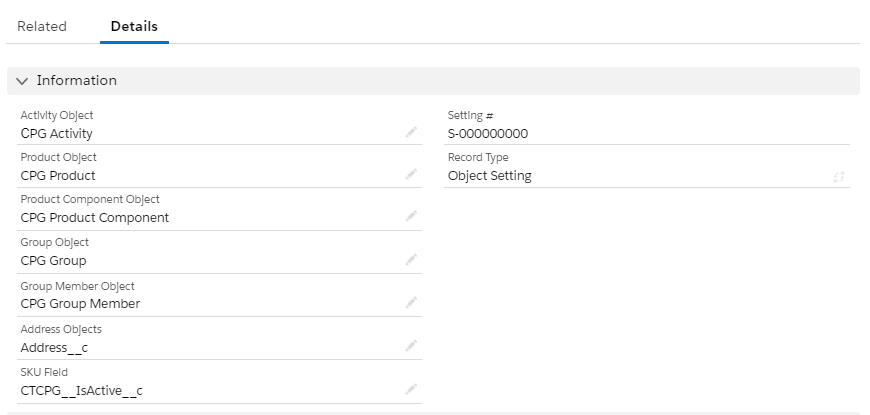
-
-
-
Click Save.
The setup is complete.