Setting up a Pricing Procedure (2.2)
Now you need to specify the pricing procedure that should be applied to calculate a discount for the promotion.
To configure a pricing procedure:
-
Go to the Pricing Procedure tab.
By default, the Pricing Procedure object has no tab. Follow this guide to create a custom tab for this object. -
Click New. The New Pricing Procedure window pops up.
-
Complete the form as follows:
-
Specify the new Procedure Name.
-
Set the Active checkbox.
-
Select the Sales Organization for which the procedure will be available.
-
Select Order Types for which you want to apply this procedure.
-
Specify the Pricing Procedure in JSON format:
{ "procedure": { "type":"SUM", "items": [ {"calculationType":"Promo" } ] }}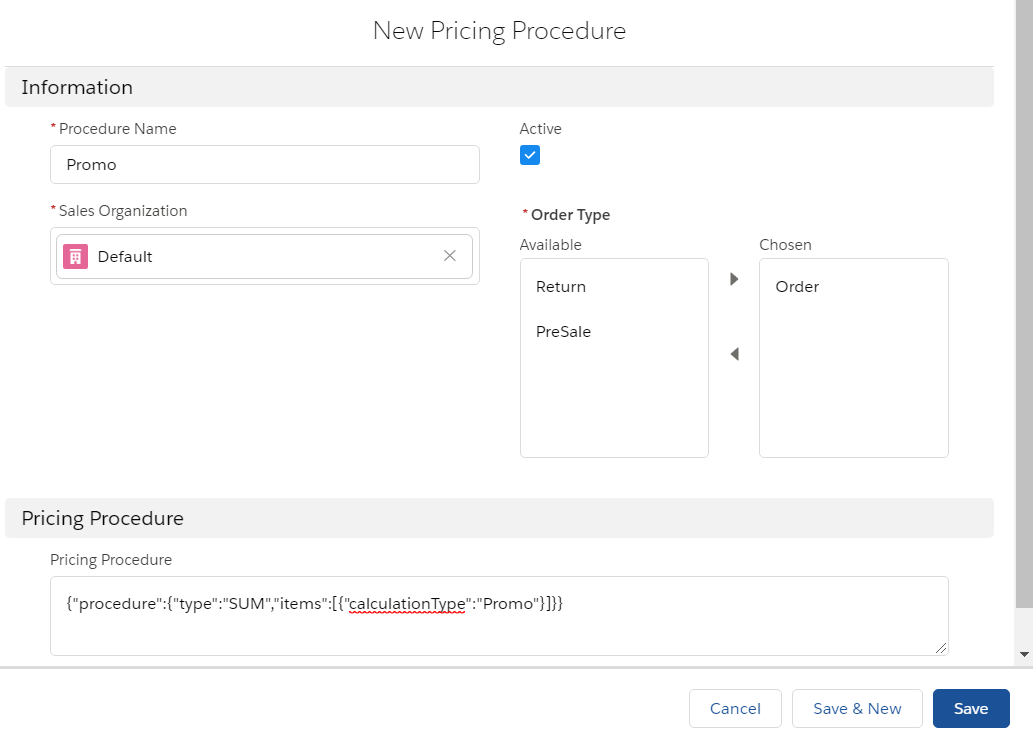
-
-
Click Save.
The setup is complete.