CT Orders Package Release Notes
- The CT Orders Package 25 R1
- The CT Orders Package 24 R2
- The CT Orders Package 24 R1
- The CT Orders Package 23 R3
- The CT Orders Package 23 R2 April
- The CT Orders package 23 R1 March
- The CT Orders package 22 R4 December
- The CT Orders package 22 R3 July
- The CT Orders package Summer '22
- The CT Orders package Winter '22
- The CT Orders package Summer '21
- The CT Orders package Spring '21
- The CT Orders package Summer '20
Here you could find a feature, the link to the corresponding article, and the version of the CT Orders package since which the feature is available.
The CT Orders Package 25 R1
| After installing or upgrading to this version, please perform post-installation actions, if you haven’t done so already. |
-
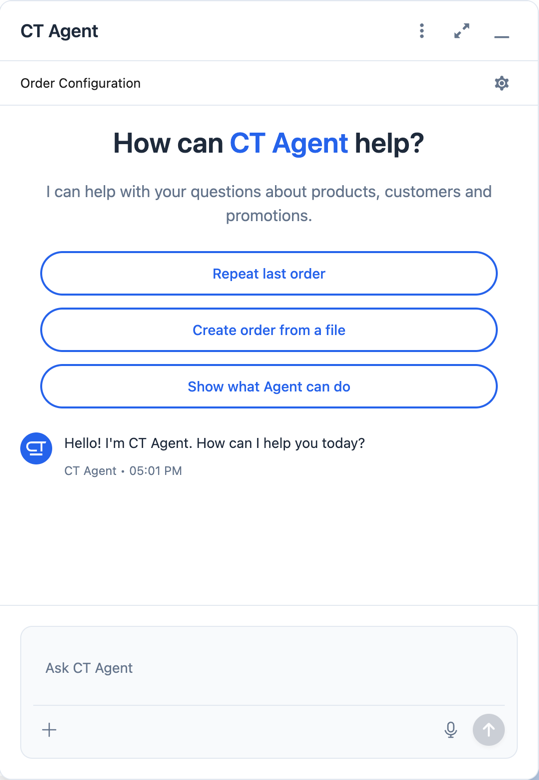
Smart Order Assistant: AI-powered tool for the order cart, including features:
-
Create orders from a photo or screenshot
-
Clone orders
-
Use voice commands
-
Apply smart order templates
-
-
If the Enable Fast Product Adding checkbox is enabled in the Left Panel Setting, press Enter key to add searched products to the order cart.
-
Sorting items by quantity in the order cart.
-
Default Address field for fast delivery creation.
-
Sync Transaction records are now deleted automatically after disconnecting from the Web Service.
-
New custom permission: orders.Allow Management of AuthData – manually manage Auth Data records.
The CT Orders Package 24 R2
Major Features
| After installing or upgrading to this version, please perform actions on the Self API tab on the CT Orders Control Panel as described here. |
-
DiscountRatePercent and DiscountRateAmount fields on Condition Level object are now validated for negative values.
-
New Assigned On Order checkbox on the Promotion object. If enabled, the promotion is displayed in the order screen.
-
The Payment Terms column on the Discount Management tab is now hidden by default.
-
Order cart now better fits full screen.
-
Deliveries in the Delivery Summary pop-up are now sorted in chronological order according to delivery date.
-
Products are added to Catalog/Promotion in the same order as they have been selected on the Product Management tab.
-
Bundles functionality improvements:
-
Quotas are now validated for bundles.
-
Bundles with Set Quantity On = Header can be distributed as freebies.
-
New design of the Product Management tab for promotions and catalogs, including bundles components.
-
New Ignore Bundle Components checkbox added for Quota record. If enabled, the quota is not available for bundle components.
-
List Price value for Header-Components bundles is displayed as a sum of listPrice values of the bundle’s components after adding them to the order cart.
-
Freebies can be distributed not only for the whole bundle, but also to selected products of the bundle.
-
New Ignore Component Availability checkbox added for bundles. If enabled, the components of bundle are always available disregarding their Product Availability status.
-
Default Availability Type and Product Availability fields now take effect on bundle disregarding if it’s calculated on header or on components.
-
New Parent Catalog Line Item and Parent Promotion Line Item lookup fields added for Catalog Line Item and Promotion Line Item objects to work with new bundles logic.
-
-
New Restrict by Order content checkbox is added for the Freebie Condition object. If enabled, only Order Line Item records with Quantity> 0 are distributed as freebies.
The CT Orders Package 24 R1
Major Features
| To work with bundles, please manually create the Product Component lookup field to the Product Component object (in CT CPG or CT Pharma) on Catalog Line Item and/or Promotion Line Item. |
-
The new Filter Setting allows to set up fields to filter products in the order cart.
-
Improved performance while opening the order cart and prices recalculation.
-
Added validation that Max Quantity Per Delivery value is greater or equal than Min Quantity Per Delivery value on the CT Product, Pharma Product and Product2 objects.
-
If the Fields To Display parameter is not set in the Totals Panel Setting, no fields will be displayed in the Total Panel of the order cart.
-
Prices are calculated more precisely in the Procedure step.
-
Fields with automatically corrected invalid values are now highlighted in the order cart.
-
New Left Panel Setting is added to configure displaying Catalogs and Promotion tabs in the left list of the order screen.
-
Self API tab is added to the CT Orders Control Panel.
-
New Export CSV Setting is added for OM Settings.
-
Added sorting by product name in order cart.
-
Pressing the Tab button in the order cart switches to editing the same field on the next order item.
The CT Orders Package 23 R3
Major Features
-
The Field Search Based On field is added to the Calculation Type object. This field determines if Condition Fields will be searched starting from Order Line Item or Delivery Line Item when performing calculation for the Web Service.
-
Calculation Types with Field Search Based On set to Delivery Line Item will be ignored and excluded from the Price Tag logic if calculations by Web Service are not use.
-
The SKU Field is now mandatory to create an object settings.
-
New features for Limit Rules:
-
Limit Rules are now validated, if their Apply Conditions contain a reference via Order Line Item Id field and the order draft has not been saved.
-
New $.deliveryOrder operator for Apply Condition and Exception Condition on Limit Rules, which specifies certain index of the delivery in the order (0, 1, 2 etc).
-
New Global Exception field to support multi-delivery exception conditions for Limit Rules. If it’s enabled, it triggers searching Exceptions Condition field in the whole order, disregarding the value of the Apply Condition field.
-
New Custom Validation Message field on Limit Rule. Contains API name of custom label, which is displayed as the validation message when the Limit Rule is applied to the order or delivery.
-
The CT Orders Package 23 R2 April
Major Features
-
The !Order shortcut can be set for Address Setting SOQL Filter.
In previous version, you could use !Account and !RetailStore shortcuts to get relevant custom address records for an order. Now, you can also use the !Order shortcut for this purpose in the SOQL Filter field. For example:
WHERE Id = '{!Order.orders__AddressId__c}' -
Support comparison operators in JSON of the Condition Details field in the Freebie Condition.
In previous version, you could use equal, notEqual, contain, notContain, in, notIn as values for the operator key in JSON of Condition Details field in Freebie Condition. Now, you can also use greater, greaterOrEqual, less and lessOrEqual operators.
Resolved Issues
-
In the Object Setting, the isActive field is used disregarding Object Settings SKU field value.
-
Products from the parent catalog cannot be added to an order.
-
Checkboxes defined as optional, appear as required on the Order Line Item and Delivery Line Item layouts.
-
Delivery Control = None for Freebie Condition does not work for orders with different dates.
-
The product does not appear in available Freebies when filling out an order unless Freebies Quantity Max is specified on the Freebie Level Line Item.
-
Freebies are not displayed in the delivery tab of the order cart, if the Split setting is set.
-
The left panel of the order cart is not minimized after switching to delivery tab, if the Split setting is set.
-
Negative values are allowed for Limit Rules and can be applied for an order.
-
The bundle structure is not displayed when clicking on the bundle icon in the left menu of the order.
-
Info icon displays more than 3 Product Availability entries.
-
Validation for extra parenthesis at the end of JSON in the Level Formula field for the Calculation type object does not work on save.
-
The Advanced Criteria field is required even if the Calculation Method is set to Basic.
-
Width of the All tab in the order cart varies while switching between this and another tabs.
-
Discount is not recalculated for created orders after changing Discount Rate field value in the Condition record.
-
After decreasing the width of the order cart window, the Add button becomes hidden by the side panel.
-
Different validation notifications for empty Limit Quantity and Limit Amount fields in Quotas.
The CT Orders package 23 R1 March
Major Features
-
Advanced Criteria 2.0 now works both in Web Service and in-app discount calculator.
-
Calculate discounts feature works both in Web Service and in-app discount calculator.
-
Promotions, Catalogs and their sub-catalogs in the Order Cart are now displayed in alphabetical order.
-
New Displayed Field Width field added to Order Line Item Layout. It allows adjusting the width of Product Name and Quantity fields in the order cart, as well as of each field listed in the Fields To Display.
The CT Orders package 22 R4 December
Major Features
Price Management
-
New Procedure Builder tab added to set up Pricing Procedure. Now you can build up Pricing procedure 1.0 or 2.0 using friendly interface instead of writing JSON query.
Freebie Management
-
New Freebie Management tab added to set up Freebies for Promotion in one place. Now you can set up Freebie conditions using friendly interface instead of writing JSON query.
Custom Permissions and Permission Set Groups
-
Assign one of the preconfigured permission set groups to users based on their role to have access to the required CT Orders functionalities.
-
Assign new custom permissions to override the standard logic:
-
Allow changing Condition Details of Promotion.
-
Price tags
-
The checkmark icon is displayed when several Delivery Line Items are tied to one Order Line Item, and different levels are applied in the conditions.
Other Improvements
-
The UX/UI improvement for the order cart:
-
The promotion sales and delivery dates are displayed in each promotion header. If the sales dates are empty, the delivery dates will be displayed instead of them.
-
The Product Availability records are displayed both for products on the left side in the catalogs/promotions and added to the order cart. No more than 3 records are available in a 365-day period.
-
The Totals Panel can be now configured to view price and discount per each delivery.
-
-
The Disable Mass Adding option on a Catalog record defines whether a sales rep can add a whole catalog to the order cart.
-
Validation for Links with the Best Of dependency action: conditions from one Calculation Type must have the same value in the Unit Of Measure field.
-
Changing criteria for searching the appropriate Totals Panel Settings record.
-
The ability to edit fields with the Lookup type in the order cart.
The CT Orders package 22 R3 July
Major Features
Custom Permissions and Permission Set Groups
-
Assign one of the preconfigured permission set groups to users based on their role to have access to the required CT Orders functionalities.
-
Assign new custom permissions to override the standard logic:
-
Allow the same Calculation Types in the Pricing Procedure steps.
-
Search
For order carts, catalogs, and promotions, a search is carried out in the fields that are listed on the product Search Results search layout (including the Name field). Only products that match the selected criteria will be displayed.
Other Improvements
-
New operators are supported for JSON in the Advanced Criteria, Condition Details, and Exception Condition fields of the Condition object:
-
The UX/UI improvement:
-
Set up the compact layout for the Product object. The title is the value of the first field in a compact layout, and the subtitle is the value of the second field in a compact layout.
-
In the catalogs and promotions, products are arranged according to their order number (if given) or the order defined inside Catalogs and Promotions. Drag-and-drop products to manage their order.
-
The ability to display fields from parent objects in the order cart and the Product Management tab for catalogs and promotions.
-
The CT Orders package Summer '22
Download the package here.
|
For correct operation of new features, use the following versions of target systems:
|
Major Features
Web Service
| Before starting work, check all the required permissions here. |
-
Set up two-way authorization to transfer data between Web Service and Salesforce and allow the Web Service to use Apex classes and SOQL queries on the Salesforce side for the SDK step and freebie calculations.
-
Set up the connection to use the Web Service calculator instead of the built-in calculator and perform all discount calculations in one place.
-
The ability to load master data to Web Service and keep it up-to-date with the Run Batch button.
-
The new advanced features, such as links, mixed discounts, and freebie values are only available when working with the Web Service.
-
Validations that a sales rep has access to all necessary fields to calculate discounts. Otherwise, the calculation will be carried out by the List Price field.
Links
-
Conduct advanced discount calculations by creating condition dependencies among paid products and freebies based on different or the same Calculation Types and non-zero conditions.
-
Administrators can set 4 types of condition dependencies and the sequence of applying them to the orders.
Mixed Discounts
-
The ability to apply multiple conditions from a single Calculation Type.
-
Advanced Criteria 2.0 provides more flexibility by simultaneously setting several filters and a minimum number of products for different size discounts.
Freebie Management
-
Freebie Values allow you to spread a different number of freebies over the freebie levels and deliveries.
-
If Web Service is enabled, freebies will be validated if changes on the Delivery Summary popup affected them.
Other Improvements
Discount Management
-
If the matching Condition record was not found on the Condition Group record, the system checks the next Condition Group record.
Quota
-
If a quota has child Quota Usage records or was created based on a Quota Template, you cannot change the quota except to extend its validity period by hanging the end date.
-
Updates to keep Quota Usage records up-to-date.
Limit Rule
-
Cells with zero quantity of a certain product will be highlighted if that product fits the limit rule, but the minimum quantity or minimum amount for that product was not reached according to the limit rule.
The CT Orders package Winter '22
|
For correct operation of new features, use the following versions of target systems:
|
Major Features
Product Availability
-
Set up availability dates of paid products and freebies for offline and online orders and deliveries.
-
Click the Info icon in the order cart to see up to 3 records of availability dates for a paid product or freebie.
-
Automatic check of catalogs and promos to display only available products and bundles in the order cart.
-
Optionally define whether to ignore the default availability for freebies.
Quotas
-
Regulate sales of a limited number of products, such as when launching a new product, running a promotion for a selected customer segment, or withdrawing a product from production, by distributing product quotas to sales reps.
-
Sales reps can reserve an available number of a product by quota and still be able to allocate all products in that quota among the orders.
-
When saving the order cart, the system validate distributed products against the allotted quotas.
-
Quotas will be also validated if changes on the Delivery Summary popup affected them.
-
-
Click the Info icon to see the booked and used quotas.
Freebie Management
-
Multiplier: specify whether the number of freebies in the order cart must be multiple to the specific value. The freebies quantity will be automatically rounded up.
-
The availability of the added freebies in deliveries will be validated.
-
In future releases, managers can assign different values for freebie products in the Freebie Value field of the Freebie Condition object.
Preparing for Web Service
-
In future releases, use the new Settings Panel tab for the secure two-way authorization and setting up the connection with the Web Service.
Preparing for Mixed Discounts
-
In future releases, the Apply Condition Type field of the Calculation Type object will be responsible for setting the condition(s) to be applied.
-
New JSON keys are available in the Advanced Criteria field for the Condition object.
Other Improvements
-
For the Set Value step of the pricing procedure, Calculation Type, and Freebie Condition:
-
The minus and divide operators are supported.
-
The cutDecimalsTo and roundTo keys help you round and truncate the number of the decimal places of the resulting value if necessary.
-
-
For your convenience, the custom SDK price tag always displays the product name to which it refers.
-
If an order has 140 or more deliveries, use the Calculate Discounts button to reduce the time it takes to calculate discounts and the total price.
-
In the case of a configured Delivery Summary layout, the system validates to see if the limit rules and quotas have been violated when the sales rep has made changes to the supplies.
The CT Orders package Summer '21
Major Features
CG Cloud Support
Integrate with Salesforce CG Cloud solution to apply complex order-taking logic to its objects.
-
Use the Salesforce Product object in bundles, catalogs, and promotions.
-
Create orders for the Retail Store object.
-
Use dynamic groups to keep stores and sales products up-to-date.
Discount Management
A fully configurable pricing procedure that allows you to implement complex custom scenarios with manual and total discounts if needed:
| The standard pricing procedure version 1 is also supported. Use the standard v.1 syntax or customize the new pricing procedure using the steps with a broadened syntax. |
-
Set pricing procedure steps to write the intermediate discount results.
-
Add step conditions to determine the step applicability.
-
Implement SDK step to use custom project logic.
Enhanced discount calculation capabilities:
-
Define quantity settings for discount calculation on Calculation Type.
-
Set exception conditions to apply the discount under specific circumstances.
-
Specify any field on any object to be used as a discount rate source.
-
Launch full or partial recalculation in the order cart if the selected field value is altered.
Freebies
-
Take advantage of full and partial recalculation and auto-update of freebies in order triggered by changes in the set of products in the cart.
-
Control the freebie distribution among several deliveries.
Limit Rules
Dynamic control over the product quantity and cost for the whole order or several deliveries:
-
Apply limit rules to all products in the order, or only for those that match conditions.
-
Apply limit rules to a single delivery or a group of deliveries in the order.
-
Set conditions to apply to exclude limit rules in specific cases.
-
Check the real-time validation during the order creation.
SDK
With the new setting, tailor the order-taking process according to your goals and facilitate the audit purposes:
-
Display custom price tags in the order basket.
-
Update custom fields when adding products to order.
-
Display the info icon with an embedded HTML template.
Other improvements
-
Support for the standard Salesforce validations to control conditions applied during the order creation.
-
Editable fields allow entering data in custom fields in real-time.
-
Decreased processing time when adding many products from catalogs and promotions.
-
Real-time update of search results in catalogs. Highlighting applied filters and the ability to clear all filters.
-
Web-service Improvements, including the possibility to turn off closed order duplications.
The CT Orders package Spring '21
Major Features
Order Management
-
Multiplicator provides flexible management of product quantity per delivery. The quantity is calculated automatically based on multiplicity settings processed on three levels: Product, Price Book Line Item, Catalog Line Item, or Promotion Line Item.
-
Add the display of price tags for a convenient visualized method of informing your sales reps about the applied calculation type and discount required quantity for reaching the next discount level and special conditions for each product added to the cart.
Delivery Management
Order split allows the distribution of products between multiple deliveries to meet your company’s logistic and financial requirements:
-
Define the split parameters for different departments and order types;
-
Review the split delivery summary with details for each delivery before finalization.
Other Improvements
-
Perform an advanced search in orders in all fields among all products in Catalog or Promotion sections and already added to the order cart, including freebies.
-
With mass actions in order, add or remove all products added to the cart from a selected Catalog or Promotion with one click.
-
Use the active price filter to apply the filter to all records in your order cart’s Catalog and Promotion sections and display only actual products with assigned Price Book and List Price.
-
Improved freebies validation now provides versatile validations to improve the working experience when adding freebies in orders. The system now checks active promotion dates, min/max required products, and other settings influencing the final freebies calculation per order and displays errors in the user interface.
-
A brand new Order Change Manager is an additional session processing agent, that ensures stable operation when opening the order cart in the CT Mobile app.
-
Overall product performance has been improved.
The CT Orders package Summer '20
Major Features
Product Management
A bundle is a new product type that includes several products under one group.
-
Bundles are now supported for use in Catalogs and Promotions.
-
Bundles management is now available for all the roles:
-
Admins can create Bundles in CRM or integrate them from ERP, set up calculations, and quantity rules.
-
Managers can use bundles in Catalogs and Promotions.
-
Sales Reps can use bundles according to settings to form an order.
-
Order Management
Order features are further improved for quantity management:
-
Control units in a package on the Product level.
-
Control of maximum and minimum values on the Product and Price Book levels.
Other Improvements
Online Order is now aligned due to its life cycle with the following features:
-
Validation for the order on the On Hold stage.
-
Save the order draft, edit, the order cart, and finalize the order.
-
Block editing for the finalized order.