1. Install the CT Orders Package
Follow these instructions to install the CT Orders managed package.
-
Contact the Customertimes team to obtain a direct link for the managed package installation:
-
in your sandboxes;
-
in your production environment.
-
-
Log in to Salesforce.
-
Select the security level of installation.
It is recommended to select Install for Admins Only security level. An org can contain numerous profiles. It may be unwise to give admin permissions to all the users. Admin can set the permissions for specific users after the package installation. -
Select the checkbox to confirm the installation of a non-Salesforce application.
-
Click Install.
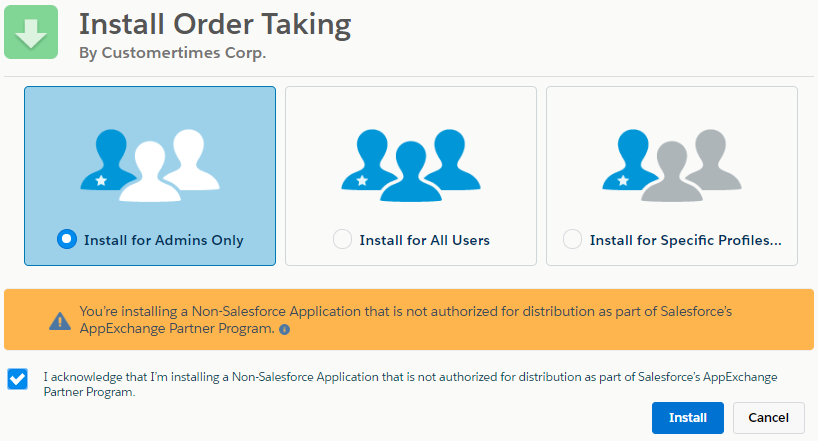
The installation is complete. It will take some time for the CT Orders package to install. You will receive the email at the specified email address when the process is finished.
-
Go to the CT Orders Control Panel page and open the Self API tab.
orders.Allow Management of SelfAPI custom permission is required to access the Self API tab. -
On the pop-up window, click Allow. Make sure that your account status is set to Authorized.
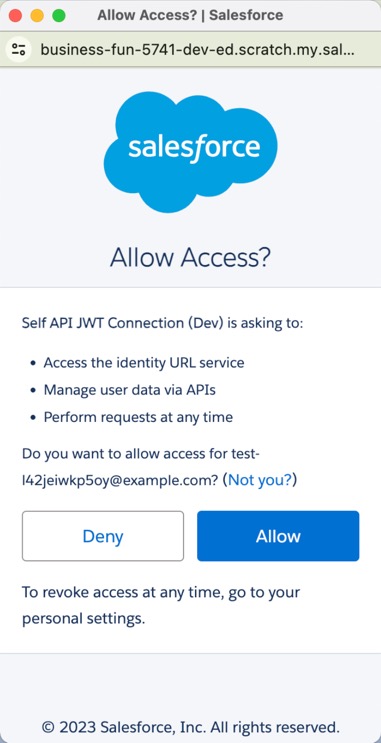
The setup is complete.
By default, all necessary settings are already configured after the package installation. To check them, refer to Setting Up an Instance.