How to Use Custom Address Object
To use a custom Address object as the Address object:
-
Create a custom Address object with the Address field(s) of the Text data type, for example, CustomAddress__c.
-
Create an OM Settings record with the Object Setting record type and specify the API name of the custom Address object.
-
Create an OM Settings record with the Address Setting record type and specify the corresponding Address field, for example, CustomAddress__c.
-
Create a lookup from the Delivery object to the custom Address object.
-
Create a lookup from the custom Address object on the Account object.
After you created the custom Address object and field(s), relate delivery addresses to the required Sales Organization record by creating the Settings record with the Address Setting record type.
-
Go to Settings and click New.
-
In the New Settings window, select the Address Setting record type.
-
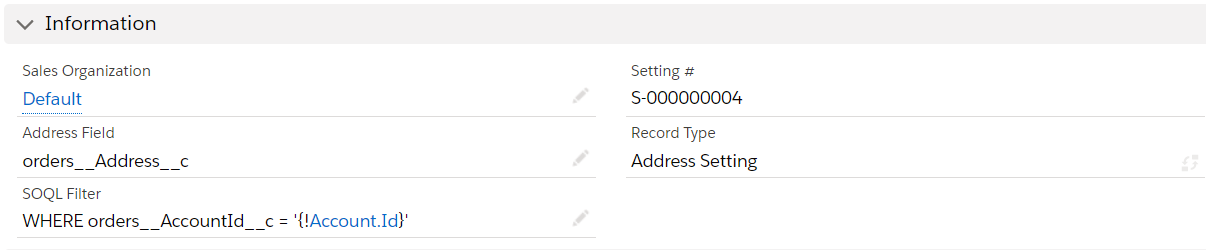
Configure the setting as follows:
-
In the Sales Organization field, select the Sales Organization if required.
If you create the setting from the Sales Organization page, the Sales Organization record will be already specified. -
In the Address Field, enter the API name of the Address field on the Account object.
Please note that any Address field with the Address data type will not be processed. Currently, the processing of the composite fields (formulas), such as BillingAddress or ShippingAddress, is not supported. -
In SOQL Filter, specify the SOQL query to sort delivery addresses given the selected Account record.
Filter example:
WHERE ParentId = '{!Account.Id}'This query will be considered by the system as:
SELECT id FROM orders__Address__c WHERE (id = '{!Account.Id}') OR (ParentId = '{!Account.Id}')where:
-
orders__Address__c is the address object you specified in the Object Settings.
-
ParentId is the API name of the lookup from Address to Account.
-
'{!Account.Id}' is a keyword that is replaced with the ID of the Account for which the order is created.
-
-
-
Click Save.
The setup is complete.