Calculation Types
The Calculation Type stores the set of rules for calculating a particular type of discount. The Calculation Type determines whether a discount should be calculated separately or in combination with other discount types.
The discount is calculated according to the Pricing Procedure, which is defined by a Calculation Type via the Procedure Calculation Type. The relationship is automatically managed by the system.
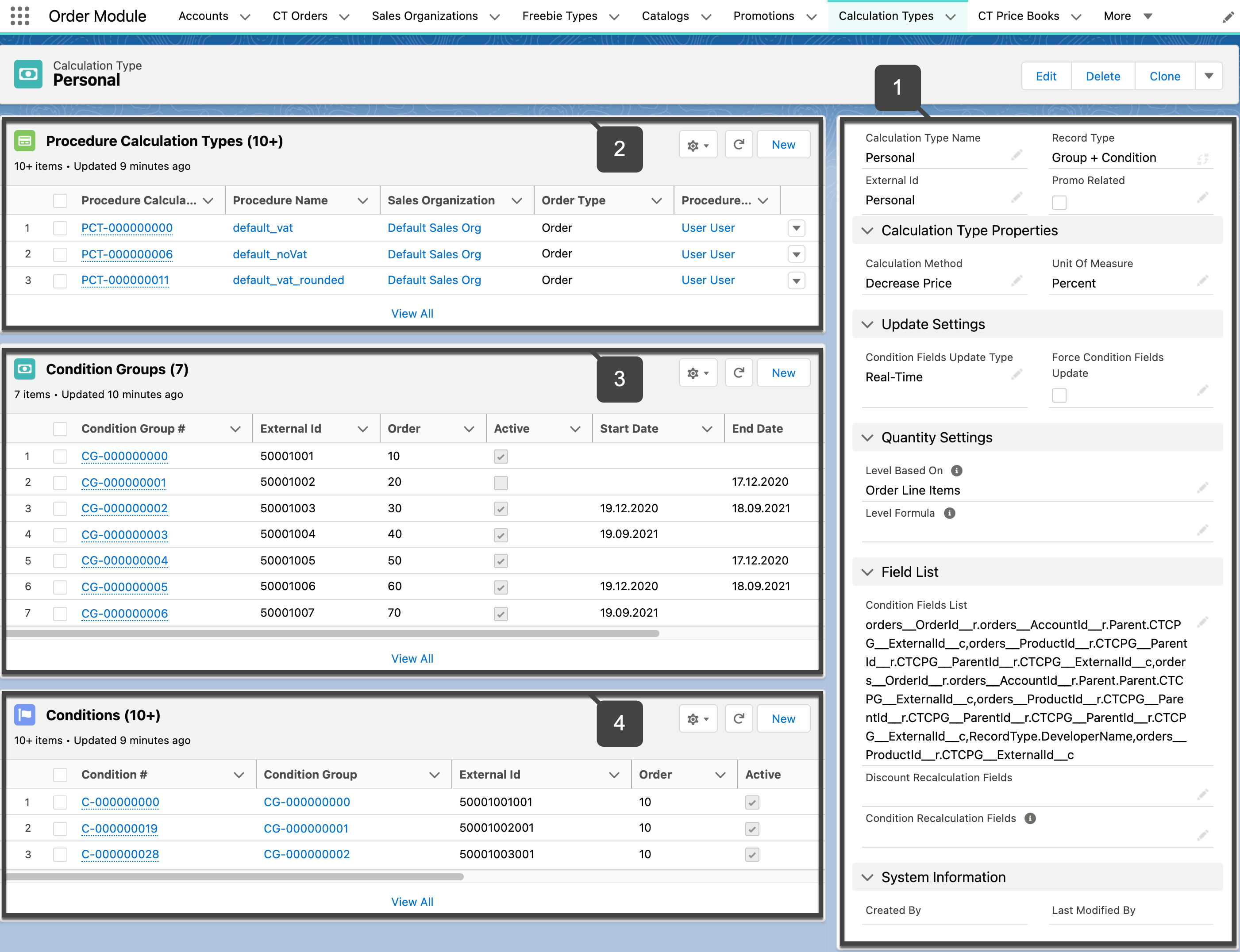
Each Calculation Type has conditions and/or a group of conditions that the products in the order must meet to apply to them a discount. On the selected Calculation Types tab, select the desired Calculation Type record (1) to view all the associated Procedure Calculation Types (2), Condition Group (3), and Condition (4) records.
-
Condition Group is present for the Calculation Type record with the Group + Condition record type.
-
Only one Condition from the Calculation Type can be applied to the Order Line Item.
Also, it is possible to avoid a discount application under the presence of certain products in the order cart. For more information, refer to Condition: ExceptionCondition__c Field Specification.
| Calculation Type | Condition Group | Condition | |||||
|---|---|---|---|---|---|---|---|
Record Type |
Condition Field List |
Level Formula |
Apply Condition Type |
Condition Fields |
Condition Details |
||
Condition + Group |
All paths to the Condition Detail field on the Calculation Type records with the Condition Group record type. |
This field is used to specify the fields by which the quantity for a Delivery Line Item or Order Line Item will be counted, and when the required quantity is reached, a discount will be provided. For more information, refer to Calculation Type: LevelFormula__c Field Specification. |
Not Applicable |
The list of field API names of the Order Line Item object that should not be empty on the Order Line Item record. |
On the child Condition records of the parent Condition Group record, the system checks the expected values for the specified Order Line Item fields.
|
||
Condition |
All paths to the Condition Detail field on the Calculation Type records with the Condition record type. This occurs automatically when creating the conditions, but may require manual editing of the Condition Field List if any changes or the removal of the conditions were made. |
Depending on the value, either the first appropriate condition, or only the first non-zero condition, or all non-zero conditions of the Calculation Type record will be considered for the discount. For more information, refer to Calculation Type: ApplyConditionType__c Field Specification. |
Not Applicable |
On the Condition record, the system checks the JSON with the path to the Order Line Item fields and the expected values used for checking for matching conditions.
|
|||
See also: