How to Manage Products in Promotion
-
On the created Promotion page, open the Product Management tab. On this tab, you can see all products from your instance database that match the criteria to be displayed in the Promotion section.
-
Select the products you want to add to the Promotion and drag-and-drop them to the top frame on the right (1).
For the Lightning component to work properly with the drag‑and‑drop functionality, make sure that Lightning Web Security is enabled in your org’s Session Settings. -
Select products that you want to be used for getting a discount by selecting the Use For Discount checkbox (2). The selected products will be displayed in the Promo Products list on the Discount Management tab.
-
Select one product to Exclude From Discount (3).
When both Use For Discount and Exclude From Discount checkboxes are selected, the product can be assigned a required minimum or counted as a unique product to get the discount for the order, but the product itself will be sold for a full price without the discount. 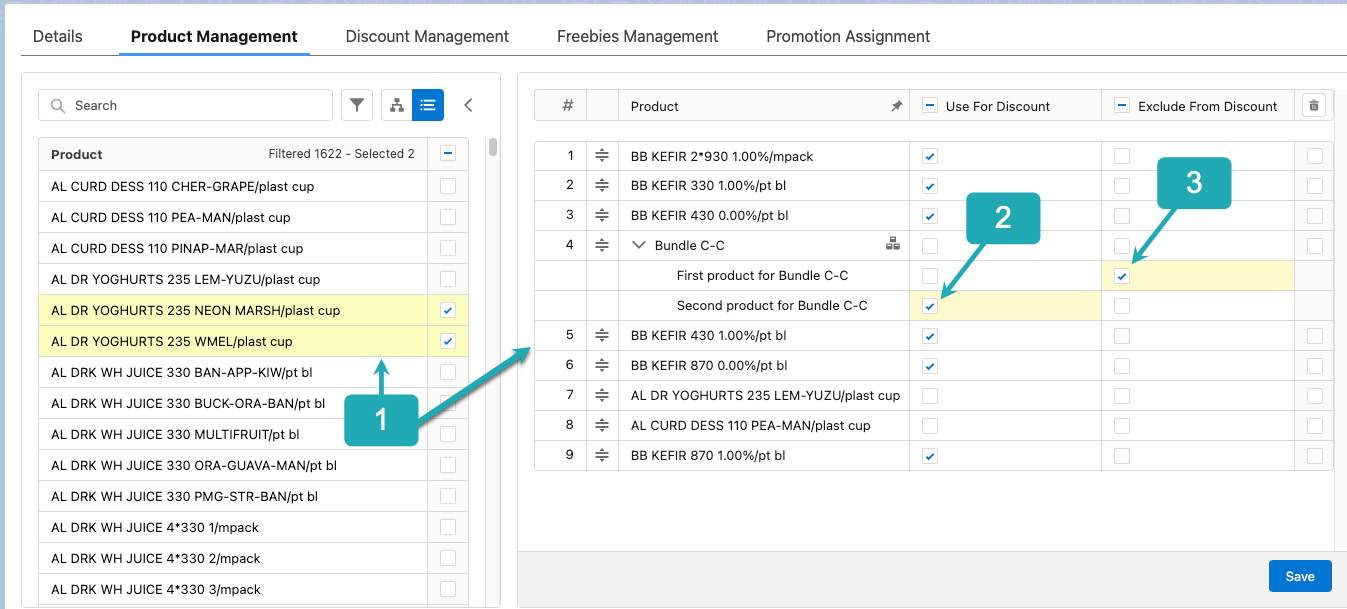
-
Click Save.