Managing Discount Settings for a Promotion (2.2)
To set up conditions for discount calculation:
-
On the created Promotion page open the Discount Management tab.
-
In the Required Min set the minimum required amount of each of the products you selected to get a discount.
-
Click New Condition level. The settings for the first level are displayed.
-
Set up the levels as shown in the image.
The Starting From value defines the starting range amount of all products from the Promo Products list to get a discount rate specified for this level for the whole order. 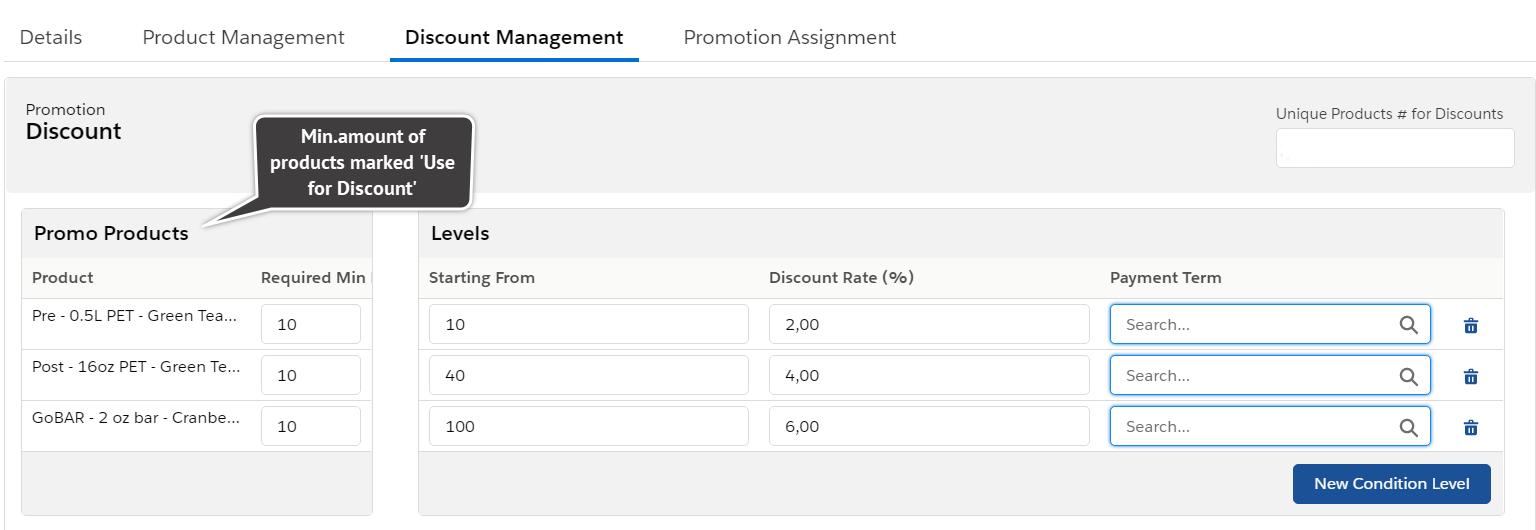
The current setup signifies that you need to add at least 10 items of each of the three products in the Promo Products list to get a discount for all products in the order cart, except the Promotion Line Items you checked as Excluded From Discount. The more the amount of ordered Promo Products, the bigger the discount rate for the order.