Price Management
Price management means implemented in the package are based on the calculation algorithm set in Pricing Procedure and Calculation Type records with specified rules and conditions that are applied during the calculation.
Please, refer to the Discount Management articles to see the full discount and price calculation object model.
Price Calculation Workflow
Before getting into details on the configuration of Pricing Procedure and Calculation Types, let’s explore the overall pricing workflow that is performed by the new CT Orders advanced pricing engine:
→ |
[1] |
Define product types for discount; Load List Prices |
||||
↓ |
||||||
[2] |
Check orders__PricingProcedure__c: the procedure is set and active |
No → |
Price calculated without a discount |
|||
↓ |
No ↑ |
|||||
[3] |
Define orders__CalculationType__c records; check mandatory fields |
→ |
[4] |
Check field accessibility in the Condition Fields List field |
||
↓ |
||||||
[5] |
Apply Calculation Type record type:
|
Discount Calculation Requirements
To successfully calculate a discount, the following conditions must be maintained throughout the pricing procedure:
-
List Prices are created for each Delivery Line Item in the order.
-
The Pricing Procedure is defined for an order.
-
The orders__PricingProcedure__с field is specified on the object for the Sales Organization and Order Type in the order.
-
The Pricing Procedure is active.
-
-
Calculation Type is linked to the applied Pricing Procedure, and Calculation Type is included in the JSON formula.
-
The Calculation Method, Unit of Measure, and External Id fields are filled out.
-
-
All fields specified in the Condition Fields List field must be accessible to a current user.
-
Condition or Group And Condition record type exists for this Calculation Type.
Pricing Procedure
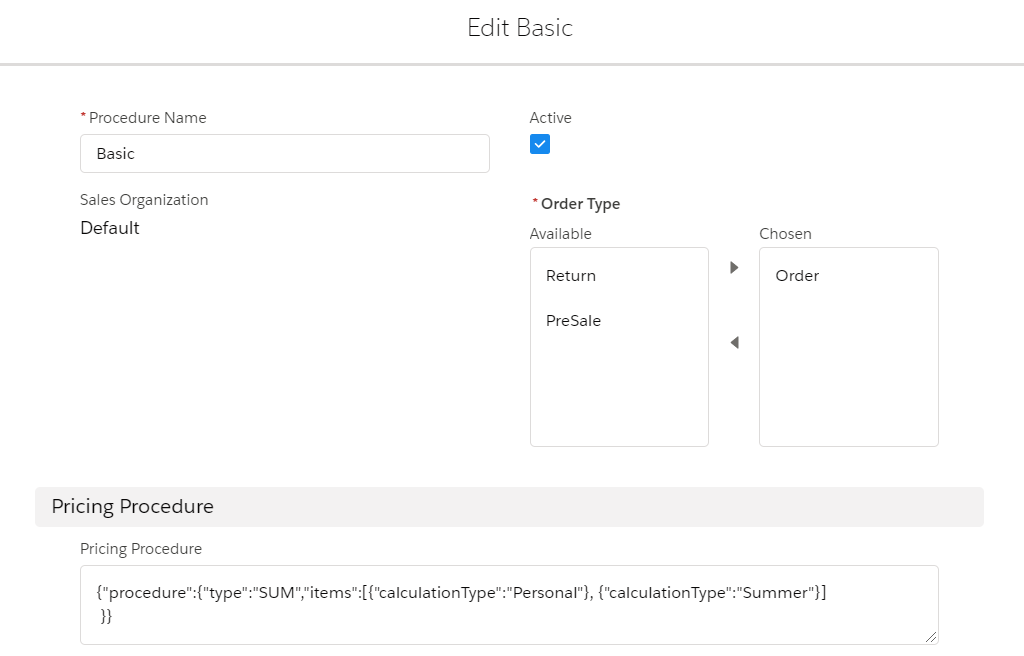
The pricing procedure is carried out with the help of the Pricing Procedure object, which determines the methods and sequence of price calculation procedures for each order.
-
The Pricing Procedure field on this object contains calculation algorithm steps in JSON format.
-
The pricing procedure can be set up differently for each Sales Organization and Order Type.
| The mobile user must have at least read access to the fields in the Pricing Procedure or recalculation fields to calculate Total Price. Otherwise, the total price will be calculated by the List Price fields. |
Price is calculated for each Delivery Line Item record based on the quantity entered on each Delivery Line Item or Order Line Item record and conditions specified in the applied Calculation Type.
Depending on the type of product, the system applies specific rules for discount calculation. For bundles, there are three possible calculation scenarios, for products the discount is applied to each product record.
To provide a link between Pricing Procedure and Calculation Types, the Procedure Calculation Type junction object is introduced. The Procedure Calculation Type records are created automatically for all Calculation Types specified in the Pricing Procedure formula.
The following procedure versions are supported:
-
Pricing Procedure v. 1.0 requires only the Procedure step, as in previous CT Orders versions. In this step, a formula is used to calculate the price of each Delivery Line Item by applying different discount Calculation Types listed in a sequence with MAX, MIN, MULT, or SUM operators.
-
Pricing Procedure v. 2.0 requires all steps of the price calculation to be specified in the JSON formula.
| Use the ExternalId__с value of the Calculation Type record in the JSON formula. |
See also: