CG Cloud Support
| To obtain access to the CG Cloud objects, create a case to Salesforce. |
CG Cloud is the standard Salesforce solution for CPG companies to keep essential products in the right stores. Integrate CG Cloud with our CT Orders package to gain advantages from both products.
Object Model
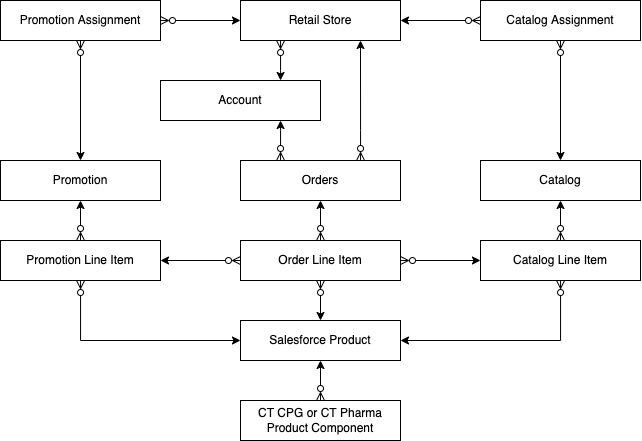
The CT Orders object model with CG Cloud support allows you to apply the CT Orders logic to the Salesforce Product and Retail Store objects. Depending on your business goals, you can either set up support for the Salesforce products or both Salesforce products and retail stores.
When the CT CPG or CT Pharma package is installed in your Salesforce instance, if necessary, set up dynamic groups with Salesforce products or retail stores and/or the appropriate Product Component object for bundles.
CT Orders can work without the CT CPG or CT Pharma solution if the Sales Cloud, E-Commerce, or CG Cloud license is activated.
| Field | API | Type | Description |
|---|---|---|---|
Product |
Product2 |
Standard Object |
Go to Salesforce Developer to see the full description. |
Product Component |
Depends on the target system:
|
Custom Object |
Go to Product Data Model to see the full description. |
Retail Store |
RetailStore |
Standard Object |
Go to Consumer Goods Cloud Developer Guide to see the full description. |
Salesforce Product
To work with the Salesforce Product object:
-
Create an OM Settings record of the Object Setting record type and specify the Salesforce Product object.
-
When configuring the settings, use the orders__Product2Id__c lookups on the following objects:
-
Order Line Item
-
Delivery Line Item
-
Catalog Line Item
-
Promotion Line Item
-
CT Price Book Line Item
-
Freebie Line Item
-
-
To work with bundles, in Object Settings select the Product Component object of the target system, such as CT CPG or CT Pharma. If the Product Component is left blank, but the Bundle checkbox is active for a Salesforce Product record, this record will be considered a regular product.
Retail Store
Working with retail stores is the same as working with the accounts, for example, you can assign retail stores to catalog(s) and promotion(s), create a dynamic group with retail stores and/or Salesforce products, create orders, and set up deliveries to the retail store addresses.
Please note, that the Retail Store object records (child) are always linked to the Account object (parent) by the Master-Detail relationship. The Account object stores information about retail business accounts, including billing and shipping payment information and store hierarchies. The Retail Store object stores the information about each physical store. Considering this relationship for the CT Orders, if you want to create an order from the Retail Store object, the Order Allowed checkbox should be active on the parent Account object.
To work with the standard Retail Store object:
-
Create a Sales Organization record and specify the Retail Store object for it.
-
Add the RetailStoreId__c lookup to the Catalog and Promotion objects.
-
Assign the desired Promotions and Catalogs to the Retail Store records. If necessary, create a dynamic group with proper retail stores to assign to catalogs and promotions.
CG Cloud Support in the CT Mobile iOS app
To work with CG Cloud in the CT Mobile app, the standard Visit record screen must be configured with the help of the CT Layouts solution. Mobile users can work with both CG Cloud and CT Orders solutions in the CT Mobile app for iOS users.
-
Set up Salesforce Product and Retail Stores.
-
To create an order, use the Place Order assessment task.
For more information, refer to the CG Cloud article.
Dynamic Groups Assignment
In the case of using dynamic groups, set up the support of the Retail Store object with the help of the SDK of the target system, such as CT CPG or CT Pharma.
| It is necessary to create custom Apex classes and trigger to implement this logic. |