Workshop 5.5: SDK Updating Values in the Order and Delivery Fields
This option is provided by the SDK allowing to update the fields on Order, Order Line Item,Delivery, and Delivery Line Item objects with new values used for further discount and freebies calculations and defined by the logic in the Apex class. This update occurs at a moment when a product is being added to the order.
To set up fields for update:
-
Create and add an Apex class to your Salesforce org to specify the update logic of the selected fields.
Click to view Apex class example
public with sharing class SDKCalculateDiscount { public class setUnitPriceAsListPrice extends orders.SDK.v1 { public override void calculateDiscount(Order.Data data) { System.debug('>>> SetUnitPriceAsListPrice '); String orderId = data.order.keySet()[0]; if (data.dli.size() > 0) { for (Order.Record dli : data.dli.values()) { dli.set('orders__UnitPrice__c', dli.get('orders__ListPrice__c')); } } } public override void updateAfterOLIUpsert(Order.Data data) { String orderId = data.order.keySet()[0]; if (data.oli.size() > 0) { for (Order.Record oli : data.oli.values()) { oli.set('orders__UnitPrice__c', oli.get('orders__ListPrice__c')); } } } } public class CustomTagPrice extends orders.SDK.v1 { public override Map<String, Object> getPriceTagHTML(Order.Data data) { return new Map<String, Object> { 'html' => '<div><h3>This is custom tag.</h3></div>' }; } } } -
Go to Settings and click New.
-
Select SDKSetting record type and click Next.
-
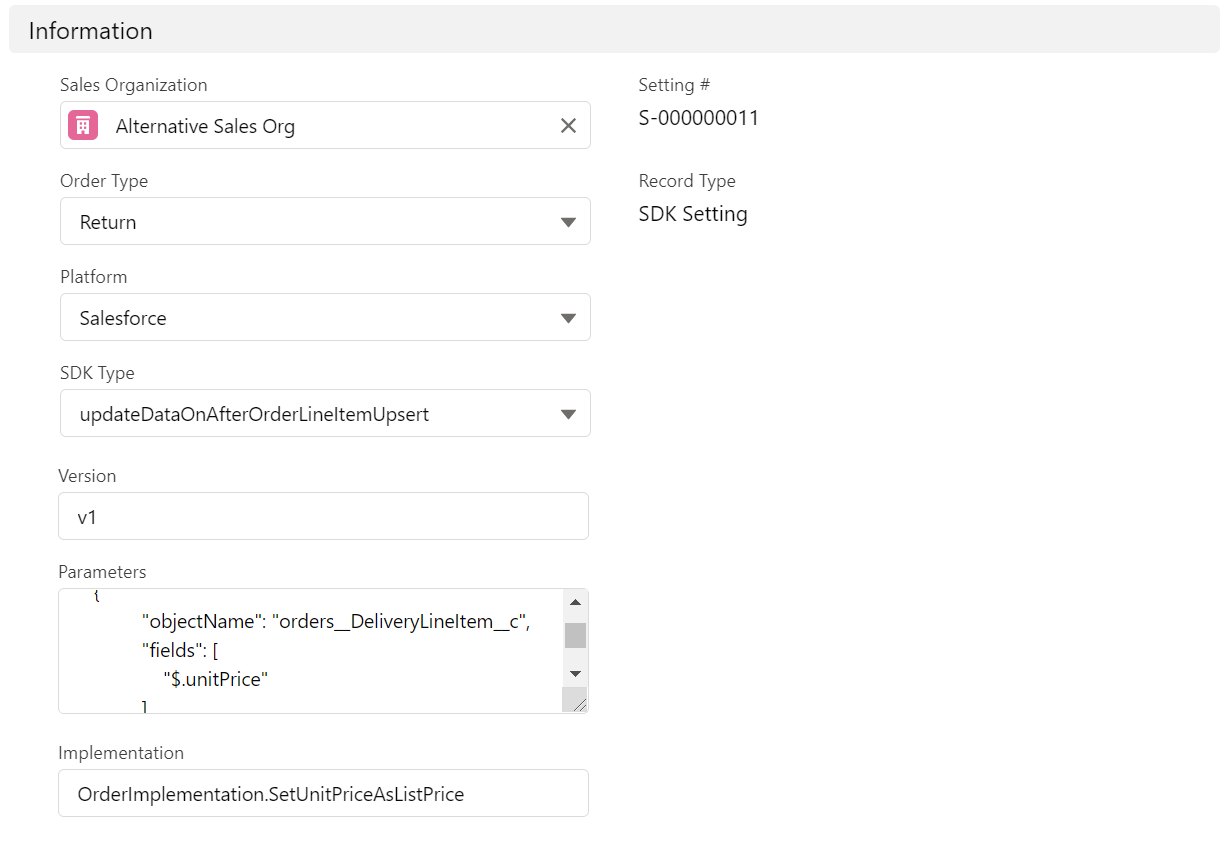
Fill in the fields:
The full description of the fields is available here. -
Fill in Order type and Sales Organization fields.
The setting is searched by the information set in the fields and applied accordingly:
-
First searched the setting with Order Type and Sales Organization filled in so that the setting will be applied to the records of mentioned order types and sales organizations.
-
If not found with both fields, the next suitable setting is searched with only the Sales Organization filled so that the setting will be applied to all records going by the mentioned sales organization.
-
Last searched the suitable setting with no specified fields.
-
If nothing is found, the setting won’t be applied.
-
-
SDK Type: updateDataOnAfterOrderLineItemUpsert.
-
Platform: select where to apply the setting.
Currently, the setting cannot be applied on mobile devices. -
Version: v1. Currently, only v1 is available, otherwise, the setting won’t be applied.
-
Implementation: enter the name of the created Apex class of step 2.
-
Parameters: fill in the list of fields in JSON format:
The fields written in the Apex class should match those written in the JSON, otherwise the setting won’t work. Click to view JSON example
[
  {
    "objectName": "orders__Order__c",
    "fields": [
      "orders__AccountId__c",
      "orders__TotalDiscount__c",
      "orders__TotalPrice__c"
    ]
  },
  {
    "objectName": "orders__Delivery__c",
    "fields": [
      "orders__TotalDiscount__c",
      "orders__TotalPrice__c"
    ]
  },
  {
    "objectName": "orders__OrderLineItem__c",
    "fields": [
      "$.unitPrice",
      "$.quantity",
      "orders__Quantity__c",
      "orders__TotalDiscount__c",
      "orders__ListPrice__c",
      "orders__First__c",
      "orders__Last__c",
      "orders__TotalPrice__c"
    ]
  },
  {
    "objectName": "orders__DeliveryLineItem__c",
    "fields": [
      "orders__ListPrice__c",
      "$.unitPrice",
      "orders__TotalDiscount__c",
      "orders__TotalPrice__c"
    ]
  }
]
-
-
Click Save.
The setup is complete.