Reference Guide
| These settings are optional. |
In this section:
-
Get familiar with the CPG Group and CPG Group Members objects.
-
Take a look at the difference between static CPG groups and dynamic CPG groups.
-
Learn the SOQL builder options to create criteria for a group.
Configure CT CPG groups for managing Contacts, Accounts, CT Products, Users or your custom object per single tasks or scheduled processes.
Group Types
The limit is equal to 500 thousand records per group. If there are more records, a warning is displayed.
Static Group
A static group is a snapshot of records per specific time. It can be used to send ad hoc emails such as:
-
announcements
-
invitations to the events
-
special offers of products
-
etc.
Dynamic Group
Use dynamic groups to keep the lists of record per different objects up to date, e.g.:
-
to create a group of users for the onboarding process.
-
to create a group of clients who meet specific criteria, for example, were not visited during the last 2 weeks but have orders for more than $ 100 000.
-
to derive the list of the most popular products based on product sales or numeric distribution.
-
etc.
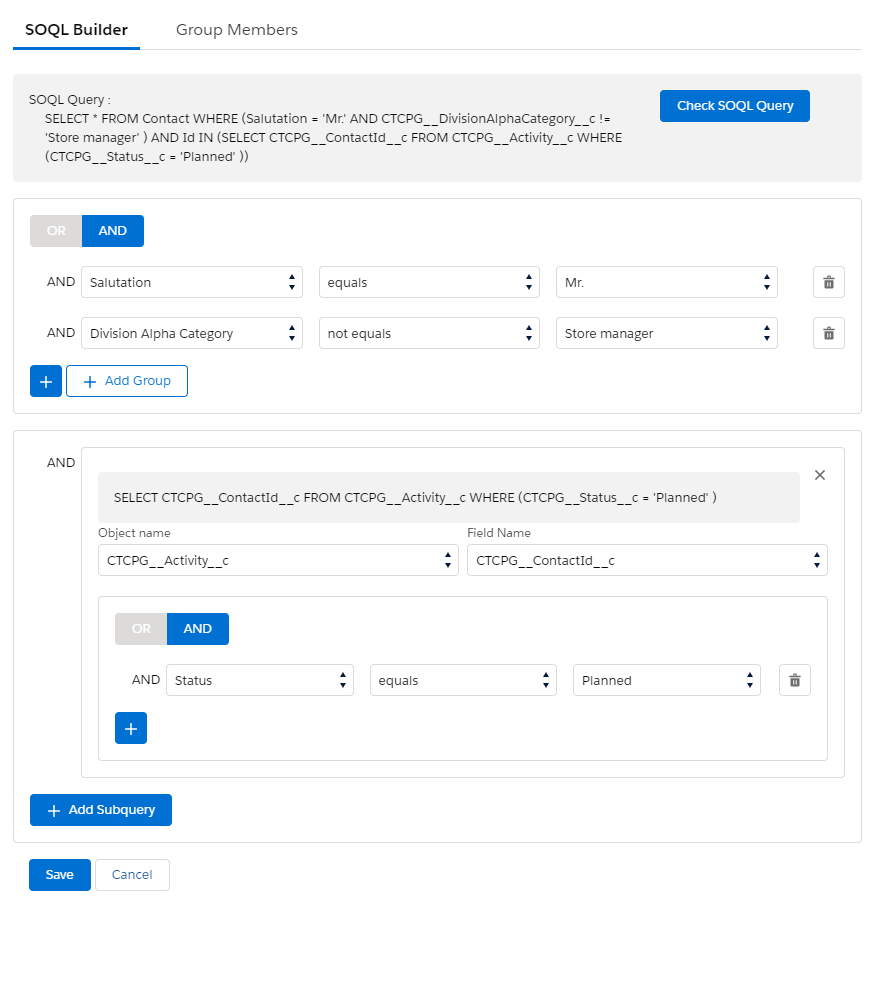
SOQL Builder to Filter CPG Group Records
SOQL Builder is used for creating a SOQL query to filter records in a CPG group.
-
On a high level, set up a query based on the parent object.
-
Add up to a maximum of two subqueries applied to children’s records if needed.
The SOQL builder buttons:
-
Click
 to add criteria based on the fields of the object’s record.
 -
Click
 to add criteria in the brackets.
 -
Click
 to add criteria based on the fields of the child object record.
 -
Click
 to launch validation of the query.