Legacy Calendar Management
| The Legacy Calendar is not supported. We recommend using the new planning Calendar. |
In this section:
-
Get familiar with the Calendar interface for each Calendar tab.
-
View the default Calendar Tab Settings and Calendar Settings.
-
Read field description for Planning Calendar Settings objects.
-
Configure Calendar for managing activities.
Calendar Tab Settings
By default, the following Calendar Tab Settings record is applied for the whole Salesforce organization.
|
Specify new Calendar Tab Settings records for required user roles, for example, representatives and supervisors. |

The CT CPG Calendar page
The Table View tab is shown by default with four list views:
-
All Accounts
-
All Contacts
-
My Target Accounts
-
My Target Contacts
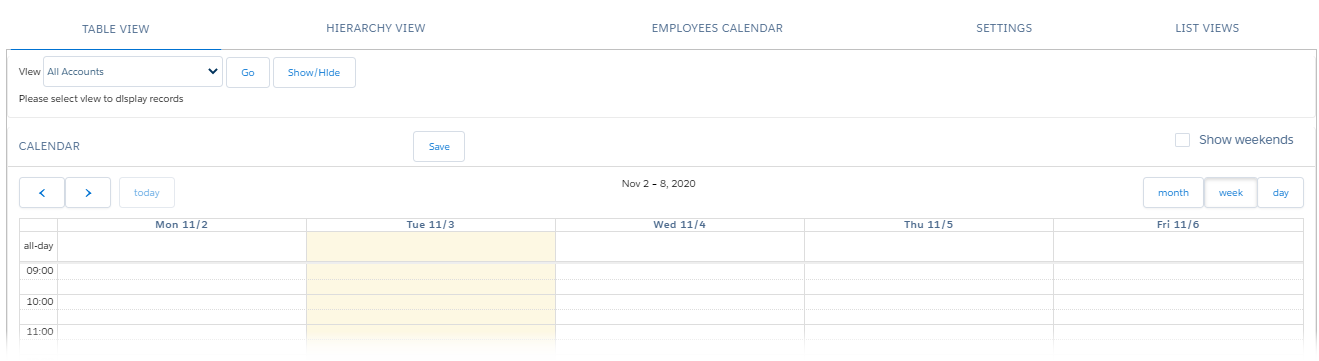
The Settings tab on the CT CPG Calendar page
On the Settings tab, the Alpha and Beta user divisions are available. The Alpha user division is set by default.
The following settings are defined by default for the Alpha user division and stored in the Planning Calendar Settings record.
-
In the Target Frequency section, the Use target frequency option is selected.
To set up the Target Frequency records, go to the Targeting and Marketing Cycles Management section.
-
The Week view is set for the calendar grid.
-
The working hours are from 9:00 to 18:00 in the 24-hour time format.
-
For the Hierarchy tab, the Account and Contact fields are specified.
-
The corresponding color is assigned to each of the available Activity statuses.
-
There are icons, durations by default, and the assigned Activity Report page to view the detailed Activity information for available Activity record types.
-
The pre-configured tips for Event (Activity), Account, and Reference objects are enabled by default.
-
There are pre-configured Event Creation Windows for available Activity record types.
-
The Visit record type of the Activity object is set for the drag-n-drop Activity creation.
-
Mass actions can be performed only in the Day view.