Create a Marketing Cycle
Create a new marketing cycle for the new division. The Application Settings affect the Marketing Cycle operation. If needed, edit the corresponding record of Application Settings.
When a user creates an Activity record, it will be automatically linked to the Marketing Cycle record if:
-
the Start Date of the Activity record is within the Marketing Cycle period;
-
the User and Marketing Cycle records are assigned to the same division;
-
the Marketing Cycle record is related to the specific record type of the Activity record according to the Marketing Cycle Linking Setting;
-
the Marketing Cycle record is active.
To create a marketing cycle:
-
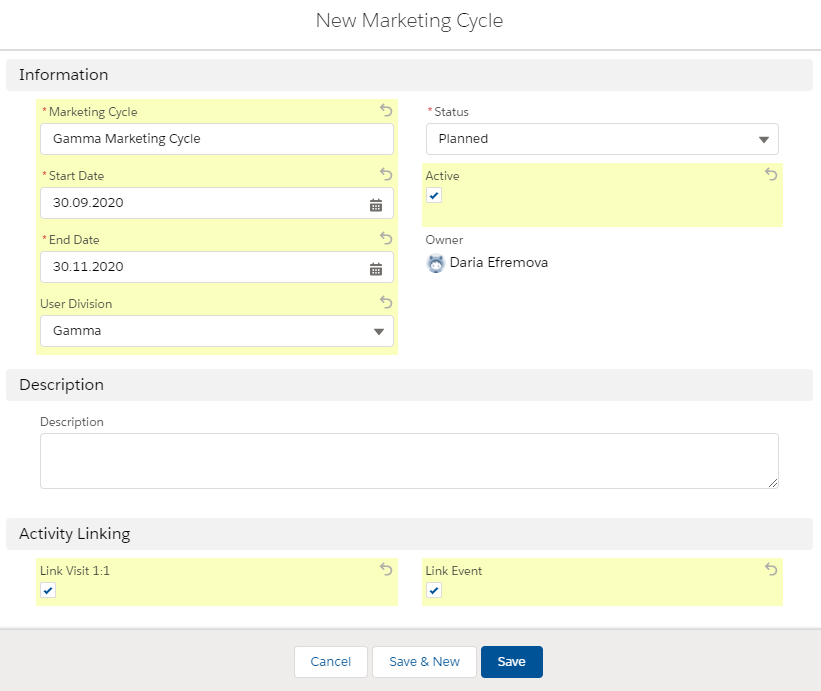
Go to the Marketing Cycles tab and click New.
-
Specify the required parameters:
Read the description of each parameter here. -
Enter the name.
-
Specify the Start Date and End Date. The marketing cycle period should be no longer than the maximum marketing cycle period on the Application Settings record.
-
Select Status.
-
Select User Division, for example,
Gamma. -
Specify Activity Linking.
-
Select Active.
-
-
Click Save.
The marketing cycle is created.