Specify Categories for Marketing Detail Tracking
For each Marketing Detail Tracking record type, specify the required Account and Contact division category and assign the object type on which the required record type of Marketing Detail Tracking will be available.
-
Add the new division categories for the Marketing Detail Tracking object;
-
Assign division categories to the record types of the Marketing Detail Object.
-
Update dependent picklist for the Type field to have an ability to select new division categories when creating new Marketing Detail Tracking records.
Add a Division Category
After the new division creation, add division categories to available values of the Marketing Detail Tracking object:
-
Go to Setup → Object Manager → Marketing Detail Tracking → Fields & Relationships → click Category.
-
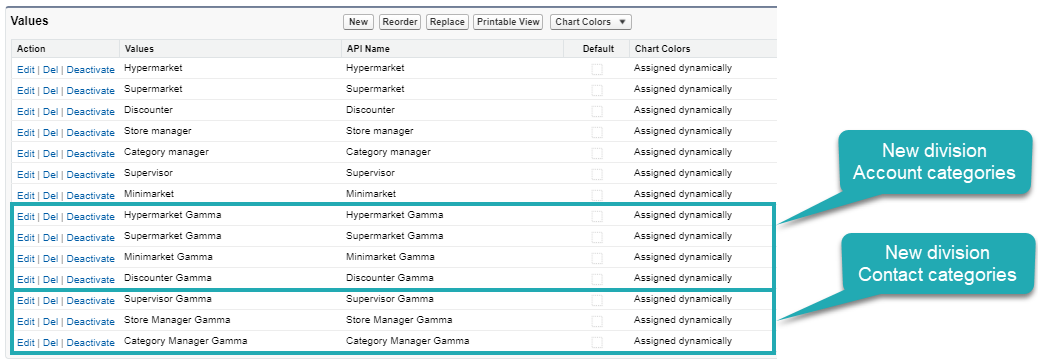
In the Values section, click New.
-
Add the new division categories of the Account and Contact objects.
-
Click Save.
The setup is complete.
Assign Division Category to the Record Type
To assign new division categories for the specific record type:
-
Go to Setup → Object Manager → Marketing Detail Tracking → Record Types → click the required record type.
You can also create new record types for the Marketing Detail Object. -
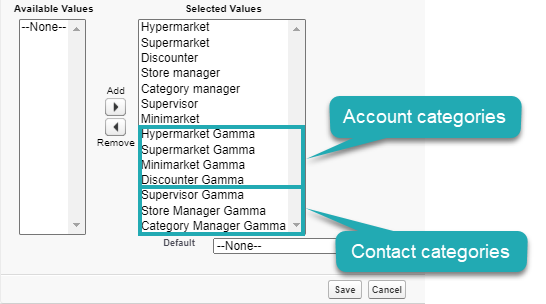
In the Picklist Available for Editing section, click Edit next to the Category field.

-
Add new division categories to which a user can create a new record of the selected record type to the Selected Values.
-
Click Save.
The setup is complete.
Update Dependent Picklist for the Type field
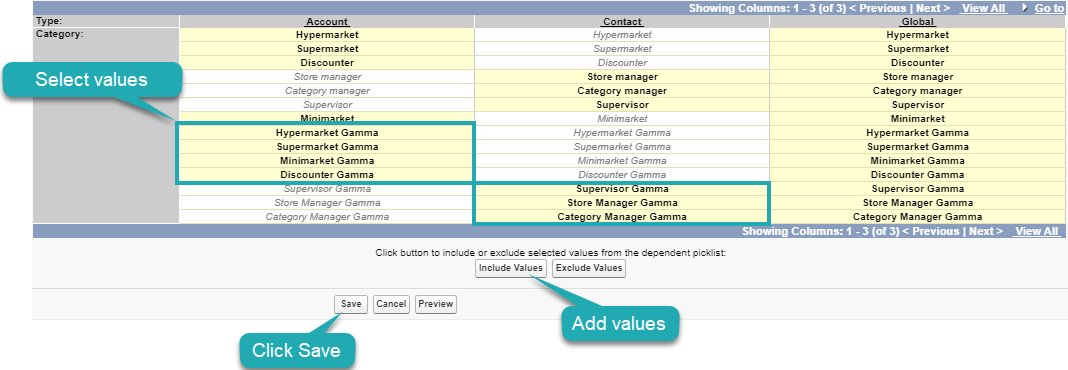
The Type field has three values to which you can add the new division categories: Account, Contact, and Global. Use field dependencies to manage available categories per each type.
To update field dependencies for the Type field:
-
Go to Setup → Object Manager → Marketing Detail Tracking → Fields & Relationships → click Type.
-
In the Field Dependencies section, click Edit next to Category.
-
Select the required categories and click for each type and click Include Values.
-
Click Save.
The setup is complete.