Manage Field Sets for Activity Report Pages
Field sets of the CT CPG Activity object are used to store the main information about the Activity record on the Activity Report page for the appropriate record type.
| The field sets for each available CT CPG Activity record type are configured by default. |
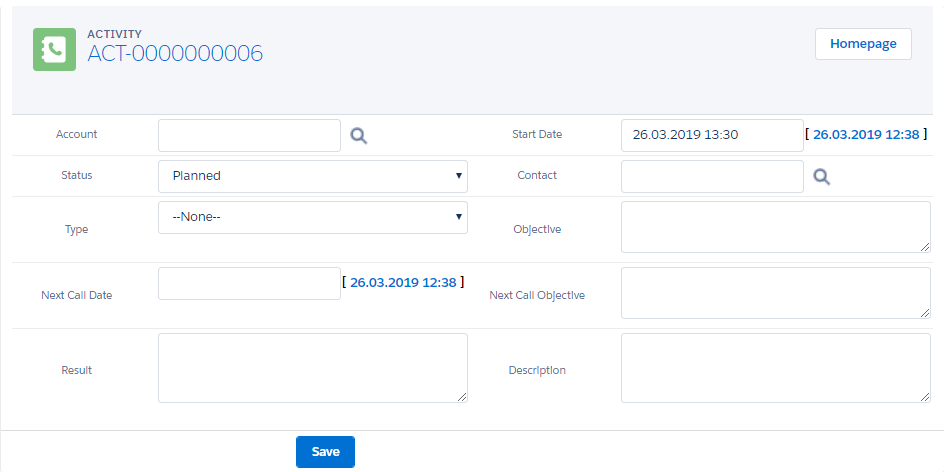
It is possible to create a new CT CPG Activity record type with the related field set. To assign a field set to the Activity Report page:
-
Create a field set for the new record type and customize fields in a set.
-
Link the field set with the Activity Report page for the Activity of the corresponding record type.
|
Customize any preconfigured field set if needed. |
Create a new record type
To create a new record type:
-
Go to Setup → Object Manager → CT CPG Activity → Record Types → click New.
-
Create a new record type, for example, CTCPGActivity, and specify profiles that have access to the record type and page layout for the record of this type.
-
Click Save.
The record type is added.
Create a field set
To create a field set and manage its fields:
-
Go to Setup → Object Manager → CT CPG Activity → Field Sets → click New.
-
Specify the label, field set API name, for example, CTCPGActivityset, and the info where it is used.
-
Drag-n-drop fields you want to use on the field set.
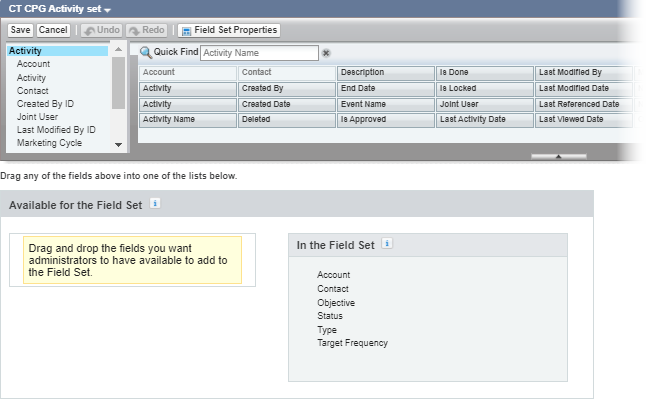
-
Click Save.
The field set is created.
Create Activity Layout Setting
To display the field set on the Activity Report page for the corresponding record type, it is necessary to add a new record of Activity Layout Settings:
-
Go to Setup → Custom Code → Custom Settings.
-
Click Manage next to Activity Layout Settings.
-
Click New.
-
Fill out the fields:
-
In the Name field, enter any name you like.
-
In the Fieldset API Name field, enter the API name of the required field set, for example, CTCPGActivityset.
-
-
Click Save.

The setup is complete.
Customize preconfigured field sets
To customize any field set:
-
Go to Setup → Object Manager → CT CPG Activity → Field Sets → click the CT CPG Activity set.
-
In the page layout editor, drag-n-drop or remove fields.
-
Click Save.
The field set is customized.