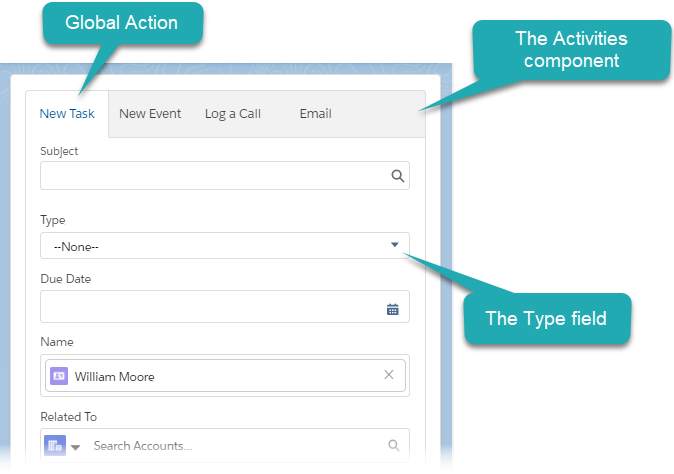
Set up Global Actions: New Task and New Event
For the correct operation of the Activity Sync functionality:
-
configure the display of the Type field for the following global actions: New Event and New Task.
If you create a new Activity Sync setting with the filled CTCPG__StandardObjectCriteria__c or CTCPG__CustomObjectCriteria__c, the Type field will not affect the Activity Sync process.
-
add global actions on the Accounts and Contacts tabs.
-
specify the EventProcess and TaskProcess records in Trigger Settings. Also, check that the ActivityProcess setting is active.
Configure the Type field display
To display the Type field on the Accounts and Contacts tabs:
-
Go to Setup → User Interface → Global Actions → Global Actions.
-
Click Layout next to New Event.
-
Drag-n-drop the Type field to the layout and click Save.
-
Go to Setup → Users → Profiles → select the required profile.
-
Go to the Field-Level Security section and click View next to Event.
-
Add Read and Edit permissions to the Type field.
-
Repeat steps 1–6 for the New Task object.
The setup is complete.
Add Global Actions
To add global actions, create a new Lightning page for the Account/Contact object and assign it to the CT CPG package and required profiles.
-
Go to Setup → User Interface → Lightning App Builder → click New.
-
Click Clone next to Account Page.
-
On the right side, specify Label and Developer Name.
-
Remove Activities and Objectives tabs.
-
Drag-n-drop Activities from the left side list.
-
Click Save and then click Activate.
-
On the App, Record Type, and Profiles tab, click the Assign to Apps, Record Types, and Profiles button.
-
Select CT CPG and other Lightning Apps (if needed) and click Next.
-
On the next page, check the selected form factors (desktop and phone) and click Next.
-
On the next page, select Master and click Save.
-
On the next page, select the required profiles and click Next.
-
Click Save.
-
Repeat steps 1–12 for the Contact Page.
The setup is complete.