Override Basic Actions for Change Request
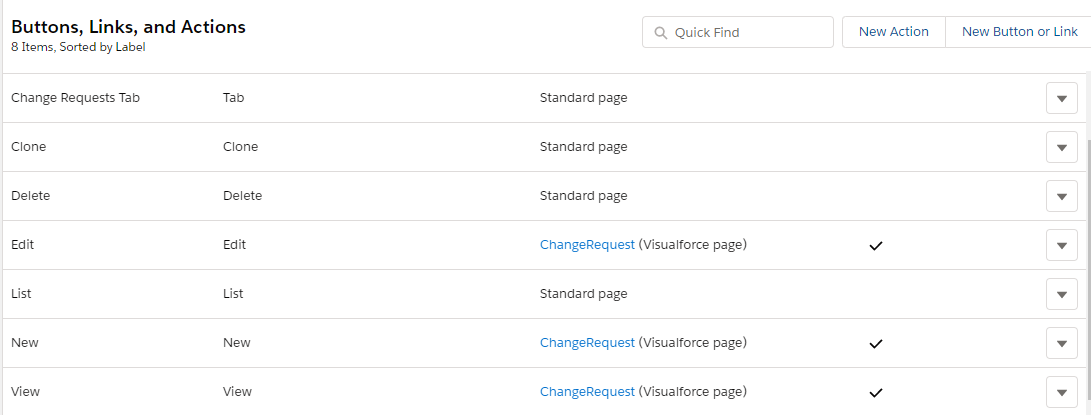
By default, when a user opens any Change Request record, the standard page will be displayed. Instead of having a standard Salesforce page, override the behavior of the New, Edit, and View buttons to open the preconfigured Change Request Visualforce page.
|
Currently, the Change Request pages are displayed only in the Salesforce Classic interface, regardless of the selected Salesforce mode. The Lightning Experience interface will be introduced later. This configuration is not necessary due to using the same Change Request page as Standard Layout. |
To override basic actions:
-
Go to Setup → Object Manager → Change Request → Buttons, Links, and Actions.
-
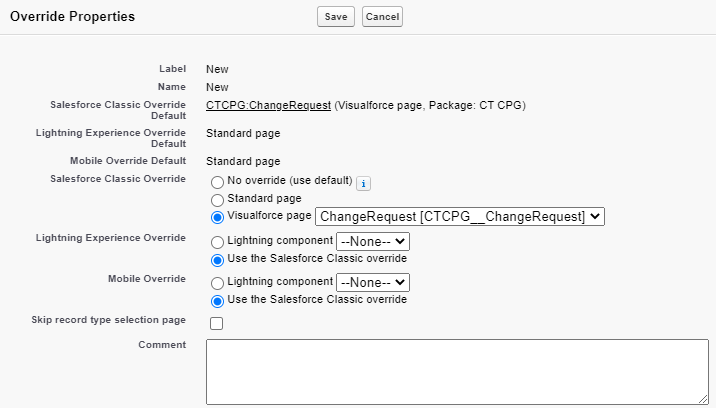
Click Edit next to the Edit label.
-
In the Override Properties section, select Visualforce page and Change Request[CTCPG__ChangeRequest] next to Salesforce Classic Override.
-
Click Save.
-
Repeat steps 2–4 to the New and View buttons.
The setup is complete. Now, when you click one of the buttons above, the Change Request Visualforce page will be open.