CT CPG Description and Deployment
- CT CPG Description
- Deployment Steps
- 1. CT CPG Package Installation
- 2. Assigning User Licenses and Permissions
- 3. Global Application Setting
- 4. Adding Sales Products
- 5. Creating the Marketing Cycle and Targeting Clients
- 6. Configure CT CPG Calendar
- 7. Streamline Representatives' Activities
- 8. Add Goals
- 9. Set up Agenda Based on Previous Activities
- 10. Simplify Activity Management
- 11. Control the Data Quality
- 12. Configure CPG Groups
- 13. Estimate field forces
- 14. Integration of CT CPG with the CT Mobile solution
- 15. Integration of CT CPG with the CT Orders solution
Here, you can find the CT CPG solution description and a step-by-step guide to configure the managed CT CPG package and a Salesforce organization to organize the work process of trade and company representatives.
CT CPG Description
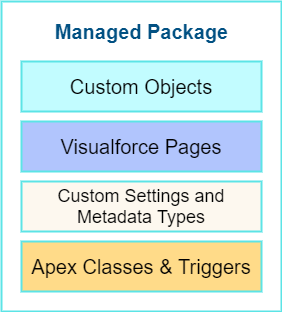
The managed CT CPG package consists of custom CT CPG objects, custom settings and metadata types, Visualforce pages, custom Apex classes, and custom Apex triggers.
Custom ObjectsThe CT CPG object model consists of custom CT CPG objects have the CTCPG prefix and are divided by group according to purpose:
|
|
Visualforce Pages
The list of available Visualforce pages:
-
Activity Management
-
Activity Report
-
Calendar
-
AddSelectedToEvent
-
-
Targeting & Marketing Management
-
Mass Manage Account Targets
-
Mass Managing Contact Targets
-
-
Coaching
-
TemplateEditor
-
-
Quizzes
-
QuizForUsers
-
QuizStart
-
QuizInfromation
-
QuizProccesing
-
QuizResults
-
RelatedList
-
-
Additional Visualforce pages
-
Change Request
-
CreateNewObjectiveWindow
-
Custom Settings and Metadata Types
CT CPG Custom Settings are used to store the configuration of the managed CT CPG package.
The list of custom settings:
-
General Settings
-
Application Settings
-
Trigger Settings
-
-
Activity Management
-
Activity Layout Settings
-
Activity Report Settings
-
Calendar Tab Settings
-
Next Call Settings
-
Product Management:
-
Company Product Tab Settings
-
Competitor Product Tab Settings
-
POS Material Tab Settings
-
Inventory Tab Settings
-
-
Event Member Tab Settings
-
Expenses Tab Tracking Settings
-
Special Tracking Tab Settings
-
-
Targeting & Marketing Management
-
Division Target Frequency Settings
-
Marketing Cycle Linking Settings
-
Target Frequency Settings
-
-
Group Management
-
Dynamic Groups Settings
-
-
Change Request Management
-
Change Request Mapping
-
Change Request Object Settings
-
Change Request Succession Cloning
-
Custom metadata types are used to store the Activity Sync settings.
Apex Classes & Triggers
-
To view the list of Apex Classes, go to Setup → Custom Code → Apex Classes.
-
To view the list of Apex Triggers, go to Setup → Custom Code → Apex Triggers.
|
Triggers can be deactivated. |
Deployment Steps
Deployment of CT CPG solution for the field sales force is performed in the following order where steps with an asterisk (*) are optional:
-
Install the CT CPG package in your Salesforce organization.
-
Assign licenses and permissions to users.
-
Specify the main application settings.
-
* Categorize your clients, set the marketing cycle up, and target accounts and contacts.
-
* Specify goals to Accounts.
-
* Set up the Activity Sync process to view all your activities in one place.
-
* Control the data quality with the Change Request process.
-
* Create quizzes to estimate your representatives.
-
* Integrate the CT CPG solution with the CT Mobile solution to provide full CT CPG and Salesforce offline functionality along with an advanced interactive Digital Sales Ais for field sales representatives via the CT Mobile app.
-
* Integrate the CT CPG solution with the CT Orders solution to have the ability for using a powerful and comprehensive order management solution.
1. CT CPG Package Installation
|
Available for the following Salesforce editions: Enterprise, Unlimited, Force.com, Developer, Performance. |
You can create your playground org on the Trailhead Salesforce portal and use it for comprehensive Salesforce training, including the CT CPG package.
CT CPG is an add-on to Salesforce, provided as an Appexchange ISV product. Follow the guide to install the CT CPG package.
-
Before installation, enable Contacts to Multiple Accounts Settings.
-
After installation, specify an additional remote site.
2. Assigning User Licenses and Permissions
To give CT CPG access to users, specify user licenses. Also, each user has the assigned profile and, if necessary, permission set.
Make sure that users have access to all custom settings and custom metadata types.
3. Global Application Setting
The first step of configuring the managed CT CPG package is to manage records of Application Settings according to your business purpose. It can be a few records in case of need to use more than one marketing cycle. For more information, refer to the Configuring Application Settings section.
4. Adding Sales Products
CT Products and Assortments management is intended to manage customer products according to their business logic.
5. Creating the Marketing Cycle and Targeting Clients
Targeting and Marketing Cycle management is designed to tailor your strategy to each client segment. Set up the frequency of planned activities to clients, products promoted for sale, assortments audit, and objectives to meet your clients' needs during the Marketing Cycle period.
You can configure your custom business logic without configuring the targeting and marketing cycles process.
6. Configure CT CPG Calendar
Calendar Management is intended to manage activities for the specific needs of each user division and role.
7. Streamline Representatives' Activities
These settings are optional.
Activity Report management is intended to set Activity Reports up for displaying details about the CT CPG Activity record and to force the detailing based on your products and business goals.
8. Add Goals
These settings are optional.
Objectives management is intended to track goals reached on the representatives' activities for the corresponding Account records.
9. Set up Agenda Based on Previous Activities
These settings are optional.
Next Activity management is intended to add some data from the previous activities to the next one on a routine basis or create a single visit based on the previous one.
10. Simplify Activity Management
These settings are optional.
Activity Sync management is intended to synchronize the standard Event/Task and CT CPG Activity records to work with them in one place, CT CPG Calendar.
11. Control the Data Quality
These settings are optional.
Change Request Management is intended to control the data quality within an organization. You can apply your company-specific approval process to update the records or to add the cloned records to the new one by succession process.
12. Configure CPG Groups
These settings are optional.
CPG Group management is intended for creating and using the CPG groups for ad hoc tasks or scheduled procedures according to specific criteria.
13. Estimate field forces
These settings are optional.
Quiz Management is intended to receive feedback from the field force representatives.
14. Integration of CT CPG with the CT Mobile solution
These settings are optional.
To simplify the routine of the field forces, it is possible to integrate the CT CPG solution with the CT Mobile app. The CT Mobile app can be installed on devices running iOS, Windows, or Android. The solution allows users to operate with the target CT CPG system data in offline mode using features that enhanced the Salesforce functionality.
15. Integration of CT CPG with the CT Orders solution
These settings are optional.
The CT Orders integration will streamline the order taking with the help of a user-friendly interface and the ability to leverage CRM flexibility with ERP price calculation complexity.