Assign Assortments to Accounts
Specify clients to whom you wish to sell the assortments by creating the Account Assortment record that ties the required Account records with Assortment records. Multiple Assortment records can be assigned for the same Account record, and vice versa.
To assign the Assortment record to the Account record, go to the Assortments or Accounts tab.
| The Assortments related list should be available on the Account page layout. |
The assigned Assortment records will be available to select on the Activity Report page or, in case of using the marketing cycle, will be automatically pulled to the Activity Report.
The Assortments Tab
To assign Assortment to the Account record:
-
Go to the Assortments tab and click the required Assortment record.
-
In the Accounts section, click New.
-
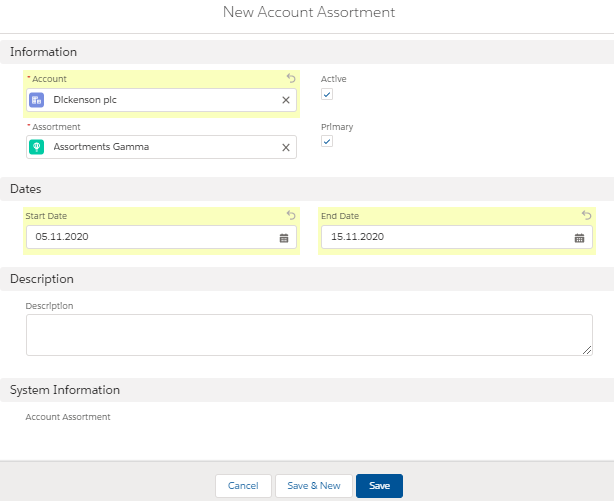
Fill in the required fields.
-
Select Account.
-
Set Active to use the Assortment record.
-
Set Primary to see the Assortment record first on the CT Product related tab on the Activity Report page.
-
Add Start Date and End Date to set up the period when the selected Assortment record will be available for the particular Account record.
-
-
Click Save.
The assortment is assigned.
The Account tab
To assign Assortment to the Account record:
-
Go to the Accounts tab and click the required Account record.
-
In the Assortments section, click New.
-
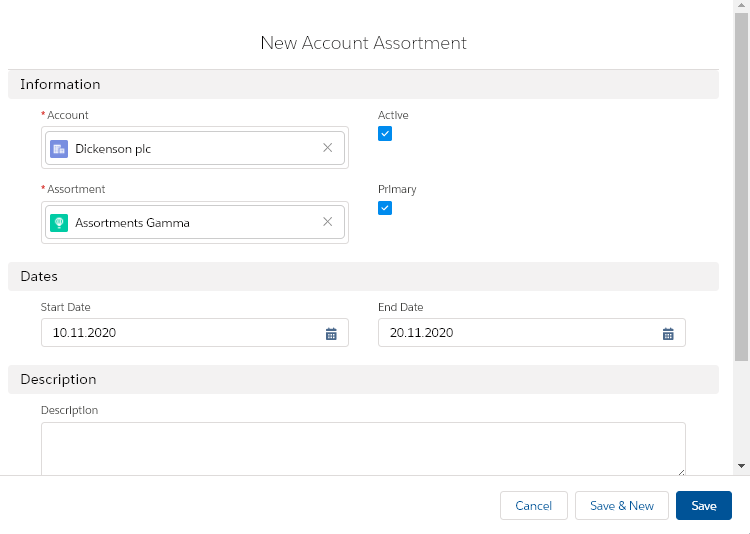
Fill in the required fields.
-
Select Assortment.
-
Set Active to use the Assortment record.
-
Specify dates that the selected Assortment record will be available for the particular Account record.
-
-
Click Save.
The assortment is assigned.