Enabling the ByPass Logic
The Bypass Logic functionality is intended to restrict the execution of one or several trigger methods by deactivating the specific trigger context(s) or methods.
To restrict execution of a method invoked by the trigger context:
-
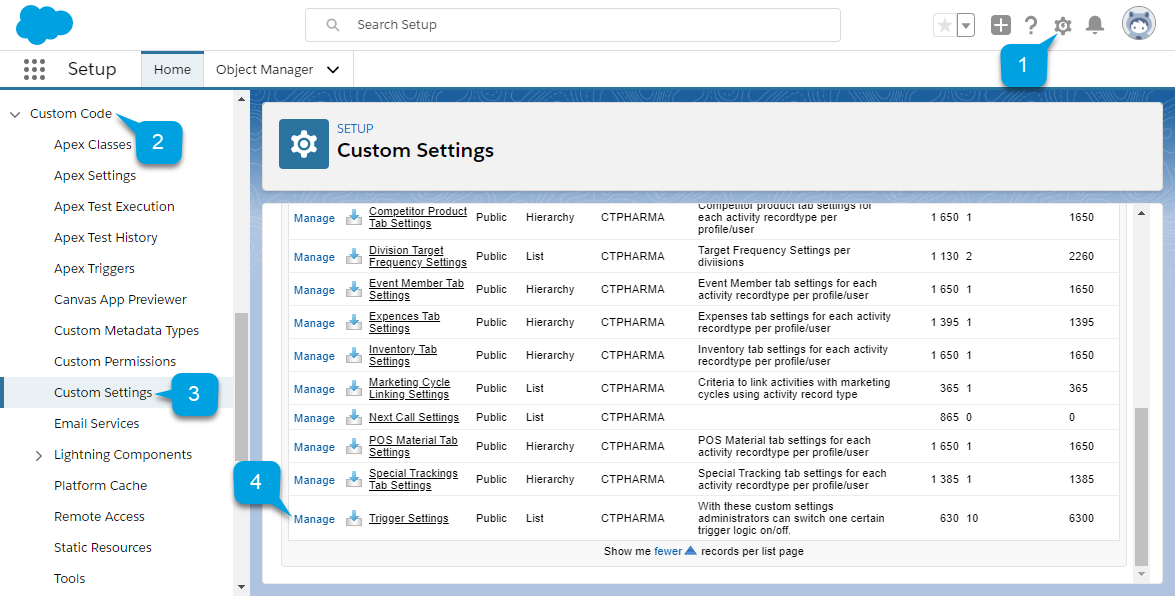
Go to Setup (1) → Custom Code (2) → Custom Settings (3).
-
Click Manage (4) next to Trigger Settings.
-
Click Edit next to a CT CPG trigger you want to configure.
If you updated the CT Pharma package, some triggers will not be added to the Trigger Settings list. Add a record with the specific CT Pharma trigger name.
-
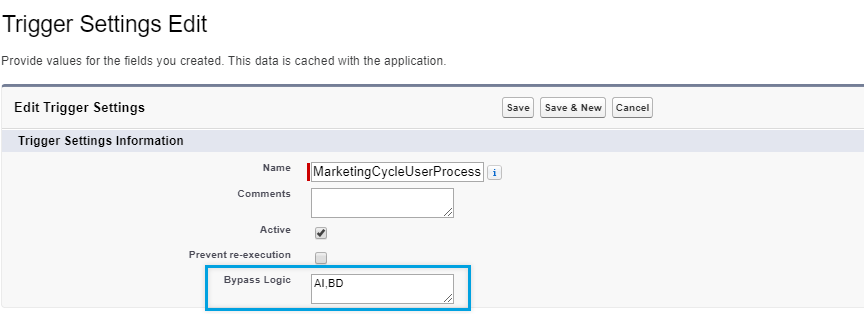
In the Bypass Logic field, specify the trigger contexts or methods that should not be invoked. For example: ai,bd (where ai stands for after insert and bd stands for before delete) or au_createRD (where au stands for after update and createRD stands for createRelatedData).
In order to disable the logic of creating Activity objects' records (either for standard or custom Activity objects), for ActivityProcess trigger specify createRelatedActivities in the Bypass logic field.
-
Select the Active checkbox.
-
Click Save.
The setup is complete.