Quiz Management
| These settings are optional. |
In this section:
-
Install the unmanaged CT Mobile: Quizzes package.
-
Get familiar with the objects:
-
Have a look at the Quiz Interface.
Configure Quizzes for passing by representatives or customers.
CT Mobile: Quizzes
The unmanaged CT Mobile: Quizzes package should be installed to pass pre-configured questionnaires.
-
Follow the link to install the package into your Salesforce org.
-
Only the simple quizzes are supported (there is no functionality to display questions depending on the previous answers).
-
Internal quizzes are designed to assess representatives' knowledge about CT Products, which are targeted at doctors and hospitals, and to get feedback about the representative’s daily routine. For example, how they conduct a meeting, what they like or do not like, how much time they spend on visits, etc.
-
External quizzes may be used to get feedback from the doctors the representative visited.
-
Quiz Model
Each Quiz record has a number of related Quiz Question records. The passed Quiz is stored as the Quiz Completion record with the linked Quiz Answer records. The corresponding Quiz Answer record is related to the Quiz Partaker record. The administrator assigns Quiz Partakers by creating a Quiz Partaker record.
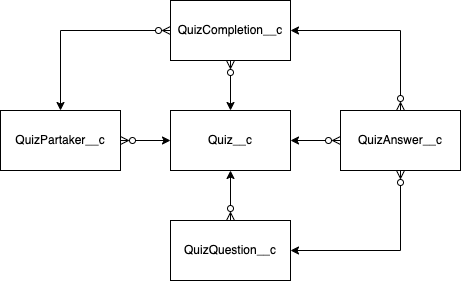
Configuring Quizzes
Quizzes may be used for the following purposes:
-
Marketing Investigation
It is a survey to get feedback from the representatives. A quiz has no time restriction and required questions.
-
Team Self Training
Based on the marketing strategy and segmentation, a representative team studies the company recommendations for visiting target doctors. To pass the quiz, it is required to give a specific percent of the right answers. The quiz can be passed many times, and the results will be shown at the end of the quiz.
-
Knowledge Estimation
Estimate your representatives by restricting the time of a quiz and setting a passing score.
-
Customer Feedback
Collect the targeted doctors' feedback to improve the representative and doctor relationship.
Follow the guidelines to set up quizzes:
-
Specify the representative access to the Quizzes objects and specify the way to pass the quiz:
-
Online by adding the quiz to the Home page or displaying the Quizzes tab.
-
Offline in case of integration with the CT Mobile app (available only for the CT Mobile iOS).
-
Configure your custom process, for example, to link a quiz to the CT Pharma Activity record.
-
-
Override the View button of the Quiz object to have the ability to add questions and assign users.
-
Define the Quiz purpose and create the Quiz record with the required options.
-
create questions for the quiz;
-
specify the order of the questions;
-
activate the Quiz record.
-
-
Assign representatives to pass the quiz.
You can test the quiz as the administrator and next assign it to users. -
Additionally, customize reports to view the quiz results.