CT Pharma Control Panel: Activity Report
For the correct presentation of activity details on the Activity Report page, you should set up field sets with main information, activity report filters, and related tabs. Previously, you should set up custom settings one by one. Now, you can customize Activity Report pages in one place.
The Activity Report tab represents the following custom settings:
According to the selected profile, customize tabs for the specific Pharma Activity Report. Define available and selected Pharma Activity Report filters.
To open Activity Report:
-
Click on CT Pharma Control Panel.
-
Click on the Activity Report tab.
The Activity Report opens.
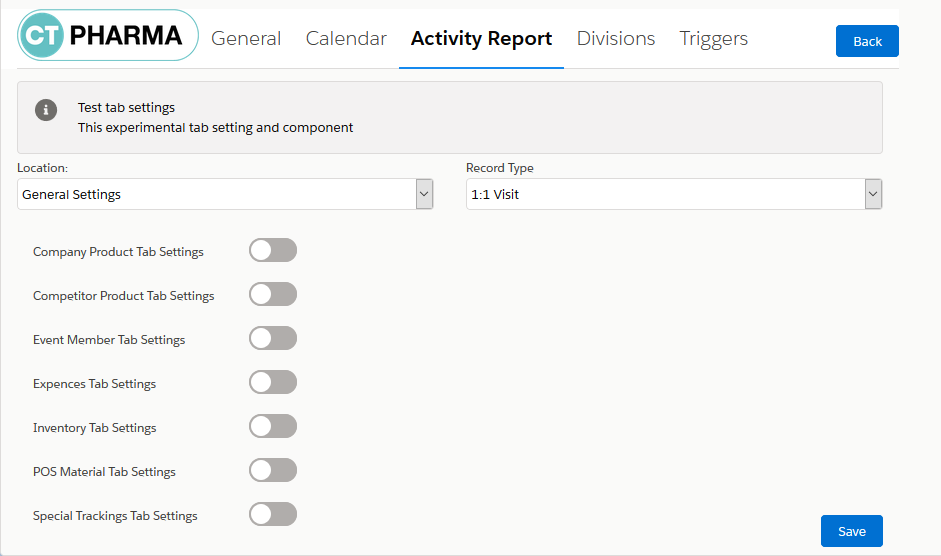
Location
Select the required profile in the Location picklist.
General Settings will be applied to all the profiles without individual settings.
Record Type
Record Type is a drop-down list, containing all Pharma Activity object record types available for the selected profile. Previously, specify the list of API names for Pharma Activity object record types or use the existing ones, in order to display the tab on the Activity Report page when creating an activity with the specified record type.
Select the record type to add the required related tabs.

Activity Report Tabs
There are several related tabs that you can add to the selected profile with the selected Pharma Activity record type.
Company Product Tab Settings
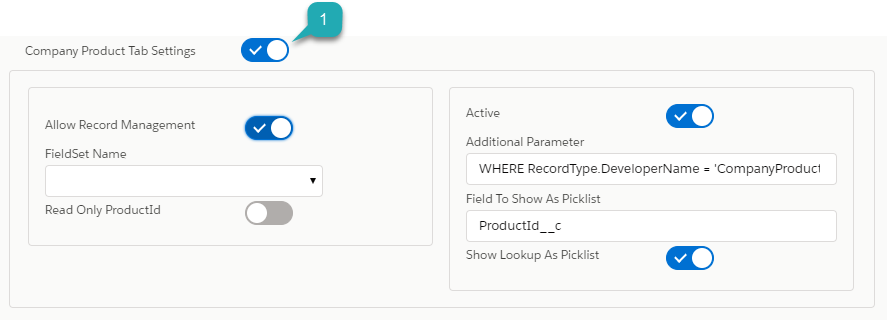
Company Product is an entity to track related information and provide an audit of the Pharma Products within a 1:1 Visit.
To configure this tab, switch the toggle (1).
-
Allow Record Management
Enable adding or removing record functionality.
-
FieldSet Name
Select a previously configured specific field set for a proper view of the records.
-
Read Only Product Id
If disabled, the ProductId lookup is switched to read-only mode.
-
Active
Enable this option to make the tab available on the Activity Report page.
-
Additional Parameter
Additional SOQL-criteria are in use to the list of available records for the object, relation to which is specified in the Field To Show As Picklist field. They are used only when the Show Lookup As Picklist switch is enabled and the Field To Show As Picklist field is populated.
-
Field To Show As Picklist
The field API-name with lookup type is displayed as a picklist in a selected order.
-
Show Lookup As Picklist
If selected, the lookup field is replaced with the picklist with values that are available according to conditions specified in the Additional Parameter field.
Please refer to the Company Product Tab Settings for a detailed description of the following settings.
Competitor Product Tab Settings
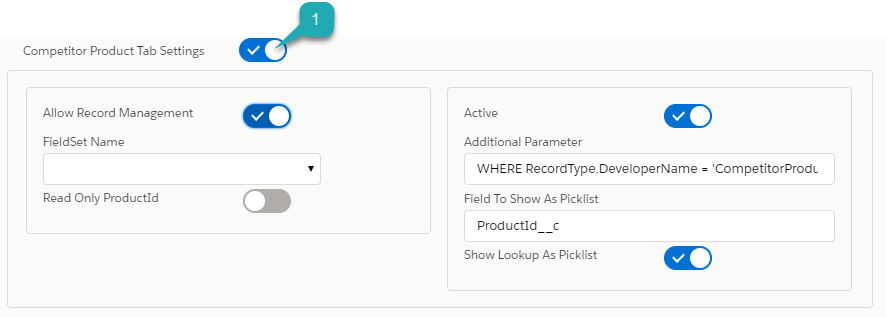
Competitor Product is an entity to track your competitor’s related information for particular clients within a visit.
To configure this tab, switch the toggle (1).
-
Allow Record Management
Enable adding or removing record functionality.
-
FieldSet Name
Select a previously configured specific field set for a proper view of the records.
-
Read Only Product Id
If disabled, the ProductId lookup is switched to read-only mode.
-
Active
Enable this option to make the tab available on the Activity Report page.
-
Additional Parameter
Additional SOQL-criteria are in use to the list of available records for the object, relation to which is specified in the Field To Show As Picklist field. They are used only when the Show Lookup As Picklist switch is enabled and the Field To Show As Picklist field is populated.
-
Field To Show As Picklist
The field API-name with lookup type is displayed as a picklist in a selected order.
-
Show Lookup As Picklist
If selected, the lookup field is replaced with the picklist with values that are available according to conditions specified in the Additional Parameter field.
Please refer to the Competitor Product Tab Settings for a detailed description of the following settings.
Inventory Tab Settings
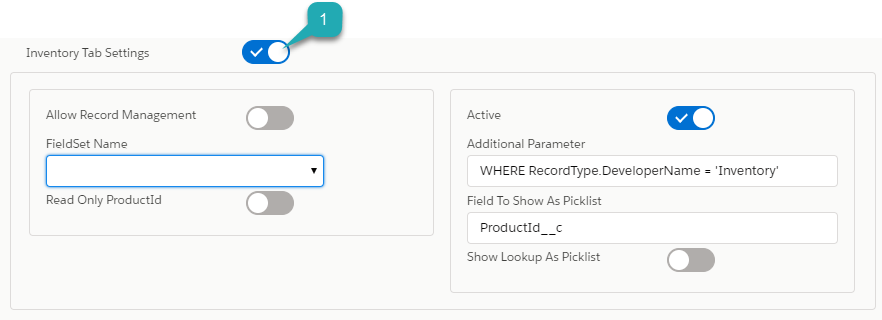
This setting controls the displaying of the Inventory Tab on the Activity Report page for a user.
To set up this tab, switch the toggle (1).
-
Allow Record Management
Enable adding or removing record functionality.
-
FieldSet Name
Select a previously configured specific field set for a proper view of the records.
-
Read Only Product Id
If disabled, the ProductId lookup is switched to read-only mode.
-
Active
Enable this option to make the tab available on the Activity Report page.
-
Additional Parameter
Additional SOQL-criteria are in use to the list of available records for the object, relation to which is specified in the Field To Show As Picklist field. They are used only when the Show Lookup As Picklist switch is enabled and the Field To Show As Picklist field is populated.
-
Field To Show As Picklist
The field API-name with lookup type is displayed as a picklist in a selected order.
-
Show Lookup As Picklist
If selected, the lookup field is replaced with the picklist with values that are available according to conditions specified in the Additional Parameter field.
Please refer to the Inventory Tab Settings for a detailed description of the following settings.
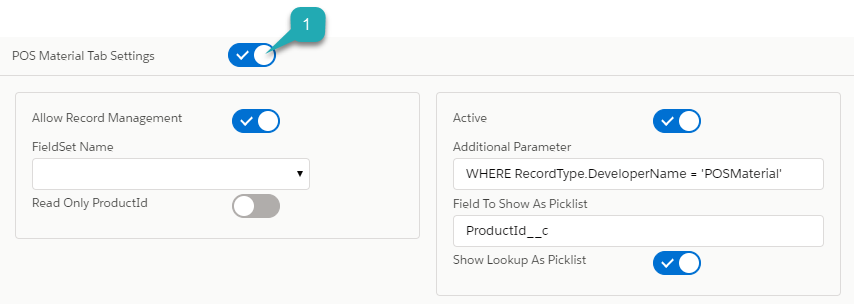
POS Material Tab Settings
POS Materials is an entity to track the marketing materials distributed for particular clients within a visit.
To configure this tab, switch the toggle (1).
-
Allow Record Management
Enable adding or removing record functionality.
-
FieldSet Name
Select a previously configured specific field set for a proper view of the records.
-
Read Only Product Id
If disabled, the ProductId lookup is switched to read-only mode.
-
Active
Enable this option to make the tab available on the Activity Report page.
-
Additional Parameter
Additional SOQL-criteria are in use to the list of available records for the object, relation to which is specified in the Field To Show As Picklist field. They are used only when the Show Lookup As Picklist switch is enabled and the Field To Show As Picklist field is populated.
-
Field To Show As Picklist
The field API-name with lookup type is displayed as a picklist in a selected order.
-
Show Lookup As Picklist If selected, the lookup field is replaced with the picklist with values that are available according to conditions specified in the Additional Parameter field.
Please refer to the POS Material Tab Settings for a detailed description of the following settings.
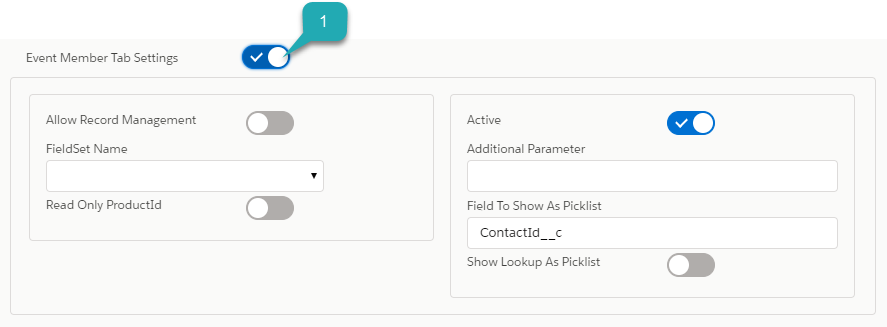
Event Member Tab Settings
This setting controls the displaying of the Pharma Event Members tab on the Activity Report page.
To set up this tab, switch the toggle (1).
-
Allow Record Management
Enable adding or removing record functionality.
-
FieldSet Name
Select a previously configured specific field set for a proper view of the records.
-
Read Only Product Id
If disabled, the ProductId lookup is switched to read-only mode.
-
Active
Enable this option to make the tab available on the Activity Report page.
-
Field To Show As Picklist
The field API-name with lookup type is displayed as a picklist in a selected order.
-
Show Lookup As Picklist
If selected, the lookup field is replaced with the picklist with values that are available according to conditions specified in the Additional Parameter field.
Please refer to the Event Member Tab Settings for a detailed description of the following settings.
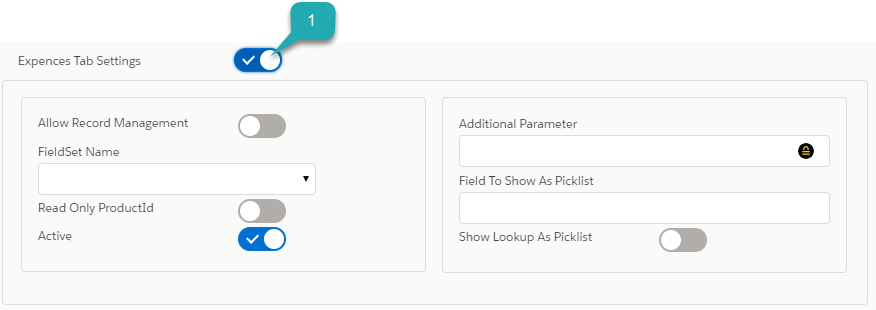
Expenses Tab Settings
Expenses is an entity to hold the spendings related to the event.
To configure this tab, switch the toggle (1).
-
Allow Record Management
Enable adding or removing record functionality.
-
FieldSet Name
Select a previously configured specific field set for a proper view of the records.
-
Read Only Product Id
If disabled, the ProductId lookup is switched to read-only mode.
-
Active
Enable this option to make the tab available on the Activity Report page.
-
Field To Show As Picklist
The field API-name with lookup type is displayed as a picklist in a selected order.
-
Show Lookup As Picklist
If selected, the lookup field is replaced with the picklist with values that are available according to conditions specified in the Additional Parameter field.
Please refer to the Expenses Tab Settings for a detailed description of the following settings.