CT Mobile Managed Package Update to v. 3.34.7
Since the CT Mobile managed package v. 3.34.7, the CTM Settings object is used to store several settings defined in the CT Mobile Control Panel. The settings of the menu, offline objects, and standard related lists will be automatically created as CTM Settings records during the CT Mobile managed package update.
Automatic Update
When the CT Mobile managed package v. 3.34.7 is ready in your sandboxes and/or production environment, assign the preconfigured permission sets to users according to their role:
-
Administrator
Select the CT Mobile Administrator permission set to give administrators permission to read and edit records and their fields of CTM Settings and other custom objects, as well as access to read and edit all custom settings, and custom metadata types.
-
Mobile Users
Select the CT Mobile User permission set to permit mobile users to read records and their fields of CTM Settings and other custom objects, as well as to read custom settings, and custom metadata types.
Manual Update
Follow the steps to manually update the CT Mobile managed package to v. 3.34.7:
-
Use the direct link to update the CT Mobile managed package:
-
in your sandboxes: https://test.salesforce.com/packaging/installPackage.apexp?p0=04t0H000001E0tu
-
in your production environment: https://login.salesforce.com/packaging/installPackage.apexp?p0=04t0H000001E0tu
-
-
Log in to Salesforce.
-
Select the security level of installation and click Install. It will take some time for the CT Mobile package to install. You will receive the email at the specified email address when the process is finished.
It is recommended to select Install for Admins Only security level. An org can contain numerous profiles. It may be unwise to give admin permissions to all the users. Admin can set the permissions for specific users after the package installation. 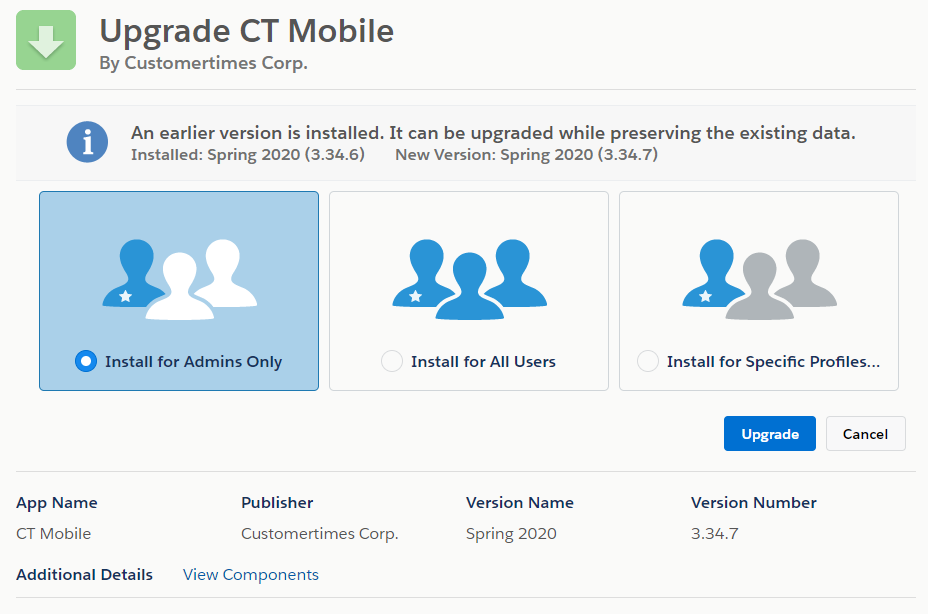
-
When the CT Mobile managed package v. 3.34.7 is ready, assign the preconfigured permission sets to users according to their role:
-
Administrator
Select the CT Mobile Administrator permission set to give administrators permission to read and edit records and their fields of CTM Settings and other custom objects, as well as access to read and edit all custom settings, and custom metadata types.
-
Mobile Users
Select the CT Mobile User permission set to permit mobile users to read records and their fields of CTM Settings and other custom objects, as well as to read custom settings, and custom metadata types.
-
The CT Mobile is ready to use.