Clickjack Protection Settings
Salesforce provides Clickjack Protection on Site.com. To use this option along with the installed CT Mobile package:
-
Configure Clickjack Protection settings. Follow the Salesforce guide here.
-
Add your domain to the trusted domains to enable CT CLM features.
Add Domain to Trusted Domains
After configuring Clickjack Protection functionality:
-
Go to Setup → Security → Session Settings.
-
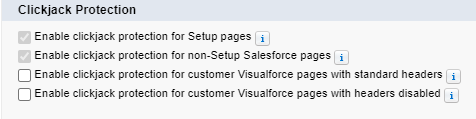
In the Clickjack Protection section, check the required options.
-
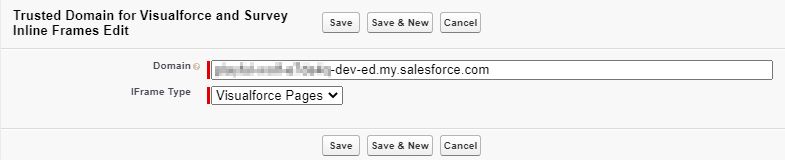
In the Trusted Domains for Visualforce and Survey Inline Frames section, click the Add Domain button.
-
In the Domain field, enter the Domain name.
To obtain the Domain name, go to Setup → Domains → copy Domain Name. -
In the IFrame Type field, select Visuaforce pages.
-
-
Click Save.
The setup is complete.