Gestures in CLM Presentations

Use gestures on slides of the launched CLM presentation in the Application module, on the mobile layout, and Home Screen.

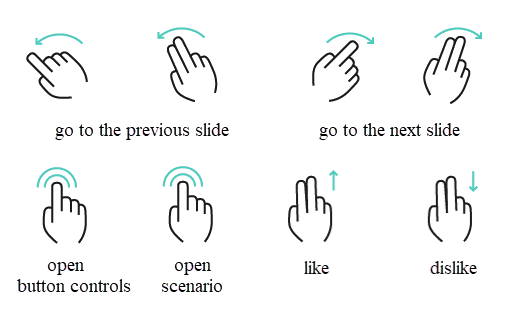
  • Double-finger swipe left and right

    The default gesture is to switch slides. You can use one-finger swiping by specifying it in the Swipe gesture type attribute for a CLM presentation record.

    A one-finger swipe for slides may interfere with embedded interactions in the slides.
  • Double-finger swipe up and down

    Like or dislike the current slide. This gesture will not affect the display of the slide.

  • Double-tap the right or left side of the screen

    Display the action menu with available options.

    • To hide the action menu, double tap on it.

      For design considerations: the bottom navigation bar has a 120 px width.
  • Double-tap on the bottom of the screen

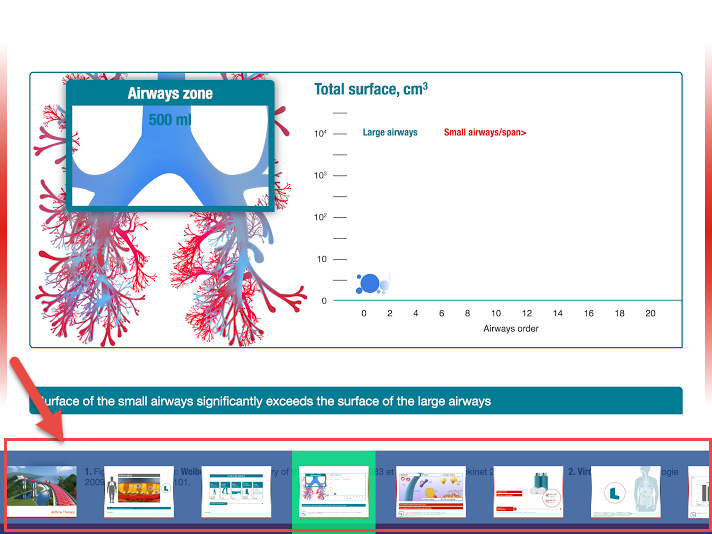
    Display the navigation bar for rapid switching between the slides.

    • Tap a slide to open it.

    • To hide the navigation bar, double tap on it.

      If there are several branches in the CLM presentation, only slides of the selected branch are displayed.
      The bottom navigation bar has a 120 px height. It is possible to preview the slides in it with resolutions 100×75 px.

57215473

gestures win en

``