Notification Center
Send push notifications from Salesforce to mobile users.
-
CT Mobile app should be signed by the Windows Store certificate;
-
CT Mobile app should have permission to run in the background on the user’s device.
Sending Messages from Notification Center
To send a notification to a mobile user:
-
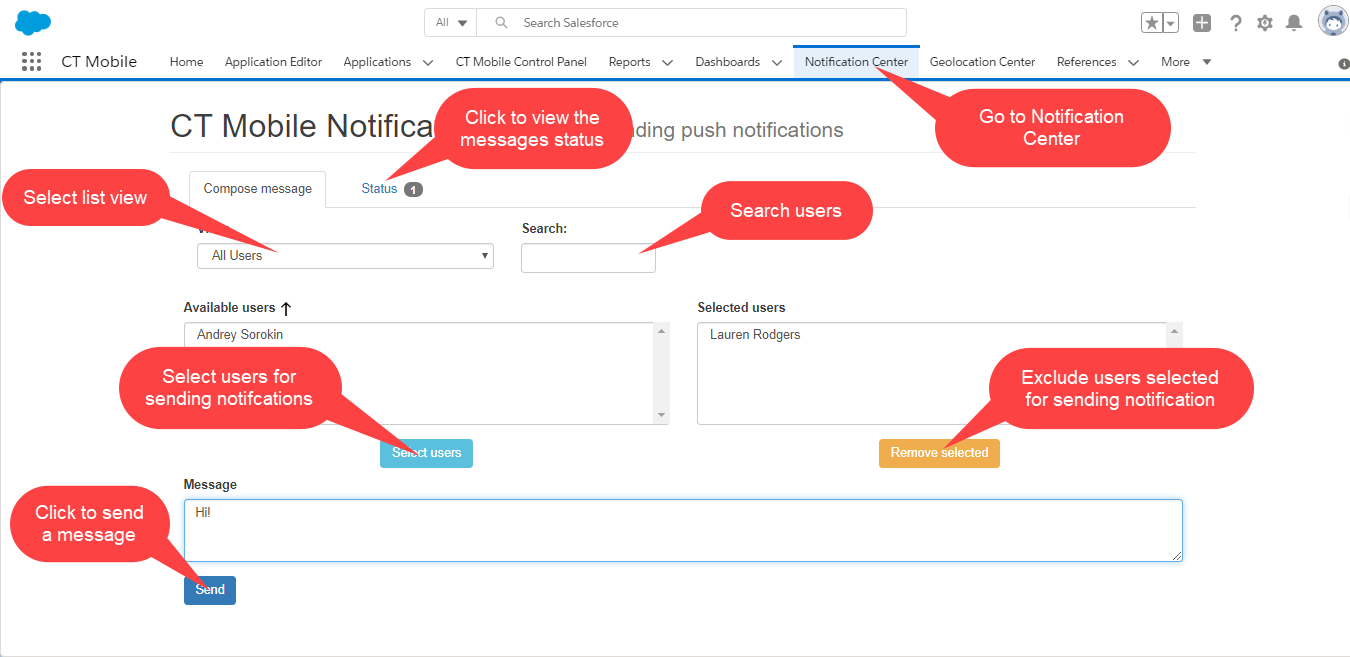
Go to the Notification Center tab.
-
Select one or several users from the Available users list and click Select users.
-
Use the Filter field to select a list view.
-
To find a mobile user, use the Search box
-
To exclude mobile users from the mail list, select them in the Selected users list and click Remove selected.
-
-
Enter a message in the Message box and click Send.
The message was sent.
The info pop-up appears if the message was successfully sent.
-
To see the status of messages, go to the Status tab.

-
If the message is successfully sent, the push notification appears on the mobile user’s device.