Requirements and Media File Formats
There is a list of requirements and media file formats for CLM presentations:
Common Recommendations
Consider the quantity and image quality of the media assets to ensure the CT Mobile app responds quickly, and the user does not wait long during the synchronization.
-
The CLM presentation aspect ratio should depend on the screens of the mobile device to display, mostly it is 16:9 or 4:3.
-
Use media according to the resolution of the target device.
HTML5 can handle large files, but you should make sure that these files do not use all the memory of a mobile device. Otherwise, CT Mobile may crash while displaying the content or soon after returning to the rest of CT Mobile functionality.
-
XML parsing within HTML5, while it may be technically possible, has been known to use up all the memory.
-
We recommend testing the display of HTML5 content and interactions with it repeatedly to ensure memory issues will not occur. However, memory warnings may appear in the device log to identify possible memory issues, although not every time.
-
For long-format, like reports and articles, we recommend using PDF that may be converted into HTML5 code.
-
For short-format media, HTML5 will provide a better navigation experience, more accurate reporting, and interactivity.
-
Also, it is possible to convert .ppt(x) or JPG/JPEG into HTML5 code with slide snapshots (degraded resolution is used to optimize image/file size).
We recommend that you consider default gestures when implementing custom actions. For example, do not override the two-finger swipe that is used to switch slides in a scenario. Or do not implement custom action by double-tapping the sides of a screen because this gesture calls out the navigation bar or the standard action menu.
-
Adobe Flash is not supported.
-
Do not name methods as the top-level domains. For example, if the .to method is used in the class on the slide markup, the classname.to will be interpreted as the link.
Recommended Media Formats
Type |
Extension |
Recommended Size |
Display (on Mobile Device) |
Additional Guidelines |
HTML5 |
|
|
Fullscreen in the landscape view |
|
Video |
|
10 MB per video 60 seconds long |
|
|
Images |
|
The minimum resolution is 1024x768 for landscape view |
||
|
|
|
||
PPT |
not more than 75 MB |
|
||
ZIP |
.zip |
|
|
PDF and PowerPoint Requirements
Consider these parameters when converting CLM presentation based on .pdf or .ppt(x).
| Parameter | Image Size, pixels | Default Rendering Quality, DPI | Physical Size, in | Physical Size, cm |
|---|---|---|---|---|
Width |
4096 |
300 |
13.65 |
34.67 |
Height |
3072 |
300 |
10.24 |
26.00 |
.ppt(x) |
||||
Width |
4800 |
300 |
16 |
40.64 |
Height |
3600 |
300 |
12 |
30.48 |
For the .ppt(x) format, these parameters mean the slide size:
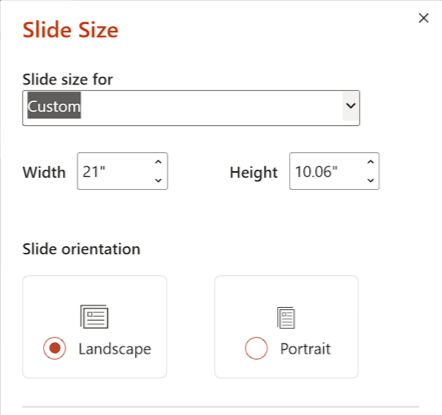
The slide size for the .ppt(x) format was tested and is recommended as a workable value. Presentations with other sizes of .ppt(x) slides may not work properly.
Video in CLM presentations
-
The link should have the following format https://www.youtube.com/embed/GhpE_7cBu44.
-
We suggest you upload videos to YouTube by selecting the Unlisted value in the Visibility option to avoid public dissemination.
-
During synchronization, the CT Mobile app downloads the video into its local repository for offline access. The code for correct video insertion in slide markup:
<iframe class="youtube-player" type="text/html" width="643" height="402" src="https://www.youtube.com/embed/GhpE_7cBu44?autohide=1&autoplay=1" frameborder="0" id="player">
</iframe>
Links in CLM presentations
To open a link in the CLM presentation, the link should be as https://www.google.com/, for example:
<a class="button brown" href="https://www.google.com/">link</a>Required JS Resources
The following JS library should be represented in the <head> tag of each slide.
<script type="text/javascript" src="../JSLibrary/js/app.js"></script>The following scripts and styles should also be specified in the <head> tag of a slide for editing via Application Editor.
<script type="text/javascript" src="../JSLibrary/js/jquery-1.8.2.min.js"></script>
<script type="text/javascript" src="../JSLibrary/js/jquery.jqChart.min.js"></script>
<script type="text/javascript" src="../JSLibrary/js/jquery.jqRangeSlider.min.js"></script>
<script type="text/javascript" src="../JSLibrary/js/jquery-ui-1.9.1.min.js"></script>
<script type="text/javascript" src="../JSLibrary/js/jquery.ui.touch-punch.min.js"></script>

<link rel="stylesheet" type="text/css" href="../JSLibrary/css/jquery.jqChart.css"/>
<link rel="stylesheet" type="text/css" href="../JSLibrary/css/jquery.jqRangeSlider.css"/>
<link rel="stylesheet" type="text/css" href="../JSLibrary/themes/redmond/jquery-ui.css"/>
<link rel="stylesheet" type="text/css" href="../JSLibrary/css/jquery-ui-1.9.1.min.css"/>