Mobile Layouts: Tabs and Sections
Set up the mobile layout by dividing it into tabs that have sections with the required fields.
Adding a Tab
To add a tab to the mobile layout:
-
Go to Setup → Object Manager → select an object.
-
Go to Page Layouts and click the required one.
-
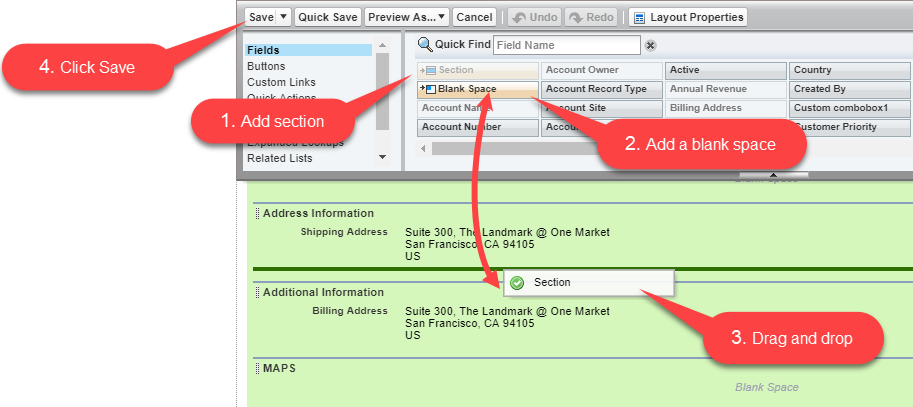
Drag and drop the Section element to the Contact Detail area.
-
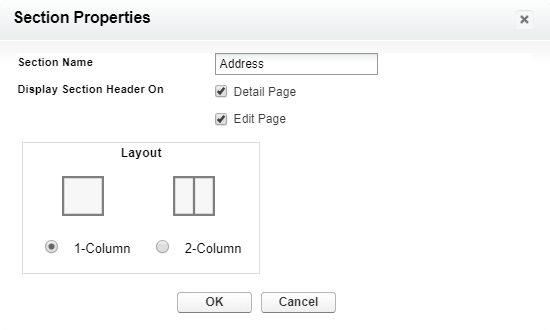
In the Section Properties window:
-
enter Address in the Section Name field;
-
select the 1-Column layout.
-
-
Click OK.
-
Drag and drop the Blank Space element below the Address tab.
-
Click Save.
The tab is added to the layout.
Adding a Section
To add the section:
-
Drag and drop one more Section element below the Address tab.
-
Enter the section name and select the 1-Column layout.
-
Click OK.
You can disable the section name visibility with the Display Section Header On checkboxes. -
Drag and drop the Shipping Address field and other desired fields below the section element.
-
Add another section with the Billing Address field.
-
Click Save.
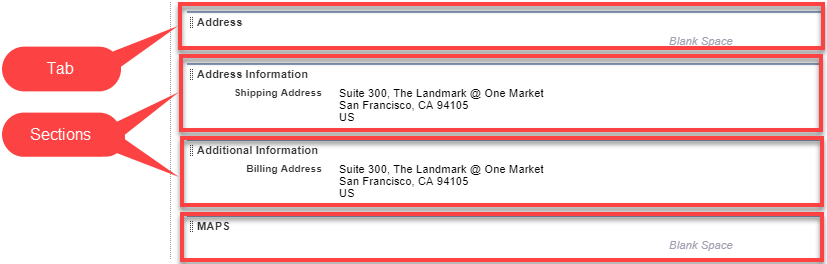
The added sections are now will be available on the Address tab.