Mobile Layouts
Mobile Layout is a special type of layout dedicated to mobile device usage. To apply a mobile layout, follow the steps:
| The standard assigned page layout will be used in case there is no configured mobile layout. |
-
Create an inactive mobile record type.
-
Create a mobile layout.
-
Assign the mobile layout to a record type for a specific profile.
A mobile layout has the Maps widget.
Creating the Mobile Record Type
In order to use the mobile layout in the CT Mobile app, it is necessary to create an additional inactive record type for the existing active record type.
To create the mobile record type:
-
Go to Setup → Object Manager → the Contact object → Record Types.
-
Click New.
-
Enter the following parameters:
-
In the Existing Record Type picklist, select the required record type.
-
In the Record Type Label field, type in the label, e.g., Mobile Record Type.
-
In the Record Type Name field, enter the API name in the following format: Mobile_API-name of the record type.
To find out the API name go to Setup → Object Manager → object (e.g.,Contact ) → Record Types → select a record type → read the Record Type Name field. For example, if the Contact object has the Doctor record type create an inactive record type with the Mobile_Doctor API name.
-
-
Make sure the Active checkbox is disabled.
-
Click Next.
-
Click Save.
The mobile record type is ready.
Creating the Mobile Layout
To create a mobile layout:
-
Go to Setup → Object Manager → the Contact object → Page Layouts.
-
Click New.
-
Enter the following parameters:
-
In the Existing Page Layout picklist, select a required layout.
-
In the Page Layout Name field, type in a name for layout (e.g., Mobile Doctor Layout).
-
-
Click Save.
The mobile layout is created.
Page Layout Assignment
In case you have several mobile layouts for a single record type, and you need to allocate them for different profiles, use the Page Layout Assignment table.
To assign a mobile layout to a profile:
-
Go to Setup → Object Manager → select an object → Page Layouts.
-
Click Page Layout Assignment.
-
Click Edit Assignment.
-
Select one or several record types for required profiles.
-
Select a profile in the Page Layout To Use picklist.
-
Click Save.
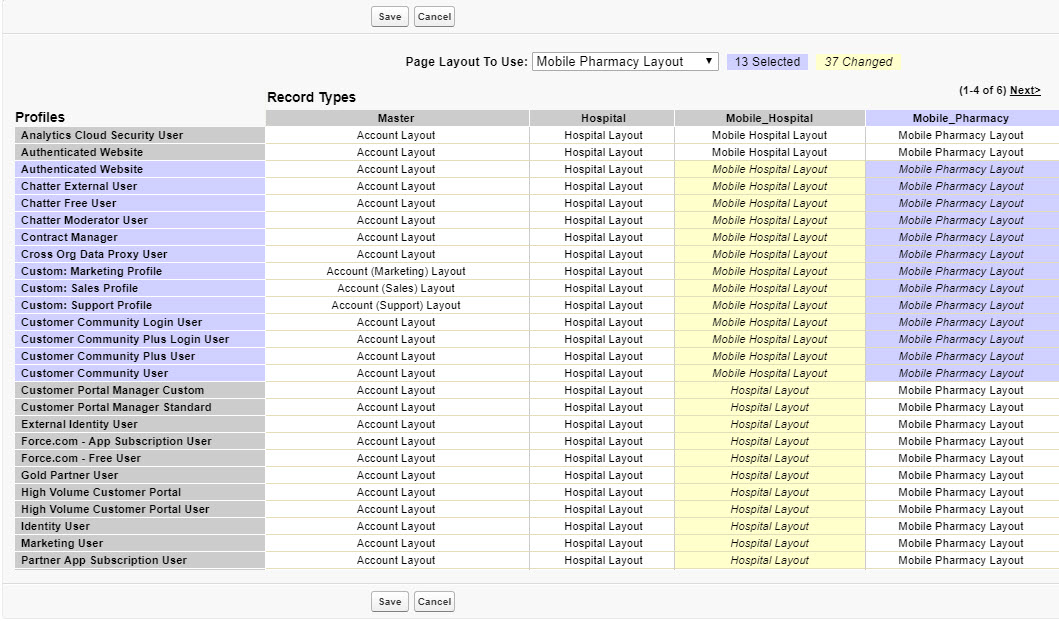
The mobile layout is assigned.