Reference Fields
A reference field contains an Id value that points to a unique record on another object. A reference field may be a field with the lookup or master-detail relationship.
Online Record Search
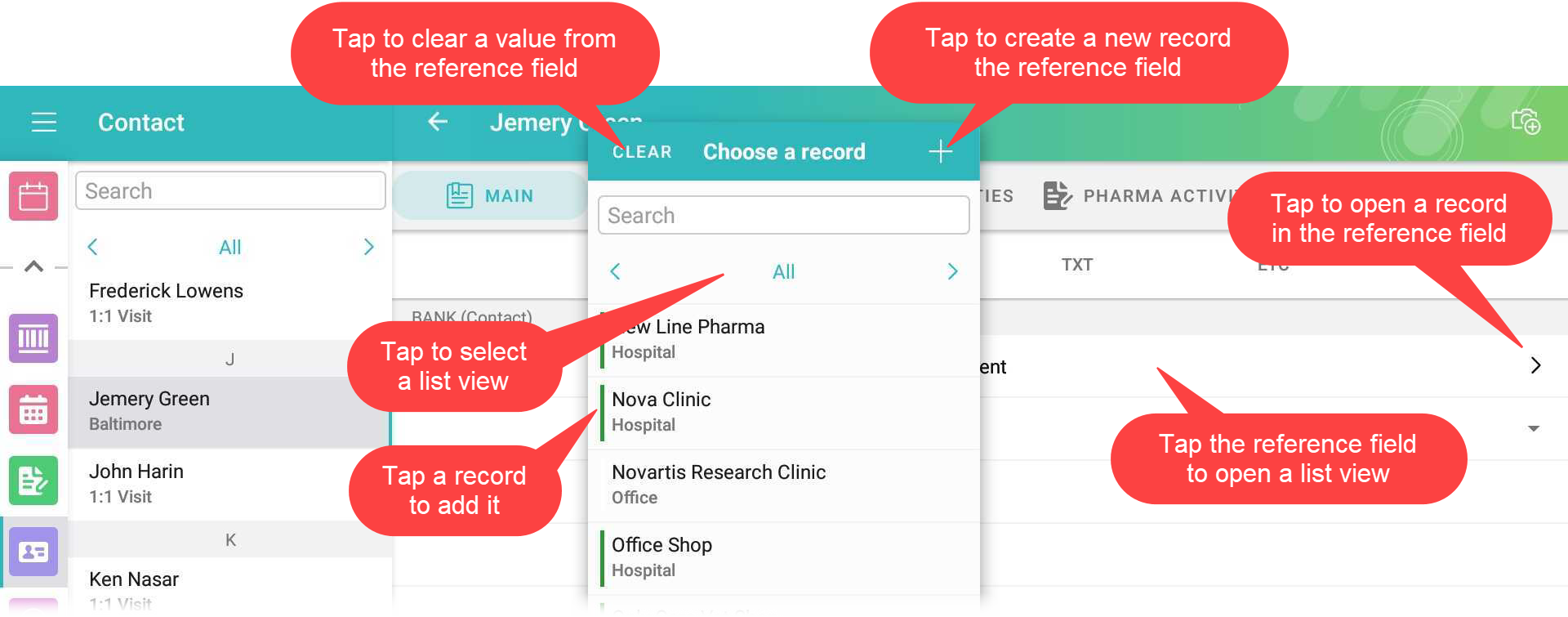
A mobile user can specify a value for the lookup or master-detail relationship field by searching or creating a record. Search is carried out in the fields that are listed on the Search Results search layout. To find a record:
-
Enter a text in the Search box to find a downloaded record. In the search results, tap a record you want to specify in the reference field.
-
Tap the list view name to select another list view.
-
Tap the Plus button to create and add a new record to the reference field by using a mini layout.
-
Tap the Clear button to clear the value from the reference field. If a reference field is empty, the Clear button is not displayed.
Lookup Filters
Lookup filters restrict the valid values and lookup dialog results for the reference field. To create a lookup filter, refer to Salesforce Help.
Lookup filter can be required or optional:
-
Required filter Only the records that match the lookup filter criteria are available when a user fills out the reference field.
-
Optional filter All object records are available when a user fills out the reference field. Records that do not match the lookup filter criteria are highlighted in red color.