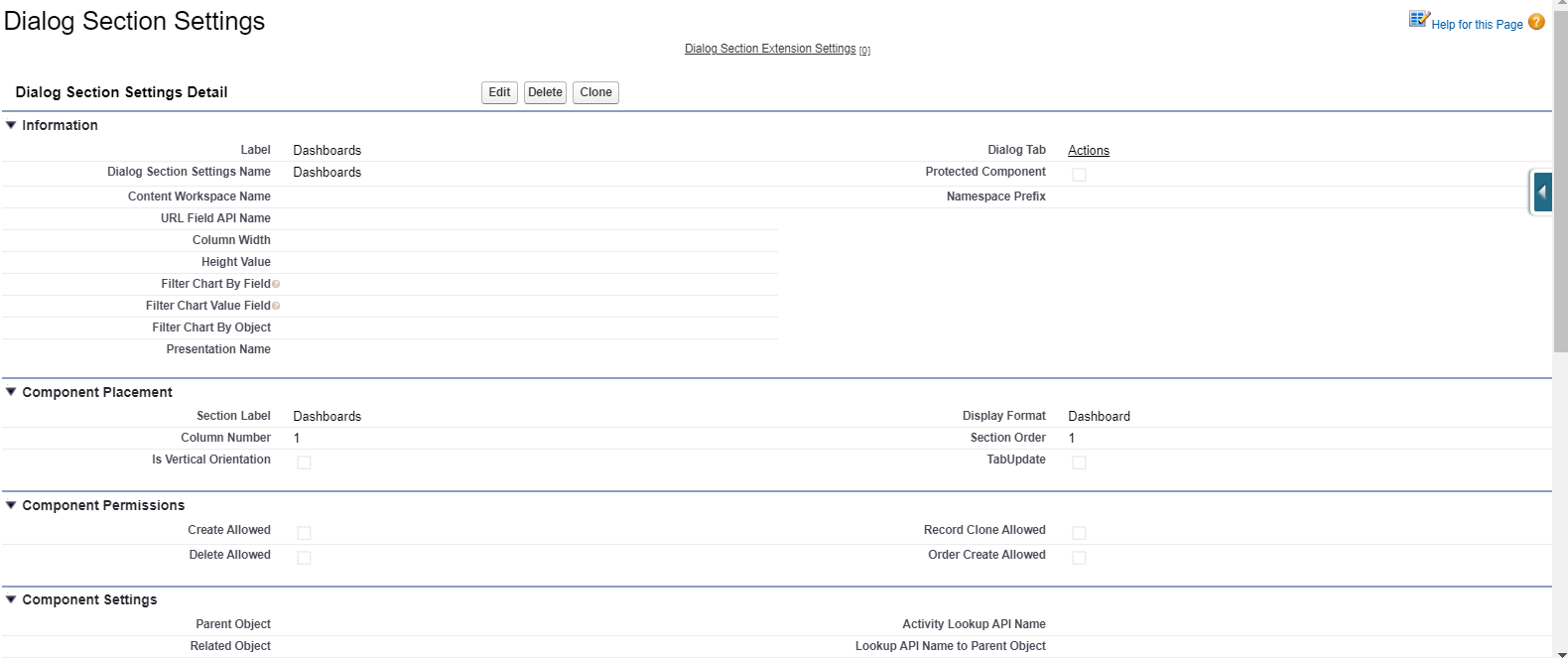
3 Display Format: Dashboard
|
The described functionality is delivered as a snippet and is out of the standard CT Mobile solution. Please consult with your Customertimes team regarding the implementation of the functionality stated below. |
Important Notes
-
(Required) add a Dashboard Component in Salesforce Classic.
-
(Optional) set up CTM Dashboards.
Dialog Section Settings Detail
Information
| Field | Description | Comments |
|---|---|---|
Label |
Label of the Dialog Section setting. |
|
Dialog Section Settings Name |
API name of the Dialog Section setting. |
|
Dialog Tab |
The label of the Dialog Tab setting that the tab is related to. |
Component Placement
| Field | Description | Comments |
|---|---|---|
Section Label |
Label of the Dialog Tab setting that is displayed in the header of the tab. |
Custom labels can be used for multilanguage projects. |
Display Format |
The format of the section. |
Dashboard in the example below. |
Column Number |
The column number to place a section. |
The horizontal positioning of the section. |
Section Order |
The order number of the row to place a section. |
The vertical positioning of the section. |
TabUpdate |
If selected, the tab will be updated in case of changes in the section. |
Update of the entire Dialog Tab. |