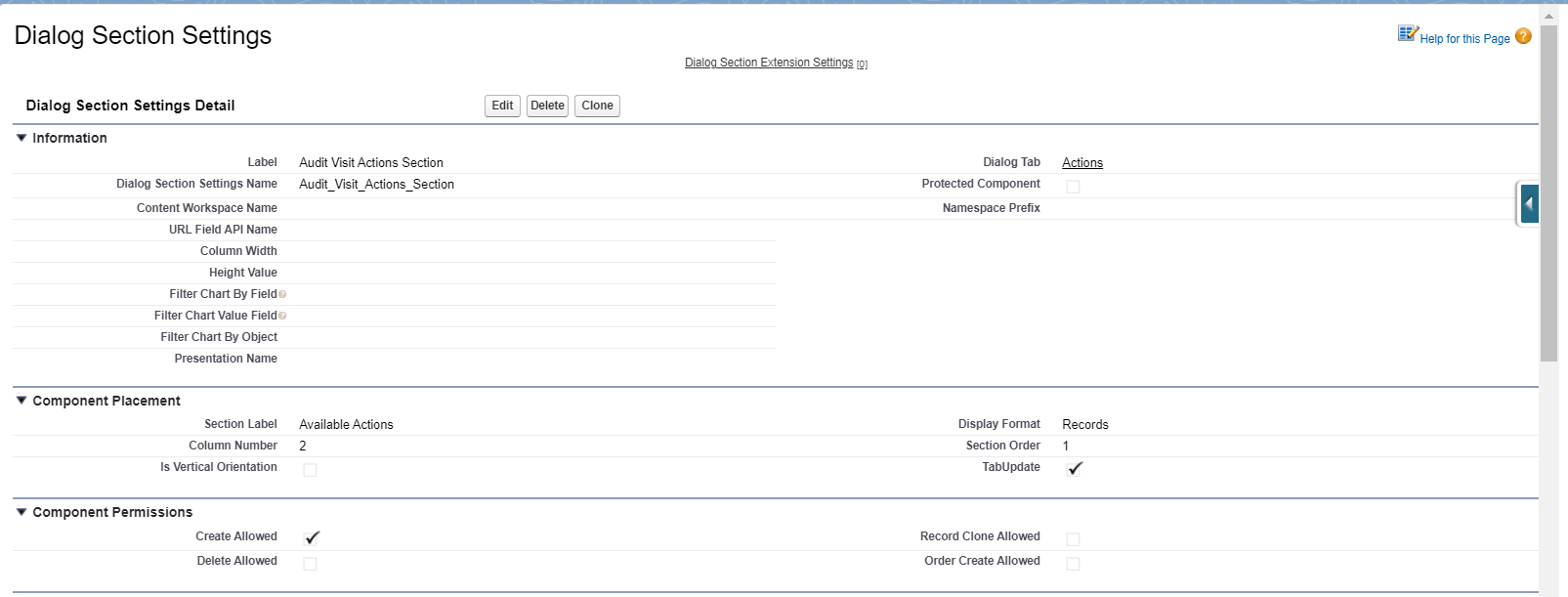
2 Display Format: Records
|
The described functionality is delivered as a snippet and is out of the standard CT Mobile solution. Please consult with your Customertimes team regarding the implementation of the functionality stated below. |
Dialog Section Settings Detail
Information
| Field | Description | Comments |
|---|---|---|
Label |
Label of the Dialog Section setting. |
|
Dialog Section Settings Name |
API name of the Dialog Section setting. |
|
Dialog Tab |
The label of the Dialog Tab setting that the tab is related to. |
|
Column Width |
The width of the columns. |
Comma-separated.
|
Height Value |
The height of the section. |
The standard height is 1. |
Component Placement
| Field | Description | Comments |
|---|---|---|
Section Label |
Label of the Dialog Tab setting that is displayed in the header of the tab. |
Custom labels can be used for multilanguage projects. |
Display Format |
The format of the section. |
Records in the example below. |
Column Number |
The column number to place a section. |
The horizontal positioning of the section. |
Section Order |
The order number of the row to place a section. |
The vertical positioning of the section. |
TabUpdate |
If selected, the tab will be updated in case of changes in the section. |
Update of the entire Dialog Tab. |
Component Permissions
| Field | Description | Comments |
|---|---|---|
Is Create Allowed |
The checkbox that allows the record creation. |
|
Is Delete Allowed |
The checkbox that allows the record deletion. |
|
Record Clone Allowed |
The checkbox that allows the record сloning. |
|
Is Order Create Allowed |
The checkbox that allows the order creation directly from the section. |
It is a very specific case and it is used very rarely. |
Component Settings
It defines the object to display information (the navigation between the objects). The start point for navigation is the current object to which the dialog layout is related.
| All the relationships described in these fields are used during the record creation from the section. |
| Field | Description | Comments |
|---|---|---|
Parent Object |
The parent object for the current object. |
If we need the information from the current object this field is empty |
Activity Lookup API Name |
The API name of the field with the Lookup type to relate parent and current objects. |
|
Related Object |
Consider the following:
|
|
Lookup API Name to Parent Object |
The API name of the field with the Lookup type to relate parent and related objects. |
|
Record Condition |
The SOQL query to define records to display. |
|
Related Object Record Type |
Specify the record type for created records if needed. |
For example, when the created records don’t meet the criteria of the Record Criteria field. |
Component Layout
| Permissions cannot overcome the User Profile settings. Restrictions can become only tougher. |
| Field | Description | Comments |
|---|---|---|
Fields Layout |
The API names of the fields (columns) that must be displayed. |
Comma-separated, without blank spaces. |
Required Attribute |
If selected, the field (a column) is required. |
Comma-separated, without blank spaces, in the same order as in the Fields Layout field. |
Read Only Attribute |
If selected, the field (a column) is read-only. |
Comma-separated, without blank spaces, in the same order as in the Fields Layout field. |