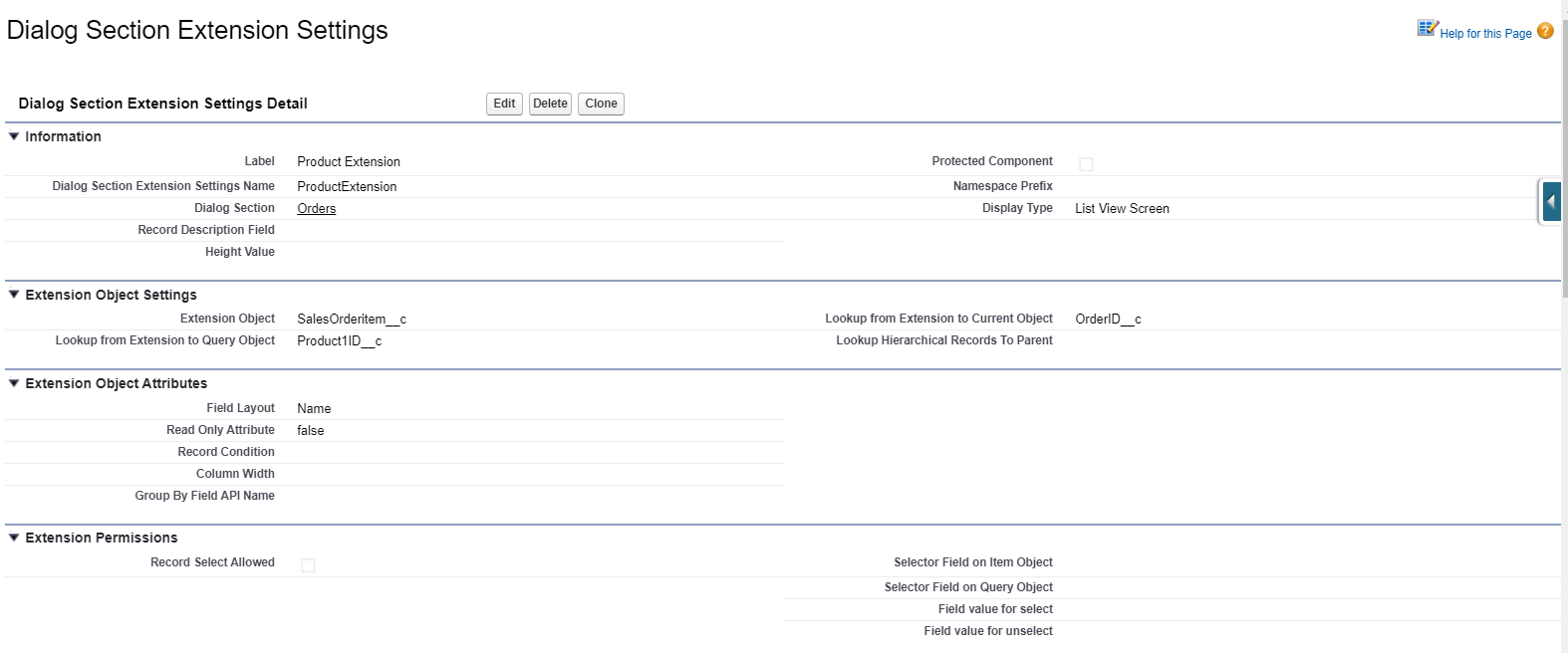
2 Display Type: List View Screen
|
The described functionality is delivered as a snippet and is out of the standard CT Mobile solution. Please consult with your Customertimes team regarding the implementation of the functionality stated below. |
Dialog Section Settings Detail
Information
| Field | Description | Comments |
|---|---|---|
Label |
Label of the Dialog Section Extension setting. |
|
Dialog Section Extension Settings Name |
API name of the Dialog Section Extension setting. |
|
Dialog Section |
The label of the Dialog Section setting that the Dialog Section extension is related to. |
|
Display Type |
The display type to define the format of the Dialog Section extension. |
List View Screen in the example below. |
List Order |
The order of list views in the case of several ones. |
Extension Object Settings
| Field | Description | Comments |
|---|---|---|
Extension Object |
API name of the object to display and for which a list view will be created. |
Define a current object to use in the extension. |
Lookup from Extension to Query Object |
The API name of the field with the Lookup type is to associate the Extension Object and another object if necessary. |
|
Lookup from Extension to Current Object |
The API name of the field with the Lookup type is to associate the Extension Object and the Dialog Section object. |
Extension Object Attributes
| Field | Description | Comments |
|---|---|---|
Field Layout |
The API names of the fields (columns) that must be displayed. |
Comma-separated, without blank spaces. |
Required Attribute |
If selected, the field (a column) is required. |
Comma-separated, without blank spaces, in the same order as in the Fields Layout field. |
Read Only Attribute |
If selected, the field (a column) is read-only. |
Comma-separated, without blank spaces, in the same order as in the Fields Layout field. |
Record Condition |
The SOQL query to select records from the list view. |
|
Column Width |
The width of the columns. |
Comma-separated.
|
Group By Field API Name |
Extension Permissions
The List View Screen display type allows viewing and creating records, but also it allows a mass update of the records.
| Field | Description | Comments | ||
|---|---|---|---|---|
Record Select Allowed |
If selected, a user is allowed to select records using checkboxes. Otherwise, records will be read-only. |
|
||
Selector Field on Item Object |
The field on the current object. |
If the fields match each other, the checkbox in the list view is selected. |
||
Selector Field on Query Object |
The field of the list view object. |
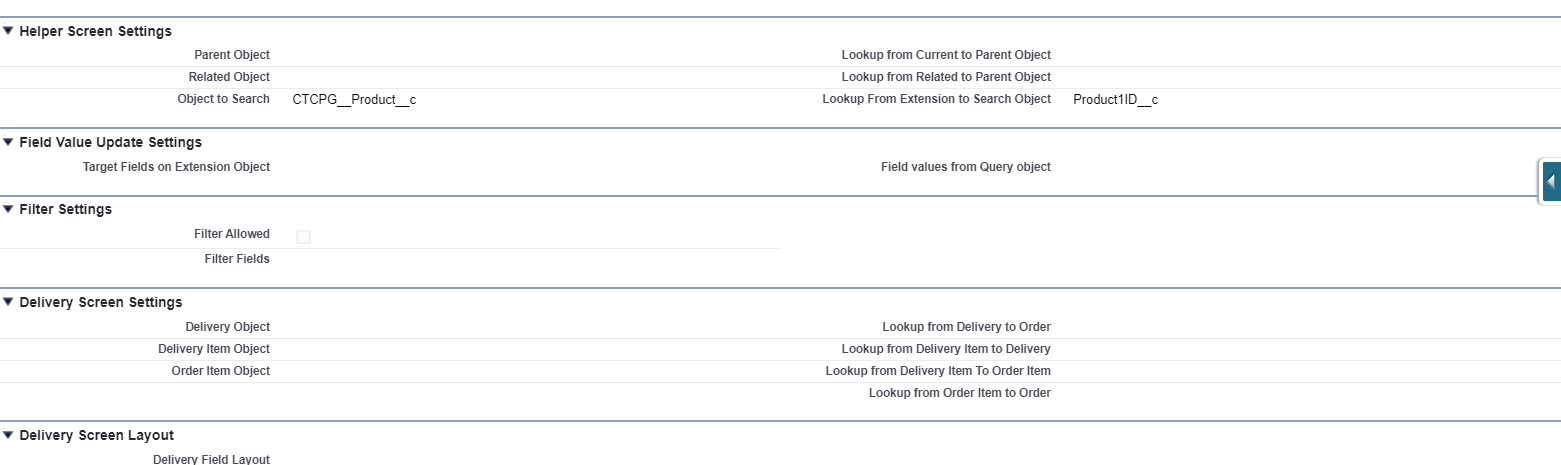
Helper Screen Settings
It defines the object to display (the navigation between the objects). The start point for navigation is the current object to which the dialog section is related.
| Field | Description | Comments |
|---|---|---|
Parent Object |
The parent object for the current object. |
|
Related Object |
Consider the following:
|
|
Object to Search |
The object that we can reach from the current object |
|
Lookup from Current to Parent Object |
The API name of the field with the Lookup type to relate parent and current objects. |
|
Lookup from Related to Parent Object |
The API name of the field with the Lookup type to relate parent and related objects. |
|
Lookup From Extension to Search Object |
The API name of the field with the Lookup type to relate current object and Object to Search. |
That field duplicates the Lookup from Extension to Query Object field of the Extension Object Settings record. It is better to fill in both fields. |
Field Value Update Settings
| Field | Description | Comments |
|---|---|---|
Target Fields on Extension Object |
The fields to update on the Extension Object. |
Comma-separated, without blank spaces. |
Field values from Query object |
The fields on the list view object whose values will be used. |
Comma-separated, without blank spaces. |
Extension Object Record Type |
Specify the record type for created records if needed. |
Filter Settings
| Field | Description | Comments |
|---|---|---|
Filter Allowed |
If selected, the filter is allowed in the list view. |
|
Filter Fields |
The list of fields that can be filtered. |
Record Description
This part is used if we need the record description in the list view (as extension to extension).
| Field | Description | Comments |
|---|---|---|
Record Description Field |
The field where the description of the record will be displayed. |
|
Record Description Layout |
The API names of the fields (columns) that must be displayed. |
Comma-separated, without blank spaces. |