CT Sign F.A.Q.
Here is a list of frequently asked questions divided by category:
CT Sign Control Panel
An error occurred when connecting to DocuSign
-
The «Redirect URI is not registered properly with DocuSign» error occurs on the DocuSign App tab when a user has specified an incorrect URL address in the URL to Publish field for DocuSign Connect.
-
The «Refused to connect to 'https://sign.customertimes.com/api/v1/salesforce/org' because it violates the following Content Security Policy directive: … » error occurs when a user tries to connect with DocuSign before the security policy has been applied. Please wait 10-15 minutes after the installation of the CT Sign package before starting to configure the connection to DocuSign.
An error after clicking Send button in the DocuSign tab
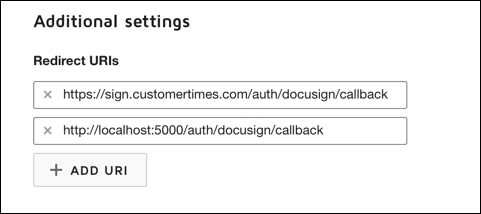
In the DocuSign App configuration, add http://localhost:5000/auth/docusign/callback as a second redirect URI and try again.
Template Editor
Template Editor is not displayed
Check the following:
-
The Sign Settings records with the Layout Settings record type are created for the object to sign as well as for the Contact and User objects. On these records, the Read-Only and Required attributes should be specified for all listed fields.
-
The libraries for document and email templates are listed in the Sign Settings records with the Library Settings record type.
PDF Generation on the Salesforce Side
The Form Document button isn’t displayed on the record of the object to sign
The Form Document button should be added to the corresponding page layout.
The list of signatories isn’t displayed
Check the following:
-
The Sign Settings records with the Layout Settings record type are created for the Contact and User objects.
-
The Sign Document button has all required parameters specified.
-
There is a lookup field on the Sign Document object to xref it with the object to sign.
-
The object to sign has the related Contact records.
-
The location of the button is specified in the X-Offset and Y-Offset fields.
I can not set up any Sign Setting — the dialog window does not have necessary options, why?
If the Sign Settings functionality does not work properly, check the following:
-
Go to Users→ Profiles and click on your user profile.
-
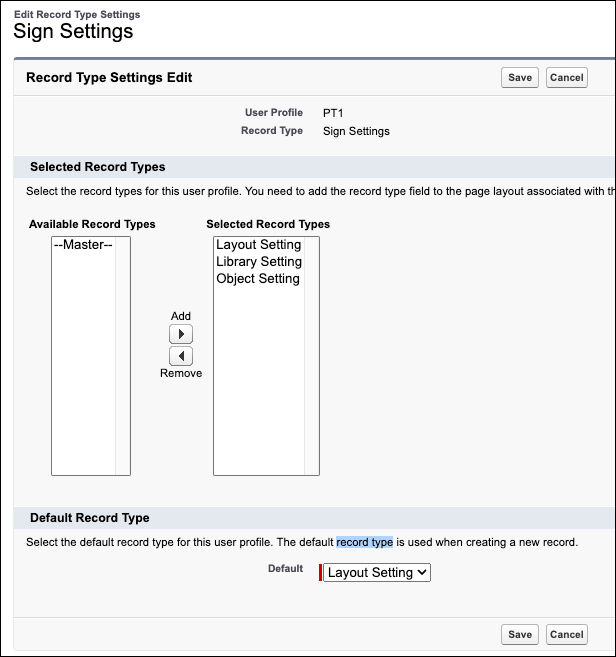
Go to Custom Record Type Settings → Sign Settings and click Edit.
-
Check that following settings are moved to the Selected Record Types list:
-
Layout Setting;
-
Library Setting;
-
Object Setting.
If necessary, move them by clicking the Add button.
-
-
Click Save.