Action Type Key Reference
Here is a list of action types that can be triggered on the button.
|
Set Value
This action type is used to automatically set a predefined value for any field of the desired Object record.
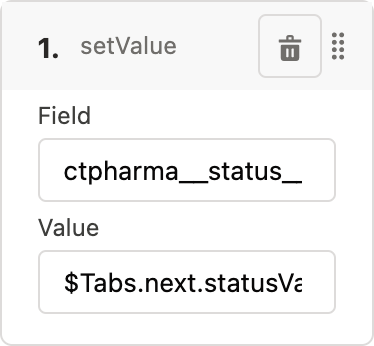
An example of the action type in the JSON format:
"onClickActions": [
    {
        "type": "setValue",
        "field": "Status",
        "value": "$Tabs.next.statusValue"
    }
]
Table of value data type and field data type correspondence.
| Value Data Type | Field Data Type |
|---|---|
String |
Lookup Relationship |
Master-Detail Relationship |
|
External Lookup Relationship |
|
Picklist |
|
Multi-Select Picklist |
|
Text |
|
Text Area |
|
Text Area (Rich) |
|
Text Area (Long) |
|
URL |
|
Date (String in the Date format) |
Date |
DateTime (String in the DateTime format) |
Date/Time |
Geolocation |
Geolocation |
Number |
Currency |
Number |
|
Percent |
|
Boolean |
Checkbox |
Navigate
This action type is used to navigate the user to another tab. Only one action can be performed.
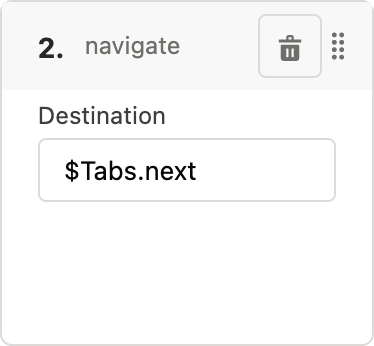
An example of the action type in the JSON format:
"onClickActions": [
      {
        "type": "navigate",
        "destination": "$Tabs.next"
       }]
Execute
This action type is used to trigger another action defined in the $Tabs context. Only one action can be performed.
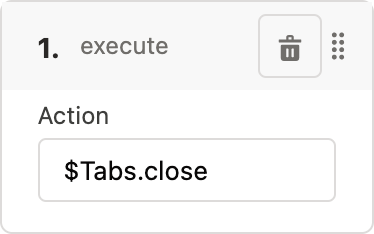
An example of the action type in the JSON format:
"onClickActions": [
      {
        "type": "execute",
        "action": "$Tabs.update"
       }]
Create Record
This action type is used to create a record of a certain object.
-
Enter the API name of the desired object that meets the criteria:
-
the object is not a custom settings object
-
the object is not a custom metadata type object
-
the object has the attribute: isLayoutable = false
-
-
Enter the API name of the object record type. Otherwise, enter --Master-- for the Master record type.
-
Activate the Use Mini Layout checkbox when the record creation should be performed in the mini layout.
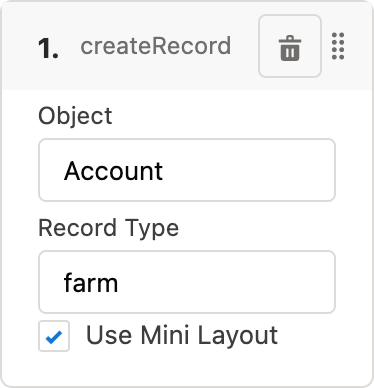
An example of the action type in the JSON format:
{
    "onClickActions": [
        {
            "type": "createRecord",
            "object": "Account",
            "recordType": "farm",
            "useMinilayout": true
        }
    ]
}
Wait Workflow
This action type is used to wait for all CT Mobile workflows triggered by previous changes will be finished. No other action should be defined.
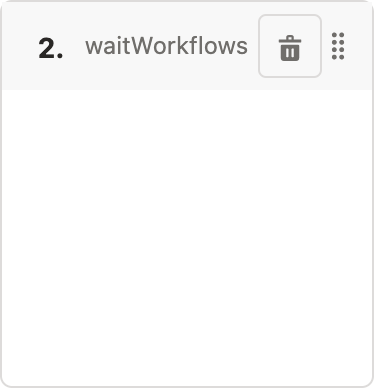
An example of the action type in the JSON format:
"onClickActions": [
      {
        "type": "waitWorkflows"
      }]
Predefined Actions for Buttons
Here is a list of JSONs with predefined actions for buttons and, if set, conditions for performing the action. The administrator can change these actions for the buttons, with the exception of the Return button, if necessary.
previousTab
{
    "name": "previousTab",
    "label": "$Label.ctlayouts__PreviousStepButton",
    "icon": "chevronleft",
    "iconPosition": "leading",
    "onClickActions": [
        {
            "type": "navigate",
            "destination": "$Tabs.previous"
        }
    ],
    "hideCondition": {
        "operator": "AND",
        "items": [
            {
                "field": "$Tabs.current.isFirst",
                "operator": "equal",
                "value": true
            }
        ]
    }
}
nextTab
{
    "name": "nextTab",
    "label": "$Label.ctlayouts__NextStepButton",
    "icon": "chevronright",
    "iconPosition": "trailing",
    "onClickActions": [
        {
            "type": "setValue",
            "field": "Status",
            "value": "$Tabs.next.statusValue"
        },
        {
            "type": "navigate",
            "destination": "$Tabs.next"
        }
    ],
    "hideCondition": {
        "operator": "AND",
        "items": [
            {
                "field": "$Tabs.current.isLast",
                "operator": "equal",
                "value": true
            }
        ]
    }
}
returnToCurrentTab
| No other action and no condition are applicable. The button can be removed but not changed. |
{
    "name": "returnToCurrentTab",
    "label": "$Label.ctlayouts__ReturnStepButton"
    "onClickActions": []
}
start
{
    "name": "start",
    "label": "$Label.ctlayouts__StartButton",   //need to be defined
    "onClickActions": [
        {
            "type": "setValue",
            "field": "Status",
            "value": "$Tabs.next.statusValue"
        },
        {
            "type": "navigate",
            "destination": "$Tabs.next"
        }
    ],
    "showCondition": {
        "operator": "AND",
        "items": [
            {
                "field": "$Tabs.next.statusCategory",   //need to be defined in the contexts
                "operator": "equal",
                "value": inProgressTab
            },
            {
                "field": "$Tabs.current.statusCategory",
                "operator": "equal",
                "value": newTab
            }
        ]
    }
}
finish
{
    "name": "finish",
    "label": "$Label.ctlayouts__FinaliseButton",    //need to be defined
    "onClickActions": [
        {
            "type": "execute",
            "action": "$Tabs.close" //need to be defined in the contexts
        }
    ],
    "showCondition": {
        "operator": "AND",
        "items": [
            {
                "field": "$Tabs.current.statusCategory",    //need to be defined in the contexts
                "operator": "equal",
                "value": completedTab
            }
        ]
    }
}
cancel
{
    "name": "cancel",
    "label": "$Label.ctlayouts__CancelButton",  //need to be defined
    "onClickActions": [
        {
            "type": "execute",
            "action": "$Tabs.close" //need to be defined in the contexts
        }
    ],
    "showCondition": {
        "operator": "AND",
        "items": [
            {
                "field": "$Tabs.current.statusCategory",    //need to be defined in the contexts
                "operator": "equal",
                "value": newTab
            }
        ]
    }
}